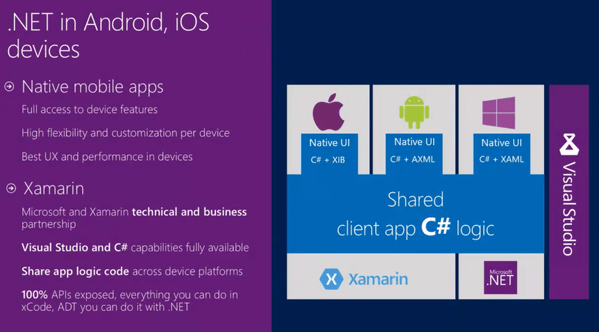
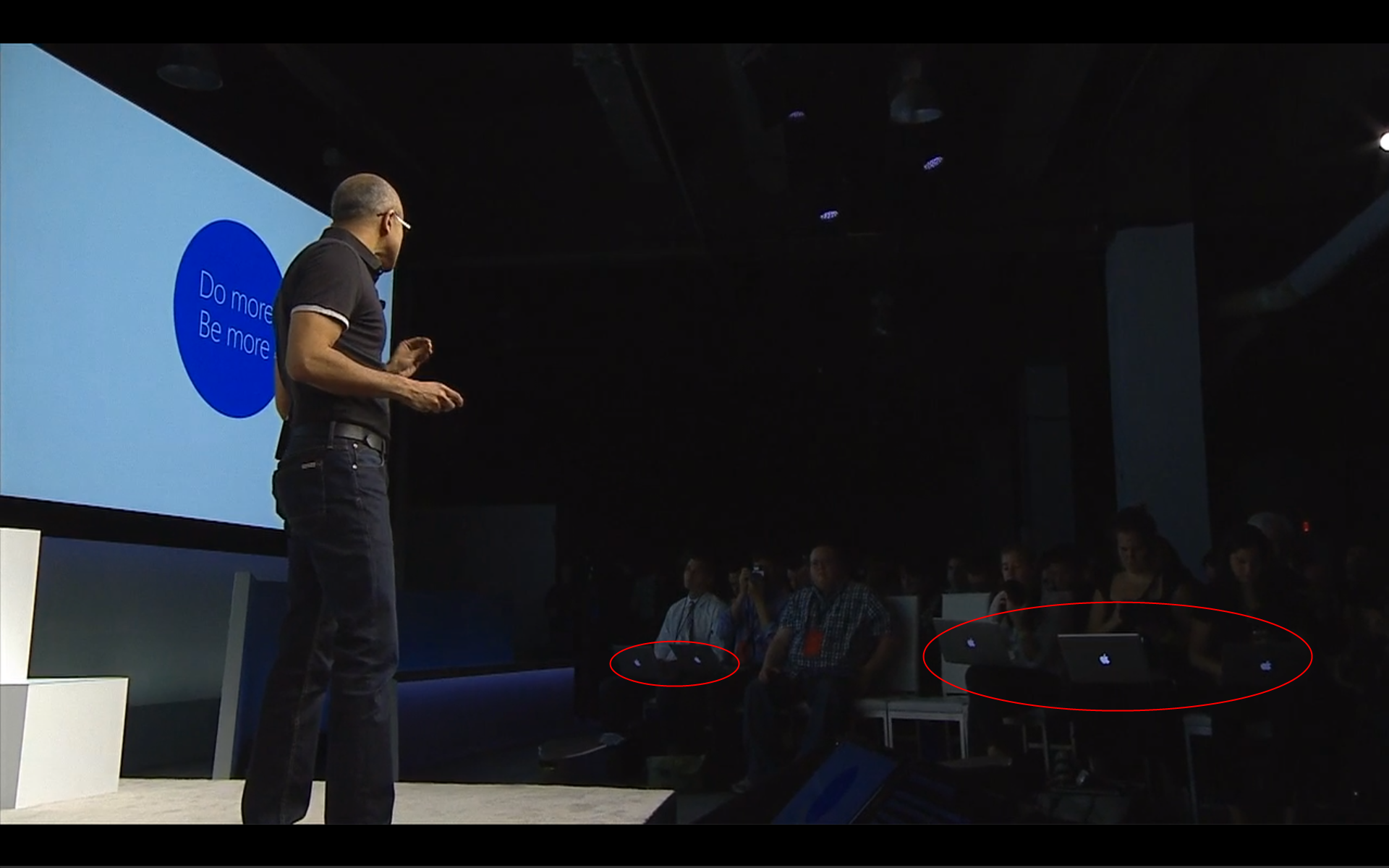
At Microsoft Surface announcement today, CEO Satya encourages everyone to “Do More” and “Be More”. Maybe he’s talking to the front row at the announcement, given that they are all using Macs?
Month: May 2014
TechEd NA 2014 – Building Rich Apps with AngularJS on ASP.NET
TechEd North America 2014, Houston
Building Rich Apps with AngularJS on ASP.NET – John Papa
Day 4, 15 May 2014, 8:30AM-9:45AM (DEV-B420)
Disclaimer: This post contains my own thoughts and notes based on attending TechEd North America 2014 presentations. Some content maps directly to what was originally presented. Other content is paraphrased or represents my own thoughts and opinions and should not be construed as reflecting the opinion of either Microsoft, the presenters or the speakers.
Executive Summary—Sean’s takeaways
-
Some great tips for organizing AngularJS projects
- Organized based on modules
- Keep Controller code separate from View
- “Above the fold”—show interface for code at the top, without implementation
- HotTowel is good template for creating a new project
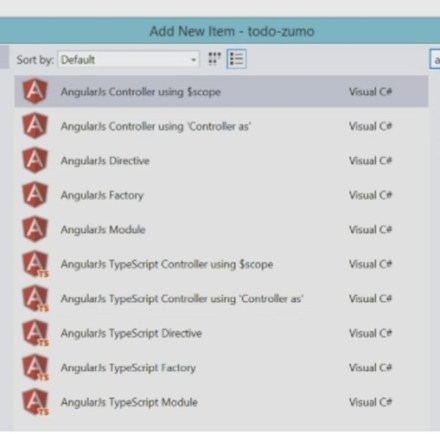
- SideWaffle.com also has a bunch of template for AngularJS objects
- Use design tools in Chrome to look at Javascript, data on wire, etc.
-
Use BreezeJS to do more involved CRUD apps
- Change management
- Dirty bit
- Work in Progress, persisting local data
- Persisting data locally really improves user experience
John Papa – Tech Evangelist, formerly of Microsoft
@john_papa
www.johnpapa.net

Why AngularJS works
- Results quickly
- But then you hit walls
- This session is—about getting past these walls
- 10 tips
Emotional roller coaster ride
- Not a smooth ride, need to get past bumps
Building large scale apps requires some planning
Demos can be found at
- https://github.com/johnpapa/ng-demos
- http://pluralsight.com/training/Courses/TableOfContents/build-apps-angular-breeze
- https://github.com/johnpapa/angular.breeze.storagewip
Agenda
- How components fit (basics)
- HotTowel
- Coding patterns
- Structuring your project
- Modularity
- Tracing data
- Exception Handling
- Rich Data
- Validation
- Local Storage / WIP
Important to know which thing you need
Tip 1 – Component hierarchy
- Module – sort of like namespace in .NET
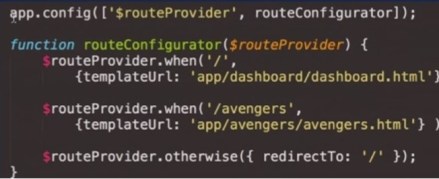
- Routes to get to various views
-
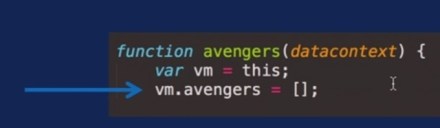
Views / binding ($scope) / Controller
- $scope – data binding
-
In View, use Directives
- 3rd party widgets
- Like HTML tag in View
-
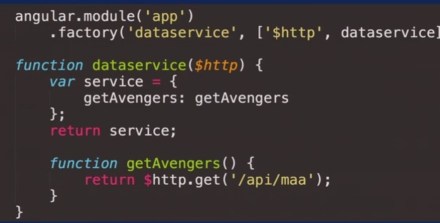
Controllers can have Factories
- Features to share across controllers
- Factory aka Service
- SOLID principles

View
- HTML
- Built-in AngularJS directives
Controller
- Goes in module
- Handles View’s needs
- Contains logic for the view (presentation)
$scope
- Data binding

Modules
- Create module
- Way to inject features into your application
- Bring in modules from other places
- Containers of related features
- Inject functionality into your app

Routes
- Wire up URLs to Views
- Defines app navigation

Directives
- ng-xxxx – angular directive
- Callbacks
- Extends HTML
- Javascript can stay in controller
- Encapsulate reusable widgets
Factories
- Basically, services
- Singleton instance, share code across controllers
- A controller’s best friend
- Controller, always get instance (new)
- Ideal for abstracting things like logger, local storage, etc.

Tip 2 – Jump-Start with HotTowel
- Easy way to get started, rather than looking at blank screen
Project template
- Layout – CSS and fonts should be there
- Angular in project
- Other commonly used scripts
- Starter Files – Controllers, Views, Services
HotTowel-Angular
Demo – HotTowel
- File|New ASP.NET Web, empty
- NuGet package manager
- HotTowel.Angular
- Gets dependent stuff
- Moment – date library
- FontAwesome – fonts
Tip 3 – Coding Patterns
Each component has one Job
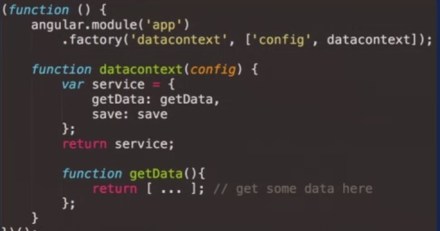
- Shorter .js files
- Code always has interface and details
- Name of service at top
- Public portion with just list of functions
- “Above the fold”

AngularJS File Templates
- http://sidewaffle.com
- Create Angular Controller, Directive, etc.
- Very good templates
- WebStorm on Mac
Demo – SideWaffle
- Lots of great things in Add New Item

Tip 4 – Structuring Your Project
Guidelines for Organizing AngularJS
- L – Locating code is easy
-
I – Identify code at a glance
- E.g. Not “Factories.js”
-
F – Flat structure as long as we can
- Lot easier to find something in flat structure
- After 7-10 files in folder, create sub-folder
-
T – Try to stay DRY
- Don’t Repeat Yourself
Typical – folders by type, e.g. controllers, services, etc.
- But when project gets big, this gets unwieldy
-
Better to do it by Feature
- E.g. Dashboard, Person, etc.
- Easier to split out on multiple-person team
- If someone says you’re doing it wrong—they’re wrong
- Browser doesn’t care how you organize your code
Options for structuring your file
- By Type
- By Feature
- Combination
But be consistent
Tip 5 – Modularity
Modularity
- Iterative development
- Reusable components
- E.g. add new module, plug into main module
- Reusable components to assemble an app
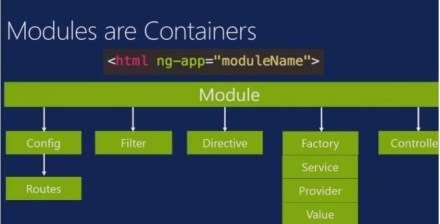
Modules
- Containers of related features
- Modules can depend on other modules
Modules are Containers
- <html ng-app=”moduleName”>
- Module contains all of the supporting members for the associated feature

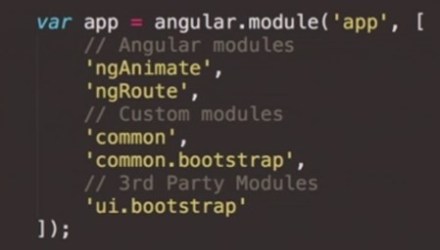
Categories of Dependencies
- Angular modules – e.g. routing
- Custom modules – things that you write
- 3rd party – e.g. bootstrap, Kendo
Example for a modular app
- Modules: Layout, Dashboard, widgets
- Share core configuration—put this in a Core module
- Drawing dependency chart for modules
Demo – Modularity
-
app.module.js – just lists the modules at the top that you need
- E.g. Dashboard, layout, widgets
-
E.g. avengers module
- avengers.module.js – defines angular.module and lists dependencies
- On GitHub, johnpapa/ng-demos
-
Each module has its own routes
- Use routehelper.configureRoutes
- Each module defines its own routes
-
Core module
- core.module.js – lists Angular and custom modules that it depends on
- config.js – general configuration stuff, like app name, etc.
- In core because all modules use this
-
Common module
- Defines module that is end of the chain, no dependencies, empty array []
Tip 6 – Tracing Data
Tracing the data calls ** slide **
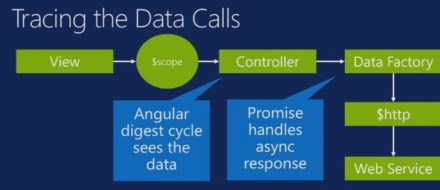
- View – button press “Get Avengers”
- $scope – binds to Controller
- Controller calls Data Factory
- $http – Ajax
- Hits web service
- Note: Application is asynchronous, i.e. responsive while data is being retrieved
- Data Factory handles async response
-
When data comes back, you need to tell Angular that you got the data
- Angular digest cycle sees the data
- With $http, Angular knows when data returns, automatically triggers digest cycle

Demo – Tracing Data in the Browser
- avengers.js – gets data, uses .then for promise, indicating what to do when data comes back
- Using debugger in Chrome
Tip 7 – Exception handler
- One place to handle all exceptions
- Use toast to show errors
Catch and Handle all Exceptions
- Local and Remote logging
- Dev vs. Debug modes
- Consistency
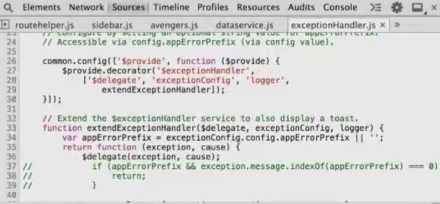
Decorate the $exceptionHandler Service
- You add to built-in exception handling features

Demo – Exception Handling
- Look at exceptionHandler.js

Tip 8 – Rich Data: BreezeJS
- When you need more than just simple data
Why Use Rich Data?
- $http gives you basic access to data
-
After that, Breeze lets you
- Track changes, etc.
- Multiple views of the same object
-
Change data in one place, change flows to other places
- Propagate changes
Dirty entities
- Can do stuff like setting Enabled for widgets, based on dirty bit
Demo – BreezeJS
- Breeze can hit against various things, e.g. Mobile Service, EF
-
Breeze keeps track of changeset – added, modified, deleted
- Data not yet sync’d to database
- Breeze then saves data back to cloud, but only the stuff that’s changed
- Explicit sync
Tip 9 – Validation
- Do you validate changes on client for better user experience?
- When validation error occurs, show the user immediately
Model Validation
- Where does presentation logic belong?
-
Validating in HTML
- Appears in every view
- Push validation down into Model
- How do we validate?
Demo – validation
- data-z-validate in <input> or <select>
- If using EF, stuff like max length of field is in metadata
- Metadata, but also custom rules
Validation on the server is mandatory
- Always do it on the server
- But also do it on the client
Demo – Model Validation
- Validation rules free, out of the box
- Also maintaining a full list of all of the validation errors
- On New item, don’t yet show validation errors for unfilled fields
Tip 10 – Work in Progress with Local Storage
- Why risk losing changes?
Options for saving changes
- When user leaves page, you lose changes
- You can’t leave (popups)
-
Auto-save as user types
- Send to database
- Tons of network traffic
- Incomplete object?
- Use local storage
Demo – Work in Progress with Local Storage
- Note: “Updated WIP” (in Breeze)
- Start indicates dirty bit
- Data survives navigate to another page and back again
- Even survives browser restart
How it Works
- Export/Import
Sean Questions
- How would Angular fit in with MVC? Can they be used together? Does that make sense?
TechEd NA 2014 – Announcing Hybrid Connections
TechEd North America 2014, Houston
Announcing Hybrid Connections: Building Amazing Hybrid Web Sites and Mobile Apps in Minutes – Santosh Chandwani
Day 4, 15 May 2014, 1:00PM-2:15PM (DEV-B307)
Disclaimer: This post contains my own thoughts and notes based on attending TechEd North America 2014 presentations. Some content maps directly to what was originally presented. Other content is paraphrased or represents my own thoughts and opinions and should not be construed as reflecting the opinion of either Microsoft, the presenters or the speakers.
Executive Summary—Sean’s takeaways
-
Hybrid connection is a simple way to access on-premise resource from Azure
- When you don’t want to do something more complex, like VPN / ExpressRoute
- Connection Manager allows connecting to an on-premise TCP or HTTP service
- Can connect to Azure web site or Mobile Service
Santosh Chandwani, Senior Program Manager, Azure, Microsoft
@santoshc1
santoshc@microsoft.com

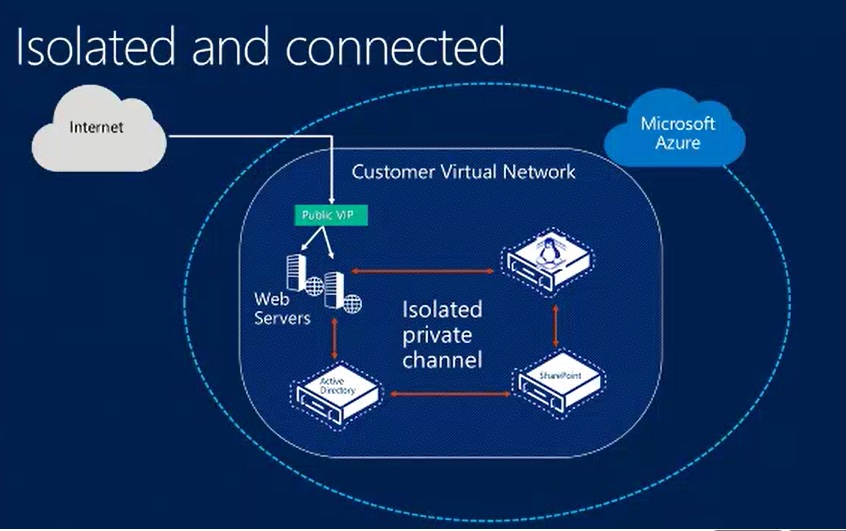
Evolving Enterprise Infrastructure
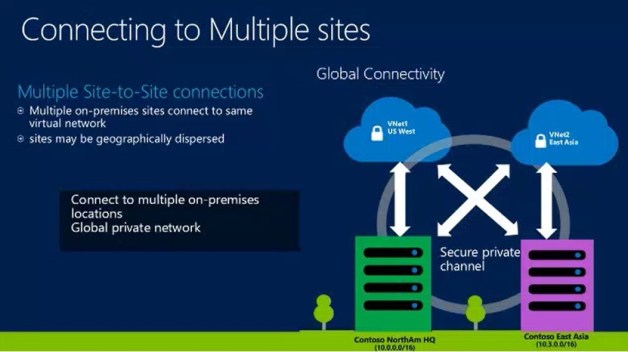
- Traditionally, have put everything on a corporate network
-
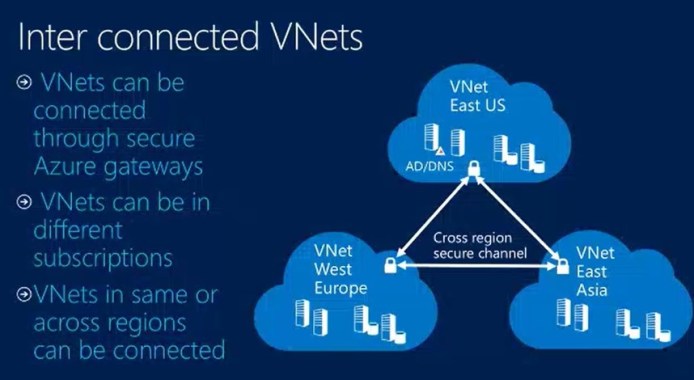
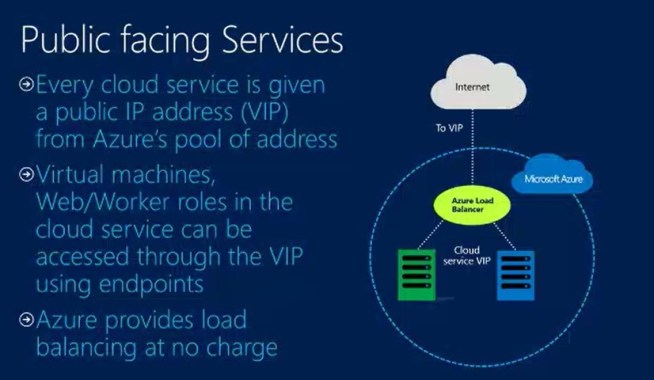
Azure also has its own network
- Makes sense to move stuff into the cloud
- But common to want to keep some critical data on-premise
-
One way to connect these networks
- VPN, ExpressRoutes
- Some limits
-
But sometimes you just a simple connection to an asset running on-premise
- Simple

Objective
- Reinforce ability to do hybrid applications on Azure
- Extend hybrid capabilities to all Azure services (e.g. PaaS)
- Don’t want custom code or infrastructure on-premise
- Secure access without changing network configuration
- Enterprise admins continue to have control and visibility
Introducing Hybrid Connections
-
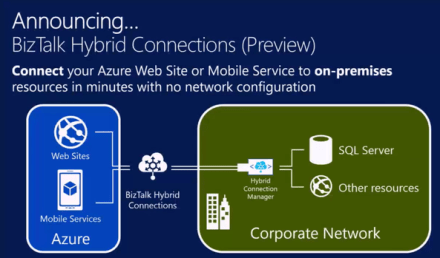
Feature of Azure BizTalk Services
- But don’t require using all of BizTalk
- Fast, easy way to build Hybrid Apps in preview
- Connect Mobile Services to on-premises resources
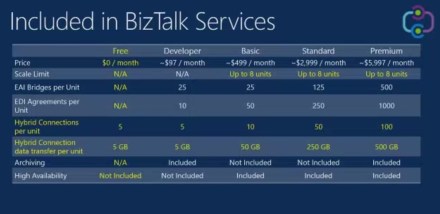
BizTalk Services FREE Edition (Preview)
- Preview this week
- Use Hybrid Connections at no charge
- Hybrid Connections and Data Transfer now included w/all BizTalk Services tiers
Key Features
-
Access to on-premises resources
- SQL Server, or resources that use TCP or HTTP
-
Works with most frameworks
- Support for .NET, .NET for Mobile Services
- No mention of Web API
-
No need to alter network perimeter
- No VPN gateway or firewall changes to allow incoming traffic
- Applications have access only to the resource that they require
-
Maintains IT control over resources
- Group Policy controls, so enterprise admins can control
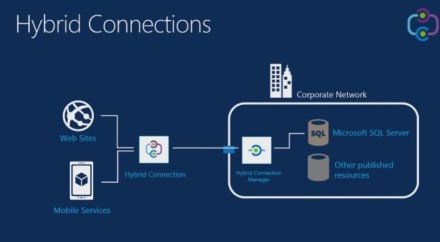
Hybrid Connections
-
Hybrid Connection Manager
- Can discover resources on premise
- From Web Sites or Mobile Services

Demonstration – Web sites
- Shows web site talking to SQL Server, both on corporate network
- Then publish web site up to Azure
- Talking to SQL Azure database
-
Now, set up hybrid connection
- From Azure Portal, add
- Name
- Hostname – on local network, also port name
- Hostname—could it be IP?
- Create or use BizTalk Service
- At this point, it’s just existing on Azure—doesn’t actually connect to anything
- Set it up from web site, so it knows that web site wants to connect to it
- Then Remote into desktop
- IP address could be any device
- Manager must run on Windows
-
Listener Setup (thru portal)
- Connected through the portal’s same account
- They could also do manual setup, with MSI & connection string
- Where in connection manager did we specify IP address to expose?
Or was it because we installed it directly on the node that we want to connect to? -
Now change conn string on web site
- Replace connection string
- Refresh web site, now talking to SQL Server on-premises
Lift and Shift
- Lift web site up into Azure
- Shift connection to point back to on-premise database
- No code changes
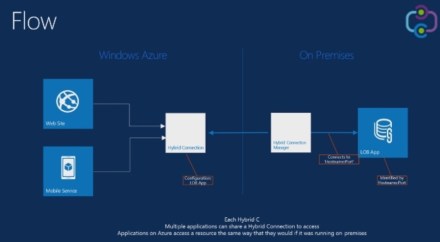
Flow
- Identify application by host name and port
-
Gave hostname and port to hybrid connection
- Note: name could only be resolved on corporate network
-
Hybrid Connection Manager
- Has gone through all security and threat models from Microsoft
-
Arrow directions—how is connection initiated
- HCM initiates connection to both local resource and up to cloud
- HCM pushes data
- Once we spin up hybrid connection, we can use it from multiple services

Demo – Mobile Services
- Mobile Services – .NET back-end
- Can now launch and debug Mobile Service locally
- Creating hybrid connection for Mobile Service from BizTalk Services portal
- From Mobile Services part of portal, then pick existing Hybrid Connection (and BizTalk service)
- Then set conn string to point to local database
- Change code in Mobile Service to use the new connection string
-
Now running local app that goes to Mobile Server to get data
- Mobile Service in turn is connected to hybrid connection
- Remote to PC and install hybrid connection manager
Constraints
-
Supports resources using TCP and HTTP for connectivity
- Only static TCP ports
- Need to know ahead of time what the port is
- Also static IP address, presumably ?
- Maybe dynamic ports in the future
-
Hybrid Connections don’t buffer or inspect traffic
- TLS can be negotiated end-to-end between application and on-premises resource
- Dynamic port redirection, e.g. FTP passive mode – doesn’t work (not supported)
Security
-
Uses Shared Access Signature Authorization
- Secure, Simple, Familiar
- Separate roles for on-premises connector and application
-
Application authorization is independent
- Between web site and on-premise resource
Walkthrough
- Max 5 connections to start with
-
On-premise setup
- Link to download MSI will be available soon
- Can use Powershell and MSI to create connection
- When you get the on-premise installer, the set of connection strings for the connection
- Mobile Services not yet in new Azure portal
Resiliency & Scale
-
On-Premises Resources can be scaled out as usual
- Clustering, availability for SQL
-
Applications can be scaled out on Azure
- Each instance of Website or Mobile Service will connect to Hybrid Connection
- Don’t have to do anything special
-
Multiple instances of Hybrid Connection Manager supported
- But going to same IP address
- Gives us scale
Enterprise IT in control
-
Manage resource access for Hybrid applications
- Group Policy controls for allowing access
- Admins can designate resources to which Hybrid Applications have access
-
Event and Audit Logging
- IT has insight into resources being accessed
- IT can use existing infrastructure investments for monitoring and control
-
Dashboard on Azure portal
- Access to connection health, status
- Will provide insights on usage and metrics (future)
Pricing

Summary
- Fastest way to build hybrid applications
- List and Shift web workloads to Azure web sites whilst connecting to on-premises data
- On-premises data just clicks away from Azure Websites & Mobile Services
2000things.com
Just a quick shout-out to new followers of this blog. Also take a look at my other two (more active) blogs:
2,000 Things You Should Know About C#
2,000 Things You Should Know About WPF
TechEd NA 2014 – Microsoft Azure Resource Manager
TechEd North America 2014, Houston
Microsoft Azure Resource Manager – Kevin Lam
Day 4, 15 May 2014, 2:45PM-4:00PM (DEV-B224)
Disclaimer: This post contains my own thoughts and notes based on attending TechEd North America 2014 presentations. Some content maps directly to what was originally presented. Other content is paraphrased or represents my own thoughts and opinions and should not be construed as reflecting the opinion of either Microsoft, the presenters or the speakers.
Executive Summary—Sean’s takeaways
- Now group all resources in Azure portal into resource groups
- Resource group should be based on whatever grouping makes sense to you
- Can use Powershell and REST-based API to create/destroy resources
-
Resource templates can be used or modified
- Start with templates used to create resources listed in gallery
Kevin Lam, Principal Program Manager, Azure, Microsoft

Today’s Challenge
-
Tough to
- Deploy or update group of resources
- Manage permissions on group of resources
- Visualize group of resources in logical view
We have various Singletons
- E.g. SQL Database, web site, etc.
- Deploy is harder
- Proper use of resources is more abstract
- Isolation makes communication a challenge
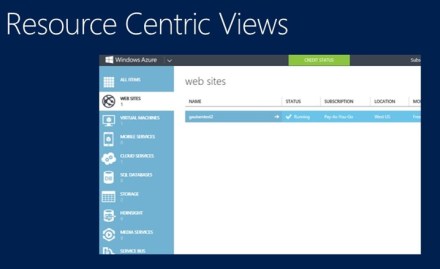
Resource Centric Views
- (old portal)
- Big flat list, long list at left

Introducing Resource Manager
- Application Lifecycle Container
- Declarative solution for Deployment and Configuration
- Consistent Management Layer
Resource Groups
- Tightly coupled containers of a collection of resources
- Can be same type or different
- Every resource lives in exactly one resource group
-
Resource groups can span regions
- E.g. web site located in multiple regions
Coupling for Resources
-
Resource Group is a unit of management
- Lifecycle – deployment, update, delete, status
- Grouping: metering, billing, quota – applied, rolled up to entire resource group
Q: Link resource groups together?
- Not yet. But soon. Will be different ways to view resources
Resource Group Lifecycle
- How do you decide where to put resources?
- Hint – do they have common lifecycle and management?
- Answer – up to you
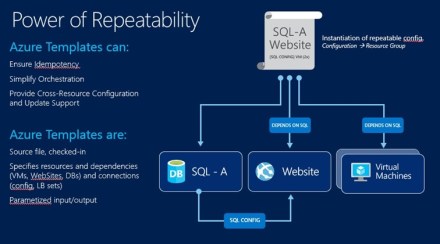
Power of Repeatability
-
Azure templates can
- Ensure idempotency –
- Simplify orchestration
- Provide cross-resource configuration and update support
-
Azure templates are:
- Source file, checked-in
- JSON file
- Specifies resources and dependencies and connections
- Parameterized input/output
- Template drives execution list, based on dependencies

Add Your Own Power
-
Some resources can be extended by allowing more code or data inside resource
- E.g. AV agent inside VM
- WordPress web-deploy package on a Website
- Allow for Scripting or Imperative configuration of resources
-
Extensible solution (Windows/Linux)
- Chef, Puppet, etc.
Consistent Management Layer
-
Service Management API
- Portal uses same API that is available to devs
-
Routing to appropriate resource provider
- Resource providers adhere to resource provider contract

What Does This All Mean?
-
Application Lifecycle Container
- Deploy/manage application as you see fit
-
Declarative solution for Deployment and Configuration
- Single-click deployment of multiple instantiations of your application
-
Consistent Management Layer
- Same experience of deployment and management, from wherever
Demo – Implementation
- Postman hooked up to REST API
- Hit API, get JSON data back
-
Examples
- Get resource groups
- PUT SQL Server (create)
- Creating SQL Server node takes a bit of time
- Then PUT SQL Database on that server
- Anything that you PUT, you can also GET
-
Can get list of resources
- Then index by number
Demo – New Portal
-
Gallery – curated list of resources that you can create
- Microsoft and 3rd party
- All creation is done by templates
- You can get these templates and pull them down (PowerShell)
- Can modify and use these default templates
New JSON editor in Visual Studio
- With intellisense
TechEd NA 2014 – Async Best Practices for C# and VB
TechEd North America 2014, Houston
Async Best Practices for C# and VB – Mads Torgersen
Day 4, 15 May 2014, 10:15AM-11:30AM (DEV-B362)
Disclaimer: This post contains my own thoughts and notes based on attending TechEd North America 2014 presentations. Some content maps directly to what was originally presented. Other content is paraphrased or represents my own thoughts and opinions and should not be construed as reflecting the opinion of either Microsoft, the presenters or the speakers.
Executive Summary—Sean’s takeaways
- Avoid async void
-
Don’t use parallel threads for I/O bound code
- Don’t want to waste threads in thread pool by having them waiting on I/O
-
Avoid event handler mess by using async/await
- Use TaskCompletionSource to hook event to lambda that sets result of task
- Don’t wrap synchronous code in async method
- Don’t block UI thread to wait for completion of asynchronous code
Mads Torgersen– Program Manager, C# Language, Microsoft
One of the people responsible for the async feature

Key takeaways
- Async void is only for top-level event handlers
- Use threadpool for CPU-bound code, but not IO-bound
- Use TaskCompletionSource to wrap Tasks around events
- Libraries shouldn’t lie, and should be chunky
Async void is only for event handlers
- User: if user clicks Print button too quickly, stuff not ready
Stop using async void
- Unless you absolutely have to
Async void only for event handlers
- Event handlers are async void
-
In your handler, you might call your own async void method
- Then in 2nd method, you hit await
- That method returns
- Event handler then also awaits
- ** slide – with arrows **
- Can’t predict which order the methods will resume in

Variant #2 – Exception in GetResponseAsync
- Exception doesn’t come back to original caller
- async void method has no Task to put exception in
- Then UI thread crashes, because no handler

How to fix
- Make 2nd function Task return, then await it

Example 3 – virtual methods returning void
- E.g. override of OnNavigatedTo, LoadState
- The override calls base
- But OnNavigated base calls overridden LoadState
- Again, a race condition because we hit awaits and exit methods
-
Solution
- Can’t return Task
- Still hand off Task from caller to callee
- Stick result of 2nd call in variable, after calling async Task helper method
- Then in 1st method, can await on the variable!
- Brilliant
- Tasks always the best way to communicate completion


Example 4 – Can’t always see when you’re doing async void
- Lambda
- Lambdas may map to delegate that returns void
- If both overloads offered, it picks Task-returning
-
E.g. If you Dispatcher.RunAsync with async lambda
- When lambda returns, the caller thinks that work is done
-
Sol’n: find another way to communicate completion
- Factor it out into async method that returns Task
- Search for async (), check it
Async void only for event handlers
-
Principles
- Fire-and-forget mechanism—almost never what you want
- Caller unable to know when async void has finished
- Caller unable to catch exceptions
-
Guidance
- Use only for top-level event handlers
- Use async Task-returning methods everywhere else
- If you need fire-and-forget, be explicit
- When you see async lambda, verify it
Threadpool
-
User: how should I parallelize my code
- Loading list of housing data
- Use Threadpool, task parallel library, parallel for?
-
Diagnose/Fix
- Users code was not CPU-bound
Threadpool – sequential
- Sequentially, you have to wait
Threadpool – Try #1
-
Parallel.For
- Deserialize and add to list
- Runs on parallel cores
- Now down to 300ms, from 500ms
-
But is it really taking 100 ms per house?
- Nope, it’s actually I/O bound
- Deserialize is actually blocking on I/O
Is it CPU-bound or I/O-bound?
- CPU-bound – should parallelize
- I/O-bound – maybe not
How it works
- Doing two threads, two cores
- Gradually spins up threads, as it sees first thread waiting on I/O
- So we created more threads than we need
How to code it right
- Parallelize I/O bound code
- List of tasks
- LoadFromDatabaseAsync
- Then: await Task.WhenAll(tasks)
- No threadpool
- Thread should not be waiting on I/O

Threadpool – may get another bottleneck?
- Moving off threadpool, but doing I/O in parallel may lead to I/O bottleneck if you have a large number of tasks
- So use a queue and workers
- Use WorkerAsync
- Create three workers

Threadpool
-
Principles
- CPU-bound okay on threads
- Parallel.ForEach and Task.Run are good way to put CPU-bound work onto thread pool
- E.g. LINQ-over-objects, computational
- Use of threads won’t increase throughput on machine that’s under load
-
Guidelines
- For IO-bound work, use await, rather than background threads
- For CPU-bound work, use background threads via Parallel.ForEach or Task.Run, unless you’re writing library or scalable server-side code
Async over events
-
User
- UI code looks like spaghetti
-
Diagnose/Fix
- Events are the problem
- Consider wrapping them as Tasks
Apple picking game
- Multiple levels of events
- Sequence of things all listed as nested lambdas
- Ick !
- Callback hell
-
Solution
- State machine
- Becomes complicated in a new way
- Now we have everything as global events
The problem is events—they’re not going away
Solution
- await async events
- Trick – how to turn helper methods into async

Async over events – async helper methods
- Use TaskCompletionSource<object>
- Guy who creates TCS controls how task completes
- Make your own task, rather than letting async create a task for you
- Lambda just tells task that things are done
- Then wire this lambda into Completed event
- Then you await this tcs.Task
- So—it’s about converted synchronous work with Completed handler into Task-based paradigm
- Fantastic!

Async keyword is for creating logic around methods that are already async
- When you want to create your own Task, use TaskCompletionSource
Wow, this is great. Learning async tricks from Mads..
Async over events
-
Principles
- Callback-based programming, as with events, is hard
-
Guidance
- If event handlers are largely independent, leave them as events
- If they look like state machine, then await is maybe easier
- To turn event into awaitable tasks, use TaskCompletionSource
Library methods shouldn’t lie
- Signature hints at whether a method is synchronous or asynchronous

Library methods shouldn’t lie
-
Honest about synchronous
- Some methods do actual work, occupy work
- You should say so, synchronous
-
Synchronous methods
- Do work
- You’re not wasting your time waiting for me
-
Asynchronous methods
- I’ll initiate something, but return immediately
Library methods shouldn’t lie – Example
-
Synchronous
- PausePrint – burns CPU
-
Asynchronous
- PausePrintAsync – await Task.Delay(10000)
- Honest, because it returns immediately, spawns task
-
Don’t: wrap synchronous code in async method
- Returns Task.Run (return it)
- This method lies—it’s not really async
-
Never: wrap asynchronous code in synchronous
- Async method that returns synchronously
- Synchronous wrappers for asynchronous work – NO !


Dangers of wrapping synchronous in asynchronous method
-
Wrap synchronous in async
- You’re still doing work
- Hiding from app dev where work is being done
-
Threadpool is app-global resource
- Scalability hurt
- On server, spinning up threads hurts scalability
-
App is the best position to manage its threads
- Don’t use threads in secret
Dangers of blocking – wrap asynchronous in synchronous
- LoadAsync
- Then wait on this in button click handler
- And then update view
- Rather than doing await so that handler returns immediately
- LoadAsync works fine—creates thread
- Blocks UI thread—bad !
- Then LoadAsync does await and it leads to deadlock
- Because the resumption of LoadAsync, after await, wants UI thread
- But you’ve blocked UI thread—crap
- A bit better in thread pool

Library methods shouldn’t lie
-
Principles
- Threadpool is app-global resource
- Poor use of threadpool hurts scalability
-
Guidance
- Help callers understand how your method behaves
- Libraries shouldn’t use threadpool in secret
- Use async signature only for truly async methods
Async – not spinning on threads
Sync – not blocking threads
Libraries should expose chunky async APIs
-
We all know sync methods are “cheap”
- Years of optimizations around sync methods
- Enables refactoring at will
-
E.g. synchronous string out
- IL is simple
-
Async method that outputs string (but doesn’t wait)
- Body of method is 3x longer
- Has to initialize state machine
- Lots of plumbing
-
Important mental model
- How many allocations are required for async state machine?
- Allocation will eventually require GC
- Garbage collection is what’s costly
Fast Path in awaits
-
Each async method has to allocate
- State machine class holding method’s local variables
- Delegate
- Returned Task object
-
If code path doesn’t hit any awaits
- Optimized so that state machine and delegate aren’t allocated. Just Task
- If awaited Task has already completed, then skip actual wait
-
If you don’t have any awaits fired and you have common result (e.g. 0, 1, true, false, null, “”)
- Compiler just grabs these pre-gen’d task and just returns it
-
You can follow this same pattern, for common return values in Tasks
- Create wrapper
Libraries should expose chunky async APIs
-
Principles
- Heap is an app-global resource
-
Guidance
- Libraries should expose chunky async APIs, not chatty
-
If library has to be chatty, and GC perf is problem, and heap has lots of async allocations
- Then optimize the fast-path
- Generally, use async to your heart’s content and don’t worry about it
- But just be aware of what’s going on under the hood
Consider .ConfigureAwait(false) in libraries
-
Sync context represents a “target for work”
- E.g. DispatcherSynchronizationContext, whose .Post() does Dispatcher.BeginInvoke()
- Sort of “where do I live”
- When await resumes execution, it has to look at sync context to figure out what thread to run code on. E.g. On UI thread
- Goal: after await, you should be where you were before (e.g. I’m still on the UI thread)
- Extra level of bookkeeping can be expensive
-
Library code often doesn’t care where it’s running
- You can ask await to not go find original context after await, but just keep running in whatever context is current
-
“Await task” uses the sync context
- await task.ConfigureAwait(false)
- Suppresses SyncContext.Post()
Consider .ConfigureAwait(false)
-
Principles
- UI message-queue is app-global resource
- Too much use will hurt UI responsiveness
-
Guidance
- If you call chatty async APIs but doesn’t touch the UI, use ConfigureAwait(false)
Resources for async Best Practices
TechEd NA 2014 – Industrial Strength Entity Framework
TechEd North America 2014, Houston
Industrial-Strength Entity Framework – John Mason, Robert Vettor
Day 3, 14 May 2014, 5:00PM-6:15PM (DEV-B356)
Disclaimer: This post contains my own thoughts and notes based on attending TechEd North America 2014 presentations. Some content maps directly to what was originally presented. Other content is paraphrased or represents my own thoughts and opinions and should not be construed as reflecting the opinion of either Microsoft, the presenters or the speakers.
Executive Summary—Sean’s takeaways
-
Entity Data Model doesn’t have to be 1-1 mapping to database tables
- EDM represents model that the developer works with
-
Segregate models, based on functional context
- Complex system would typically have several models
- Data linking accomplished by bringing in only what’s needed from another model
- E.g. Order EDM has Customer info, but only some basic read-only Customer attributes
-
Transactions
- EF does implicit transaction on SaveChanges
- You can now do explicit transactions
-
Concurrency
- You need to be thinking about it
- Catch concurrency exceptions and do something about them (e.g. merge)
-
Performance
- Measure performance of queries with Profiler and Query Analyzer
- Some good tricks for using Profiler
- Stored Procedures are fine—first-class citizens in EF
- Use async—prevalent in EF now
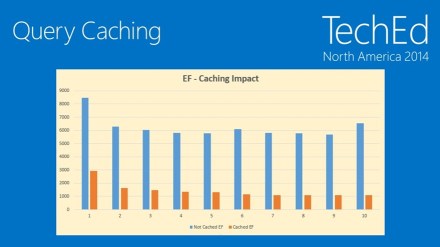
- Query caching in EF—huge gains
-
For best performance, use EF 6 and .NET 4.5+
- Query caching requires EF 5, .NET 4.5
John Mason – Senior Developer Consultant, Microsoft Premier Services

Rob Vettor – Senior Developer Consultant, Microsoft Premier Services

Simple Layered (Multitier) Model
- People sometimes don’t understand what’s in each box
More Complex Layered (Multitier) Model
-
Service Layer blown out
- KPIs – business (transactions), devs (perfmon)
- Unit of Work – how to talk to Data Layer
Complex Layered Multitier Model
- This is more typical of modern multi-tiered system
-
Data Tier
- Data Sources might be database or something else
- EF will at some point be able to talk to non-relational data sources
- “Critically important” that we accept NoSQL model
- This is where Entity Framework fits into the large picture

Enterprise Apps are Data Aware
What is a Model?
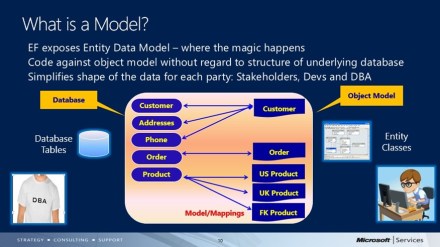
- EF exposes Entity Data Model
- On the left side are database tables
-
On the right side, classes
- Code against data model that might not map 1-1 to database
- This is the object model
- Default behavior is 1-1 mapping between database table and a class
- Dev’s shape of the data vs. DBA shape of the data
- If DBA changes schema, only the mapping (arrows in middle) has to change

Model Simplifies the Data
-
Model simplifies data
- Validates your understanding
- Stakeholders can more easily understand
- Reduces complexity
-
Defining the model
- Sketch data model for enterprise
- Create initial mappings
- Identify functional groupings
-
Abstraction has cost
- Overhead of models
- Overloading with entire entity graph might not make sense
- Good idea to work with subset of entities
Model Segregation
-
Break model up into smaller functional context
- Can have several different models (EDMs) that segment the business domain
- Call these “functional contexts”
-
Benefits
- Each functional context targets specific area of business domain
- Reduces complexity
- Functionality can evolve and refactor can occur on separate timelines
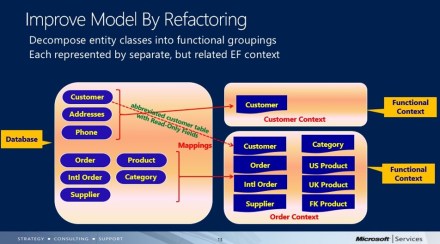
Improve Model by Refactoring
- Customer vs. Order contexts
- Customer context – might be where you actually change customer
-
In Order context, just needs read-only reference to customer
- So you just pull in subset of tables/fields, read-only
-
Helps ensure that devs use the context properly
- Avoid architectural erosion—if you don’t understand architecture, you make changes that don’t match the original vision
- Also enables teams to work separately

Enterprise Apps are Transactional
- Typically
Transaction
-
Are
- Related operations, single unit of work
- Either succeeds or fails (Commit or Rollback)
- Guarantees data consistency / integrity
-
Basic types
-
Local
- Single-phased (1 database) handled directly by database provider
-
Distributed
- Affects multiple resources
- Coordinated by 3rd party transaction manager component
- Implement two-phased commit—present candidate changes, then go ahead and do it
-
Local Transactions
-
Implicit
- Built into EFs internal architecture – automatic
-
SaveChanges invokes implicit transaction
- EF automatically either commits or rolls back
-
Explicit – Two Types
- BeginTransaction
- UseTransaction
Demo – Transactions
-
Default behavior
- Profiler running in background, shows SQL being used
- After SaveChanges, do raw SQL Command—gets its own transaction
- Another set of changes and then SaveChanges—another BEGIN TRANSATION / COMMIT TRANSACTION
- Doing smaller transactions is good practice for highly transactional database
-
BeginTransaction (new in EF 6)
- ctx.Database.BeginTransaction
- trans.Commit
- Now we get everything within one transaction
-
UseTransaction
- Create new connection, outside of EF
- On Connection, BeginTransaction
- Create EF context, pass in conn, which has transaction
- ctx.Database.UseTransaction(trans)
- Still assumes single database
Best Practices – Transactions
-
Favor implicit local transactions
- All you need, usually
- Automatic when calling SaveChanges()
- Implements Unit of Work pattern
-
Explicit local transaction
- BeginTransaction, UseTransaction
-
Distributed transactions
- Favor TransactionScope
Enterprise Apps are Concurrent
Concurrency
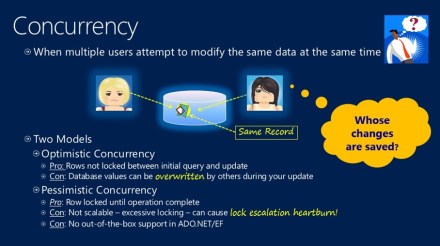
- When multiple users modify data at the same time
-
Two models
-
Optimistic concurrency
- Pro: Rows not locked between initial query and update
- Con: Database value can be overwritten
-
Pessimistic concurrency
- Pro: Row locked until operation complete
- Con: Not scalable, excessive locking, lock escalation
- Con: No out-of-box support in ADO.NET and EF
-

Concurrency in EF
- Out-of-box, EF has optimistic concurrency – last in wins
- Can detect concurrency conflicts by adding concurrency token
- EF, on update, delete, automatically adds concurrency check to where clause
- If concurrency conflict, EF throws DbUpdateConcurrencyException
Resolve Concurrency Conflicts
-
Client Wins
- Out-of-box behavior
-
Server wins
- First in stays – your changes discarded
- Notify user of conflicts
-
Code custom algorithm
- Let business decide
- EF has: 1) original data; 2) your changed data; 3) data currently in database
Demo – Concurrency
- When you catch DbUpdateConcurrencException, good place to have strategy pattern
- E.g. custom merge
- GetDatabaseValues, OriginalValues, CurrentValues
- Merge is sometimes possible (if we’re not changing the same thing)
- On merge failure (true conflict), we log it
“Programming to DBContext” – Rowan Miller
Enterprise Apps are Performant
Performance in Apps
-
Defining performance
- Emergent property, blends latency and underlying infrastructure
-
Measuring performance
- Can’t improve what you don’t measure
- Business KPIs and application KPIs
- Use application KPIs to keep track of application metrics that are meaningful to you
- Who falls over first: business tier, database, etc.
-
Performance impactors
- Can buy your way out of bandwidth issues
- Can’t buy fix for latency
- Must be considered up front
Performance rules
- Choose right architecture
- Test early/often
- Whenever you make a change, re-test
Performance Pillar – Efficient Queries
Default Query Behavior
- LINQ query eventually transformed into SQL query
- EF materializes untyped SQL result set into strongly-typed entities

Query Performance
-
Is Your SQL Efficient?
- Customers assume that LINQ is smarter than it actually is
- Looks like SQL but doesn’t necessarily act like SQL
- EF may not be efficient
-
Must Profile LINQ Queries
- Structure of LINQ expressions can have tremendous impact on query performance
- EF can’t determine query efficiency from LINQ expression
-
The Truth is in the SQL execution plan
- Actual, not estimated
In a perfect world, you’d profile all of your queries
Profiling Check List
-
Set Application Name Attribute in conn string
- Allows filtering just SQL from your application
- Run SQL Trace
- Run Query Analyzer
- SET STATISTICS TIME ON/OFF
- Review Actual Execution Plan
Demo – Profiling
- Profile slow or complicated query
- Tools | SQL Server Profiler
- Start trace
-
Events Selection
- No Audit, ExistingConnection,
- Only show RPC Completed, SQL BatchCompleted
-
Column Filters
- Application Name like “EF” (or whatever you put in conn string)
- Run
- Run simple query
-
In Profiler, you see full SQL query
- Tells us what application is doing—just the query
- Copy out of Profiler
- New Query window
- Paste in
-
SET STATISTICS TIME ON
- (and OFF at bottom)
- Select database
- Query | Include Actual Execution Plan
-
Get rows back, took 94 ms, then 35 ms
- SQL caching
-
Look at Execution plan
- Favor Seeks over Scans
- Clustered Index Scan
- Given structure of database, we can’t improve on it
-
Look at how we’d write query
- Query plan is the same on your own query
- You really don’t know how query works until you look at Query Execution Plan
- If you know of a better way to get to the data, you can use a Stored Proc
Can change underlying LINQ statement
- Sometimes can find better way
What About Stored Procedures?
-
EF Loves to Generate SQL
- Default behavior – devs do LINQ, EF gens SQL
-
Sprocs always option
- Simple to map select/update ops to stored procs
- EF generates method from which to invoke
-
Consistency across EF
- Same experience
- Full change tracking
- Right tool for the Job
“Don’t fear the SPROC”
Performance Best Practices
-
Profile early/often
- Slow operations of complex queries
-
Must Haves…
- Application Name conn string attribute
- Set Statistics Time On/Off
- Actual vs. Estimated Executed Plan
-
Don’t fear the Sproc
- Stored procs are first-class citizens in EF
- Customers often blend both EF queries and stored procedures in hybrid approach
- Common customer usage pattern for large application
80/20
- 80% CRUD simple queries
-
20% more complex
- Good place for stored procedure
Performance Pillar Asynchronous Operations
Async
-
EF 6 Exposes Asynchronous Operations
- Most IQueryable<T> methods now async-enabled
- Leverages recent Async/Await pattern
-
Fast and Fluid Experience
- Increase client responsiveness, server scalability
- Prevents blocking of main thread
- *** more ***

Demo – Async
- Method that does async call, do await
- In async function, return Task
- await ctx.SaveChangesAsync()
- FirstOrDefaultAsync
Performance Pillar: Caching
Performance Enhancements
- Overall Query Construction
-
Performance Improvements
- EF 5 and EF 6 has big perf improvements
- And need .NET Framework 4.5+
Query Caching
-
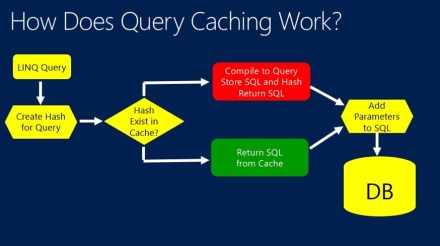
Earlier
- Linq query
- Compiler builds expression tree
- EF parses tree and builds SQL query
- Repeated each time query executed
-
Now, Autocompiled Queries
- EF 5+, SQL query constructed once, stored in EF query cache and reused
- Parameterized – same query/different parameter values
- For your application, all user share this cache (App Domain)
- Supports up to 800 queries
- Uses MRU algorithm to decide which queries to drop
- This is (obviously) different from SQL caching


Closing Thoughts
Step 0 – Learn the Framework
- Framework is complex
-
Allocated time to learn
- Understand LINQ and subtle nuances of each
- Understand immediate vs. deferred execution
- For Microsoft Premier customers, Premier EF training
Books
- Programming Entity Framework
- DbContext
- Code First
- Entity Framework 4.1: Expert’s Cookbook
Entity Framework 6 Recipes – Rob Vettor
TechEd NA 2014 – Public Cloud Security
TechEd North America 2014, Houston
Public Cloud Security: Surviving in a Hostile Multitenant Environment – Mark Russinovich
Day 3, 14 May 2014, 3:15PM-4:30PM (DCIM-B306)
Disclaimer: This post contains my own thoughts and notes based on attending TechEd North America 2014 presentations. Some content maps directly to what was originally presented. Other content is paraphrased or represents my own thoughts and opinions and should not be construed as reflecting the opinion of either Microsoft, the presenters or the speakers.
Executive Summary—Sean’s takeaways
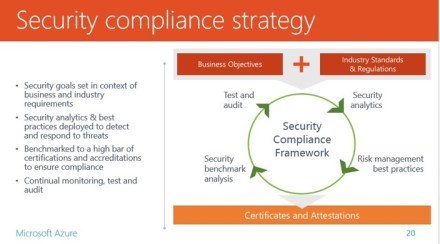
- To move to cloud, customers must trust us
-
Need to follow best practices to make things secure
- At least as good as what your customers are doing
- Makes sense to look at top threats and think about mitigating risk in each case
-
Azure does a lot of work to mitigate risk in many areas
- Often far more than you’d do in your own organization
-
Top three threats
- Data breach
- Data loss
- Account or service hijacking
- Encryption at rest not a panacea
Mark Russinovich – Technical Fellow, Azure, Microsoft

“There is no cloud without trust”
- Security, Availability, Reliability
Misconceptions about what it means to be secure in cloud
- Will dispel some of the myths
- Look at what’s behind some of the risks
- Mitigation of risks
The Third Computing Era
- 1st – Mainframes
- 2nd – PCs and Servers
- 3rd – Cloud + Mobile
- (Lack of) Security could ruin everything
Security
- Study after study, CIOs say looking at cloud, but worried about security
-
Other concerns
- Security
- Compliance
- Loss of control

Goals of this Session
- Identify threats
- Discuss risk
- Mitigate
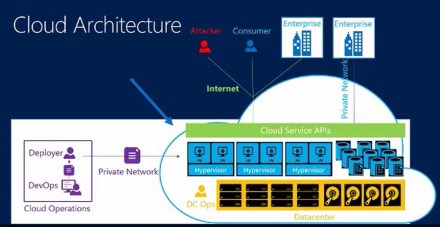
Cloud Architecture
- Canonical reference architecture
- Virtualized structure
- Datacenter facility
- Microsoft—deployment people and DevOps
- Customers of cloud—Enterprise, Consumer
- Attacker

Cloud Security Alliance
- Microsoft is a member
The Cloud Security Alliance “Notorious Nine” (what are threats to data in cloud?)
- Periodically surveys industry
- 2010 – Seven top threats
- 2013 – Nine top threats
- Mark adds 10th threat
#10 – Shared Technology Issues: Exposed Software
-
Shared code defines surface area exposed to customers
- In public cloud, servers are homogeneous—exact same firmware
- Hypervisor
- Web server
- API support libraries
- What if there’s a vulnerability?
-
Stability and security are balanced against each other
- Patching might bring down servers
- Assumes infrastructure is accessible only by trusted actors
- Corporate and legal mechanisms for dealing with attackers
- This is: Enterprise Multi-tenancy
#10 – Shared Technology Issues: The Cloud Risk
-
A vulnerability in publically accessible software enables attached to puncture the cloud
- Exposes data of other customers
- Single incident—catastrophic loss of customer confidence
- Potential attackers are anonymous and in diverse jurisdictions
- “Are you doing as good a job as I’d be doing if I had the data in the house”?
-
Important (vs. Critical) – data not at risk, but confidence in Azure is critical
- “Cloud critical”
- “Hostile Multi-tenancy”
- We do whatever it takes to patch immediately
#10 – Shared Technology Issues: Bottom Line
- Enterprises and clouds exposed to this risk
-
Clouds at higher risk
- Data from lots of customers
- API surface is easy to get to
-
Clouds are generally better at response
- Azure has about 1,000,000 servers
- Can do critical patch in just a couple hours, all servers
- Breach detection/mitigation
-
Risk matrix
- Perceived risk—bit below average
- Actual risk – Fairly high (Mark’s assessment)
#9 – Insufficient Due Diligence
-
Moving to cloud, but side-stepping IT processes
- Shadow IT
- BYOIT – Bring your own IT—non-IT going to cloud
- IT management, etc. are designed for on-premises servers
-
Bottom line
- IT must lead responsible action
#9 – Insufficient Due Diligence – Azure
-
Azure API Discovery
- Monitors access to cloud from each device
- SDL
- Cloud SDL (under development)
#8 – Abuse of Cloud Services
- Agility and scale of cloud is attractive to users
- Use of Compute as malware platform
- Use of storage to store and distributes illegal content
-
Use of compute to mine digital currency
- VMs shut down per month, due to illegal activity: 50,000-70,000
- Bulk of it is for generating crypto currency
- Top 3 countries that are doing this: Russia, Nigeria, Vietnam
- Password for Vietnamese pirate: mauth123 (password123)
- Harvard supercomputer was mining bitcoin
#8 – Abuse of Cloud Services: It’s Happening
- Attackers can use cloud and remain anonymous
-
Bottom line
- Mostly cloud provider problem
- Hurts bottom line, drives up prices
- Using machine learning to learn how attackers are working
#7 – Malicious Insiders
- Many cloud service provider employees have access to cloud
- Malicious check-in, immediately rolls out to everybody
- Operators that deploy code
- Datacenter operations personnel
-
Mitigations
- Employee background checks
-
Limited as-needed access to production
- No standing admin privileges
- Controlled/monitored access to production services
-
Bottom line
- Real risk is better understood by third-party audits


Compliance is #1 concern for companies already doing stuff in cloud
#7 – Malicious Insiders – Compliance
#6 – Denial of Service
- Public cloud is public
- Amazon was at one point brought down by DDOS
- Your own app could get DDOS’d
- Cloud outage – a form of DDOS
- Redundant power from two different locations to each data center
- Blipping power to data center results in major outage—several hours
-
Mitigations
- Cloud providers invest heavily in DDOS prevention
- Third party appliances that detect and divert traffic
- We do this for our clients too
- Large-scale DDOS, doesn’t catch smaller things
- Geo-available cloud providers can provide resiliency
-
Azure
- DDOS prevention
- Geo-regions for failover
#5 – Insecure Interfaces and APIs
- Cloud is new and rapidly evolving, so lots of new API surface
- CSA – one of the biggest risks
-
Examples
- Weak TLS crypto – DiagnosticMonitor.AllowInsecure….
- Incomplete verification of encrypted content
-
Bottom line
- Cloud providers must follow SDL
- Customers should validate API behavior
#4 – Account or Service Traffic Hijacking
- Account hijacking: unauthorized access to an account
-
Possible vectors
- Weak passwords
- Stolen passwords (e.g. Target breach)
- Then you find that people use same password everywhere; so attacker can use on other services
-
Not specific to cloud
- Cloud use may result in unmanaged credentials
- Developers are provisioning apps, hard-coding passwords, publishing them
- Lockboxes, “secret stores”
- Back door—someone in DevOps gets phished, then brute force
-
Mitigations
- Turned off unneeded endpoints
- Strong passwords
-
Multifactor authentication
- Entire world moving to multifactor
- Breach detection
-
Azure
- Anti-malware
- IP ACLs (with static IP addresses)
- Point-to-Site, Site-to-Site, ExpressRoute
- Azure Active Directory MFA
#3 – Data Loss
-
Ways to lose data
- Customer accidentally deletes data
- Attacker deletes or modifies it
- Cloud provider accidentally deletes or modifies it
- Natural disaster
-
Mitigations
- Customer: do point-in-time backups
- Customer: geo-redundant storage
-
Cloud provider: deleted resource tombstoning
- Can’t permanently delete
- 90 days
-
Azure
- Globally Replicated Storage
- VM Capture
- Storage snapshots
- Azure Site Replica
#2 – Data Breaches
- Represents collection of threats
- Most important asset of company is the data
#2 – Data Breaches: Physical Attacks on Media
- Threat: Attacker has physical access to data/disk
-
Mitigation: cloud provider physical controls
- To get in data center, gate with guards
- To get into room with servers, biometric controls
- Disk leaving data center—very strict controls
- Data scrubbing and certificate
- SSDs never leave data center, because it’s so hard to scrub it
- HDDs are scrubbed
-
Enhanced mitigations
- Third-party certifications (e.g. FedRamp)
- Encryption at rest
- Azure: third-party encryption
Encryption at rest
-
Two types
- Cloud provider has keys
- Customer has keys
- When you have keys, you’re also giving keys to cloud to decrypt
#2 – Data Breaches: Physical Attacks on Data Transfer
- Man-in-the-middle
-
Mitigation
- Encrypt data between data centers
- APIs use TLS
- Customer uses TLS
- Customer encrypts outside of cloud
#2 – Data Breaches: Side-Channel Attacks
- Threat: Collocated attacker can infer secrets from processor side-effects
- Snooping on processor that they’re co-located on
-
Researcher assumptions (but unlikely)
- Attacker knows crypto code customer is using and key strength
- Attacker can collocate on same server
- Attacker shares same core as you
- Customer VM continuously executes crypto code
- Not very likely
-
Bottom line
- Not currently a risk, in practice
#2 – Data Breaches: Logical Attack on Storage
- Threat: attacker gains logical access to data
-
Mitigations
- Defense-in-depth prevention
- Monitoring/auditing
-
Encryption-at-rest not a significant mitigation
- If they can breach logical access, they can maybe get keys too
- The keys are there in the cloud
- Encrypt-at-rest isn’t based on real threat modeling
#2 – Data Breaches: Bottom Line
- Media breach not significant risk
- Network breach is risk
-
Logical breach is a risk
- Encrypt-at-rest doesn’t buy much
#1 – Self—Awareness
- E.g. Skynet
- People are actually worried about this
TechEd NA 2014 – Windows Desktop Development – Panel Discussion
TechEd North America 2014, Houston
Windows Desktop Development – A Panel Discussion – Dmitry Lyalin, Tim Heuer, Habib Heydarian, Chipalo Street, Eric Battalio, Jay Schmelzer
Day 3, 14 May 2014, 1:30PM-2:45PM (DEV-B327)
Disclaimer: This post contains my own thoughts and notes based on attending TechEd North America 2014 presentations. Some content maps directly to what was originally presented. Other content is paraphrased or represents my own thoughts and opinions and should not be construed as reflecting the opinion of either Microsoft, the presenters or the speakers.
Executive Summary—Sean’s takeaways
- Universal App platform really pervades everything that dev teams are doing
- .NET Native – for faster Windows Store apps
- Worth looking at PRISM—good way to build apps
- If using C++, make sure you’re using modern C++, i.e. C++11
Dmitry Lyalin, Product Manager, Visual Studio, Microsoft
Panel members are all Engineering team members from the Visual Studio team.
Agenda
- What’s new for WPF devs
- Panel discussion
On the panel:
- Tim Heuer – Program Manager, XAML UI

- Habib Heydarian – Principal Group Manager, .NET Team

- Chipalo Street – Program Manager, XAML

- Eric Battalio – Senior Program Manager, C++

- Jay Schmelzer – Partner Director, .NET Team

VS 2013 XAML improvements
- Intellisense for data binding & resources
- Go to definition (F12)
- Nesting comments in markup
- Renaming start tag renames end tag
- New XAML code snippets
PRISM v5 (WPF & .NET 4.5)
- PCL version of Prism library
- Separate features into separate assemblies
- Address high priority items
Debugging and Diagnostics
-
Memory analysis
- New managed memory analyzer
-
Debugging improvements (4.5.1)
- 64-bit edit and continue
- Improved async debugging
Q: Deploy 4.5 app in 4.0 environment?
- 4.5 is in-place update, so you can upgrade
- ASP.NET vNext – new model
- To get new functionality, you do need to install .NET 4.5
.NET Native vs. Traditional
- Framework displayed as one single unit
- .NET Native not yet available for desktop apps
Q: Problem when View tries to load other DLLs and they get called when I go into design surface
- See Hari, try to repro this
On the radar – new deployment models for desktop apps
- Maybe sort of Windows Store model for company apps within the enterprise
Q: Do you recommend always working in x86 mode in designer?
- Yes
Q: If you put custom controls in shared UI library, seems like they never show up in the designer.
- Take this offline
Q: Can you auto format when you change tag?
- It’s either everything on one line, or one line per property
Q: XAML verbosity – anything planned to make XAML more concise? E.g. Data bindings, Setters, Converters, etc. Improvements to XAML syntax coming?
- Point to tools, Intellisense / Auto Completion, code snippets
- Language evolving – has evolved just a bit, simplifying
- Tough to change XAML itself, because it’s a public language spec
- Thought about inline scripting, but thinking about ways to do less markup and have XAML compiler generate stuff
- “More of a compiled approach” in tools
Q: 4.53 coming? 5.0? Compatibility?
- For 4.5.1, did around 300 compatibility fixes
- 4.5.2, 120+ compatibility fixes
- So 4.5.2 more compatible than 4.5 was
- Cadence is going to continue to be quick—new framework every few months
- Can no longer just release stuff every 3 years
Q: WPF dev doing LOB apps that will never be touch-based. Screens too busy. Any chance of writing desktop apps, but using Windows RT
- When Win 8 came out, it was really focused on mobile. But now more focused on desktop
- Now, with Universal Apps, spacing that is nice for both desktop usage but also okay for touch
- E.g. For Outlook, Microsoft will try to have one single GUI that works on both Win RT and desktop
Q: WPF pain point – implicit styles for windows in user controls. Couldn’t define implicit style that applies to all user controls.
- No plans, but follow-up with us
Q: For cross-platform, we still have to do View on specific platforms. But is there any way to use XAML solution for other platforms?
- Third party doing this
- We’re not thinking about this right now
- If you need a cross-platform UI language, HTML is the way to go
- Shared projects in Visual Studio
- UI abstraction layers are tough. Not sure that it’s something that would work for users
- Goal is to provide best native for Windows and also best web for cross-platform UI
Q: In 2012, we used Blend. Now, in VS 2013, about 90% of the stuff that was in Blend is now in Visual Studio. What’s the future of Blend and Visual Studio?
- Purely design-oriented things like states will stay in Blend
Q: Can I do Roslyn plug-ins?
- Yes, can do little plug-ins. E.g. Diagnostics, distribute in your team, flag violations of coding standards
- Yes, you can do that on top of Microsoft’s copy of Roslyn
Q: What are the C++ guys working on?
- See the VC blog
- We hear a lot about performance and MFC
- Talk at BUILD about C++ performance
- MFC – no definite plans
- MSDN guys are focused on scenarios, rather than on purely API documentation
Q: Future planning for Windows, e.g. Minority Report or 3D UI experience
- Contact lenses? Tongue-in-cheek comment—makes Oculus Rift look like child’s play
- Kinect for Windows, continued work
- Nothing for augmented reality at the moment
Q: What does .NET Native mean for C++?
- “Productivity of C# and performance of C++”
- Recommend: continue developing in whatever paradigm you’re comfortable with
- .NET Native still has garbage collector, so C++ might be preferable to some who want to do their only memory management
- .NET Native v1 targeted just at Windows Store apps
- In modern C++, you’re not typically doing new/delete explicitly
- Should be using C++11
- “It’s not like it used to be”
Q: Why is .NET Native limited to Windows Store apps and not desktop?
- Win Phone, “compiler in the cloud”, you upload IL and it compiles down
- Started with phone, no technological hurdles to do it on the desktop
Q: What is the next thing for which support will drop off (like XP)?
- The .NET Framework versions support is matched to the corresponding OS version
-
Lifecycle Policy for out of band releases
- E.g. Framework 4.0, we do something like 2-4 yrs
- So when next version of Windows is deprecated, associated .NET Framework for that OS will also be deprecated/expired
Q: Moving from 2.0 to 4.0, customers still on XP. Can we go directly to 4.5 and run on XP?
- As of 4.5, we no longer support XP
Q: Universal Apps – WPF ?
- “Head” projects in solution – Windows Store, Phone 8, WPF
- Don’t expect everything to work with shared projects
- But can do partial classes
Q: Apps don’t scale well on different resolution devices (pre-WPF). Some controls scale, some don’t. Will you revise scalability for older apps? Win Forms. Or Wizard to convert from Win Forms to WPF
- There are people thinking about multi-resolutions. Starting with immersive (phones), then WPF now.
- Not sure how much they’ve thought about Win32 / Win Forms stuff, though
- Some new lower-level APIs in Windows 8 to help app get more info about DPI stuff. Could call directly from your app
- .NET 4.5.2, some fixes in Win Forms stack to make control a tiny bit more DPI aware
- Jay: No silver bullet. There’s stuff that just won’t automatically scale
- Maybe something in the future, but will have to go back and touch your apps to fix things
Q: OpenGL support on Win Phone 8.1?
- Unknown
Q: When is next update to DirectX that will get pulled into WPF?
- Newer features on older platforms..
- DirectX – struggle with value of just updating to DX11. What does it give you?
- Maybe just D3Dimage improvement?
- Not sure what ROI is, just going to DX11
Q: Recommendation for native application that does graphics?
- Eric: No answer.
- Universal App, includes support for Native C++ / XAML
-
Office internally, tablet apps are using Native XAML
- So we’ll have to give them something for native desktop apps
TechEd NA 2014 – Cloud-Based Load Testing
TechEd North America 2014, Houston
Using the Cloud-Based Load Testing Service and Application Insights to Find Scale and Performance Bottlenecks in Your Applications – Vibhor Agarwal
Day 3, 14 May 2014, 10:15AM-11:30AM (DEV-B335)
Disclaimer: This post contains my own thoughts and notes based on attending TechEd North America 2014 presentations. Some content maps directly to what was originally presented. Other content is paraphrased or represents my own thoughts and opinions and should not be construed as reflecting the opinion of either Microsoft, the presenters or the speakers.
Executive Summary—Sean’s takeaways
-
Various testing scenarios, e.g.
- Load Testing – how will application perform at expected load?
- Stress Testing – how/when will application “fall down”?
-
Load Test uses one or more web tests to hit web site or service
- Lots of options for configuring test–# users, timing, etc.
- Can configure the Load Test to match what you believe to be real-world scenario
- User response time is a good key indicator
-
Cloud-based load testing allows scaling out in cloud
- Allows heavier duty tests, e.g. for stress testing
- Easy to set up and tear down test
- Visual Studio 2013 Ultimate only
- Application Insights—dashboard with key metrics about running site
Vibhor Agarwal – Principal Group Program Manager – Testing Tools, Microsoft

Agenda
- Why load testing?
- Cloud load testing
- Application insights
Mention of healthcare web site issues—didn’t scale
Why load testing?
-
1 – Performance testing
- How fast will the application perform?
- Typically when you have single user
- Also—how fast, based on current load? Ok, see below
-
2 – Load testing
- How will application behave under expected load?
- Might work fine for single user, but break under load
-
3 – Stress testing
- At what point will application break, i.e. at what load?
- “Limit testing”, “scale testing”
- If expected load is X, try out 2x, 3x, etc.
-
4 – Capacity planning
- Will application scale up to future capacity
- How many more servers do we need
- You can use load testing data to extrapolate
Demo – Performance testing
- File | New – Web and Load Test Project
- Create a simple webtest
- Record some actions on web site, hit a few pages (typical browsing)
- If there is user input required, the web test will parameterize that stuff
- Play on local machine—repeats the same actions
- Records how much time it takes at each steps
- Look at dependent links that are being followed
- Also shows # bytes being transferred
Demo – 2nd web test
- Want to model various typical user scenarios
- When you enter input, e.g. user input, it doesn’t capture it—so need to do full UI test
Demo – Other stuff available
- Can data drive web test from CSV, XML or other data source
- Can generate code based on web test, then modify stuff to customize
-
Parameterize web servers
- Use same web test, but run on a different web server
Demo – Create Load Test
- Project | Add | Load Test
- Wizard
-
Think time profile
- Use recorded – follow original time profile
- Normal distribution based on recorded times
- Typically do use think time, normal distribution
-
Load Pattern
- Constant load – # users
- Step load – start at one level, then add users. Good for Stress Testing
-
Test Mix
- Total # of tests
- Add web tests to load test, set distribution
- You could create load test with many parallel scenarios
- Browser mix
-
Load test duration
- Set time
- Typically, you also do warm-up – e.g. once cache is full, response gets better
Demo – Run Load Test
- Run load test, using local machine
-
Users power of local machine to generate load
- Works for small load
- More realistically, you want test rig to do load test with larger # users
- Creating test rig is sort of a complex process
What is needed to make that work?
-
Network-based load testing is
- Expensive to set up
- Complex provisioning
- Slow to scale
- Costly to maintain
- Get PCs, physically set them up, replicate – painful
Demo – Cloud Load Testing
- Infrastructure uses Azure cloud
-
Test Settings | Run tests using Visual Studio Online
- That’s all you need to do
- Test gets queued
- You do have to connect to Visual Studio Online
- Load test now in progress in cloud
- Spits out data while test is running
- Can open up load load tests that were run
Q: What is application sits behind firewall
- You need to find hole in firewall to allow the web-based testing
- VPN tunnel – might be too much for the tunnel, but haven’t done much with this yet
Demo – Review load test results
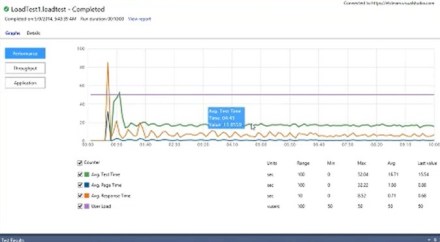
- Graph showing user response time, over length of load test
- View showing entire test, with various key indicators
- What is most relevant is response time – 95th percentile

Demo – Excel plug-in
- Can dump out all test data to Excel
- Trend Analysis or Comparison view
- Comparison view is the most interesting
Benefits of cloud-based load testing
- 1 – Don’t have to set up test infrastructure
- 2 – Get infrastructure in cloud when you need it
-
3 – Use same load test project that you use on premises
- Just single settings change
- 4 – Scale out easily in case of doing stress testing
Cloud load testing today
- Public preview, Nov-2013
- General availability, Apr-2014
- Using it: Xbox, Skype, Visual Studio Online
-
Some customers doing load testing as part of regular process, e.g. weekly
- Rather than waiting until end of project
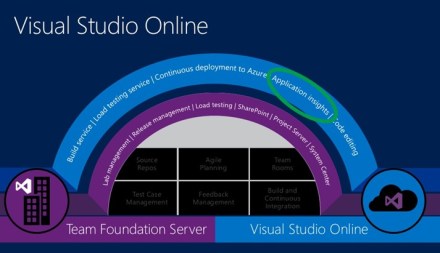
Visual Studio Online
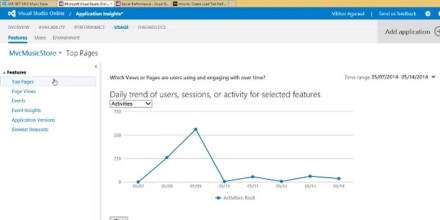
- Application Insights

Application Insights
-
360 degree view of your application
- Available – is application available, e.g. from various locations
- Performing – under load conditions
- Succeeding – usage dashboards; what are usage metrics, data
Demo – Using Application Insights along with Load Testing
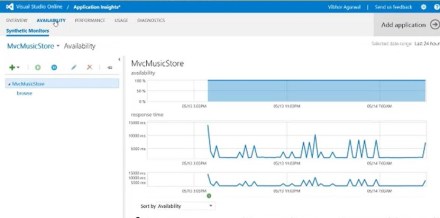
- Under Load Test | Run Settings, right-click Applications, Get Performance Data
- Can look at various Performance Counters for your application—right in Visual Studio IDE
- Can then export to Excel report, correlate
- In Visual Studio Online, lots of graphs, showing metrics on your application
- Can use webtest to test availability for long time period
- Using load testing and Visual Studio Online to get good analytics
-
Can look at top slowest pages
- Dbl-click into specific events; will jump back to Visual Studio and show you location of problem (in VSO)


Q: Can you manage specific tests up in the cloud? View for Test Management in Visual Studio Online?
- Not really well represented now, but something that we have planned
Q: Do I need Visual Studio Ultimate?
- Yes
Q: Is there any way to automatically schedule and then auto compare against various thresholds?
- Will get to this (future things)
Q: If I run a web test that’s reading/writing to database on-premise, how will that work when running in cloud
- Cloud test won’t be able to handle this
- Will have to do SQL Azure storage, rather than on-premise
Upcoming features
- Customer counters from Application Insights with load test
-
REST APIs to queue Load Tests (automate/schedule)
- Then have your own logic to compare logic
-
Geo-specific load generation
- Load service today always come from East U.S.
- Coming soon—Europe
-
Richer analysis/reporting
- Excel plug-in, reports
Who can use cloud load testing?
- Ultimate and Visual Studio Online account
- http://aka.ms/loadtfs
- 15,000 user-mins free every month
- Support – vsoloadtest@microsoft.com
TechEd NA 2014 –Building Real-Time Applications with ASP.NET SignalR
TechEd North America 2014, Houston
Building Real-Time Applications with ASP.NET SignalR – Brady Gaster
Day 3, 14 May 2014, 8:30AM-9:45AM (DEV-B416)
Disclaimer: This post contains my own thoughts and notes based on attending TechEd North America 2014 presentations. Some content maps directly to what was originally presented. Other content is paraphrased or represents my own thoughts and opinions and should not be construed as reflecting the opinion of either Microsoft, the presenters or the speakers.
Executive Summary—Sean’s takeaways
- SignalR is a mechanism for real-time communication between web server and client(s)
- You code to abstraction that is unaware of capabilities on either server or clients
- SignalR automatically uses the most appropriate protocol to accomplish real-time
-
Basic idea
- Something happens in one browser (or on server) and you can inform all current web clients immediately
-
In action
- Move rectangle around in one browser and you immediately see it moved in all other browsers
- New Browser Link feature implemented using SignalR
-
Practical applications
- Web Chat, Hit Counter
- Real-Time display of some central data store
Brady Gaster – Program Manager, Azure SDK & Visual Studio Web Tools Publishing, Microsoft

@bradygaster
bradyg@microsoft.com
Main web page for SignalR – www.asp.net/signalr
https://github.com/signalr/signalr
When he first saw SignalR, “everything changed”
- Always open source
Agenda
-
What is SignalR
- After you see it, everything starts looking like a nail
- For real-time HTTP
- Might lose 1/100 messages
- Not for pub-sub with queues—not for durable messaging
- Don’t replace all your REST APIs with SignalR
- Browser Link uses SignalR
- Hub Class & jQuery Plugin
- SignalR and AngularJS
- SignalR .NET Client
- Calling SignalR Hub methods on the server
- Authorization with SignalR
- Scaling SignalR in web farms
- Self-hosting SignalR using OWIN
SignalR is an abstraction that intelligently decides how to enable real-time over HTTP
- But HTTP is stateless protocol, not really designed for real-time
- You write to an abstraction
Demo – SignalR in action – SignalR Hub and jQuery plugin
- New project, ASP.NET Web app
- HitCounter app
-
Install NuGet pkg – Manage NuGet, “Microsoft ASP.NET SignalR”
- If you want SignalR in web app
- .NET Client – for server-side
-
Readme.txt shows up
- Uses Owin, hosted in Owin, no global.asax stuff
- “Map your hubs”
-
Add file – “OWIN Startup class”
- App.MapSignalR(); — how to route request to hub
-
Add | SignalR Hub Class
- HitCounterHub : Hub
- HubName “hitCounter”
-
Public method RecordHit
- Add to hit count
- this.Clients.All (or Caller, or Others)
- .onHitRecorded
- Hub/Spoke mode
- “Once I learned how to use SignalR, dynamic made a lot more sense”
-
Client-side web page
- Add in jQuery, jQuery.signalR
-
Javascript, function
- Create connection with $.hubConnection
- createHubProxy(‘hitCounter’)
- hub.on(‘onHitRecorded’) => callback for when hub calls this method
- Define function that updates counter ** scode 8:49 **
- Start connection and then invoke method on hub
- SignalR allows sending message out of the client
Demo – Know when clients disconnect
- In Hub class, define OnDisconnected
- Server will know when something disconnected
SignalR on old-school servers & clients
- Old-school—polling
- SignalR will actually do polling on older browsers that don’t support newer constructs that allow event handling
- HTML Client starts up, asks server if it can do real-time, web sockets
SignalR built almost entirely on async, so won’t block threads back to server
- E.g. stress testing team/tool
- SignalR, first thing that fell down was the network card
Demo – Move Shape
- Moving shape in one browser, you see it move in all browsers
- URL shows “foreverFrame” in URL
- SignalR figured out best mechanism
-
Then enable web sockets
- Now no foreverFrame in URL, but using web sockets
Demo – SignalR with Angular
- jQuery and Angular play well together
- Trace hub – no code
- Connect trace hub to listener
- Create Angular factory, signalRService
- Client dumps out trace messages as 2nd browser hits pages
Demo – Using SignalR’s Native .NET Client – MoveShape with Kinect
- Daemon on server, pulls in SignalR.Client
- JavaScript and .NET clients have parity
- HubConnection created on server
- Console app that patches Kinect into SignalR on the server
- Moves shape with his hand
Demo – Calling a SignalR Hub from the Server
- Real-time location tracking
- As people connect, pins show up on the map in real-time
- As people hit site, it’s calling server to add location info
- GetHubContext<MappingHub> – gives instance of sub back to client, so that he can call methods on it
Demo – Authorization with SignalR
- You’ll generally want to authorize clients
- Server calls client to say “hello”
- Put Authorize attribute on hub—can’t use hub unless logged in
- You only want to let people use hub if they are authorized
Hubs are server-bound, so you’ll need to use a backplane if you’re running a web farm
- E.g. if you’re running multiple instances on Azure
How do Backplanes Work?
- By default, messages back out to client only go to clients on that server
-
Backplane
- Redis or SQL
- Client requests go all the way to backplane, then out to all web servers

Demo – Using a SignalR Backplane – Chat App
- In Startup, SetupScaleOut
- DependencyResolver.UseSqlServer
- Same site hosted on two instances of IIS
- Enable backplane, hit different servers from different browsers
- Now messages show up in both browsers
Demo – Self-Hosting SignalR Using OWIN
- Bring OWIN self-hosting and SignalR self-hosting (NuGet packets)
- Host in .exe
- SignalR.SelfHost package
-
app.UseCors (authorization)
- Prior to MapSignalR
TechEd NA 2014 – Native Mobile Application Development using Xamarin
TechEd North America 2014, Houston
Native Mobile Application Development for iOS, Android, and Windows in C# and Visual Studio Using Xamarin – Anuj Bhatia
Day 2, 13 May 2014, 5:00PM-6:15PM (DEV-B221)
Disclaimer: This post contains my own thoughts and notes based on attending TechEd North America 2014 presentations. Some content maps directly to what was originally presented. Other content is paraphrased or represents my own thoughts and opinions and should not be construed as reflecting the opinion of either Microsoft, the presenters or the speakers.
Executive Summary—Sean’s takeaways
-
The case for native apps built using Xamarin
- Native UI for rich experience
- Native performance
- C# on the client, leverage existing .NET skills
- Huge % of shared code across platforms
- Working directly in Visual Studio
- Universal Apps – single solution, cross platform
- Sharing code with either Shared Source or Portable Class Libraries
- Component Store – lots of 3rd party components, easy one-click install/use
- Xamarin Test Cloud – test simultaneously on hundreds of devices
Anuj Bhatia – Enterprise Account Manager, Xamarin

Premise of Xamarin story
- How do we turn you (Microsoft dev) into a mobile developer?
People Expect Great Experiences
- First experience for people are things like Facebook and Twitter—great experiences
- Attention to detail
What’s Driving Mobile?
-
Engagement on mobile devices—how are they engaged?
- 86% apps / 14% browser
- We’ve come to expect great experiences

Facebook HTML5 app (hybrid)
- Horrible ratings in app store for HTML version

Facebook then did true native app
- Clearly a better experience for everybody (judging from the app store ratings)
- Meeting (or exceeding) people’s expectations

Xamarin growth – 600,000 registered developers
- Lots of enterprise customers
Xamarin Studio + Visual Studio
- Build native apps on iOS, Android using C#
- Reach 2.6 Billion devices
- Build fully native apps
- Go mobile overnight—leverage existing skillsets, e.g. .NET, C#
- Accelerate development—code sharing, component store
- Component Store—easy to add functionality
- Securely connect enterprise data—easy to connect to back-end systems
Could do “Write Once, Run Anywhere” approach
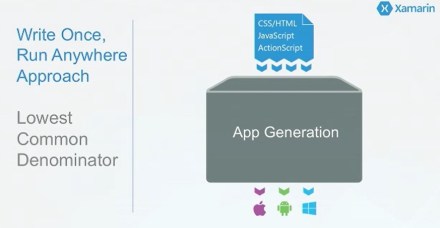
- Lowest common denominator
- Not good for scaling

How Xamarin Works
- Native UI
- Native performance

C#, Native Apps, No Compromises
Demo – Build Native iOS App with C#
Demo
- Running sample app on iOS
- Some simple animations: slow zoom on image, and Add to Basket animation
- Mac with Build Host connection to PC
- F# build scripts
-
Shared source project (i.e. for universal app)
- Back-end services connecting to Azure
- Extension methods
- Models – huge benefit, not having to rewrite code
- Authentication client
-
Authentication
- Oauth2Authenticator – from Xamarin?
- Automatically shows login screen
- Filling out form, then “Place Order” click
Azure
- Using Azure Mobile Service client service library
Native UI
- Designer in Visual Studio
- Add from Toolbox
Sharing Code Across Platforms
Universal Apps
-
Universal Apps
- Easily share code between platforms
- VS 2013 in beta
- Soon – Xamarin Studio on Mac
- Shared Source
Portable Class Libraries
-
Pure PCL
- Limits expressiveness, but easy to build
- Requires interfaces/plugs to work properly
- Vs. shared source
- Can pick targets – just platforms that you want
-
Xamarin moving entirely to PCL
- Profile 78 is favorite
- System.Drawing, moving to new platforms
- In progress
Component Store
- >150 components
- Click on component, add to App, package managed for you, everything automatic
- Charting controls, et al
Xamarin Test Cloud
- Developers end up testing apps for mobile
-
Find bugs before your users do
- Start immediately
- Hundreds of devices – target hundreds of real devices (like Azure, for smartphones)
- Continuous integration – integrate with your ALM (e.g. TFS)
- Beautiful reports – great visual reporting
- Test for fragmentation –
-
Object-based UI testing – test entire app, from UI down, using object-level UI testing
- Don’t hard-code screen coordinates !
- Too many device geometries
Automatically test device on hundreds of mobile devices
The Ideal Automated UI Testing Solution
- Maximum market coverage with lowest coverage
- Tests on real devices – from UI down
- Resilient to UI changes
- Continuous integration processes
- Beautiful dashboards and detailed analytics
Real devices
- Same as end users—no jail-breaking
-
Test from UI down
- User interactions
- Bugs & Crashes
- Memory & performance
Resilient to UI Changes
- Object-level user interface testing
- Tests adapt as user interface changes
Support for continuous integration
- Run tests directly from TFS, for example
Beautiful Xamarin Test Cloud UI
- Cloud environment to allow testing on multiple real devices
- Step through test code
Rdio demo
- Simultaneously see app running on multiple devices—all on one screen
- This is amazing
Xamarin University
- Live delivery
Xamarin Certifications
- iOS, Android, and Cross
TechEd NA 2014 – What’s New in Mobile Services and Notification Hubs
TechEd North America 2014, Houston
What’s New in Mobile Services and Notification Hubs – Elio Damaggio, Miranda Luna
Day 2, 13 May 2014, 3:15PM-4:30PM (DEV-B330)
Disclaimer: This post contains my own thoughts and notes based on attending TechEd North America 2014 presentations. Some content maps directly to what was originally presented. Other content is paraphrased or represents my own thoughts and opinions and should not be construed as reflecting the opinion of either Microsoft, the presenters or the speakers.
Executive Summary—Sean’s takeaways
-
Mobile Services is turnkey back-end service for mobile apps
- Adds features that you don’t need to write yourself
- Microsoft manages/runs/monitors back-end service
-
Lots of new stuff in Mobile Services
- Offline sync, push with Notification Hubs, etc.
-
Offline sync – for apps that are sometimes connected
- Easily sync with Push/Pull paradigm
- Hybrid Connections allow mobile app to connect to on-premise resource that has static IP
-
Push notifications in Mobile Services now use Notification Hubs
- High volume, low latency
- Use Push to silently sync app
Miranda Luna, Product Manager, Azure Mobile Team, Microsoft – @Mlunes90

Agenda
- Mobile Services Updates
- Notification Hubs Updates
- Questions & Resources
Mobile Services Investment Areas
-
What’s New
- .NET backend – Web API on server
- Heterogeneous data
- Hybrid connections – between on-prem and Azure
- Offline sync – occasionally-connected scenarios
- Xamarin
- AAD Authentication – Azure Active Directory
- Visual Studio – tighter integration
- API Management – publishing/managing access to API
- Notification Hubs – easier now to achieve high volume, low latency
- Sencha
Azure Active Directory
- Extend line-of-business to mobile
- Adds notion of AD user in Mobile Services
- Enable applications built around organizational structures
Active Directory Authentication Library (ADAL)
- Enables single sign-on
Basic ADAL + Mobile Services Flow
- Access Token / Refresh Token
Access resources on behalf of the user
- Mobile Service passes Access Token to AAD along with requested resource URI
Mobile Services .NET
- Easy backend
- Logic via .NET Web API
- Turn-key Mobile Backend Capabilities
- Local debugging
- Flexible data model
-
Client SDKs for major platforms
- iOS, Android, Windows, WinPhone, Xamarin, PhoneGap, Sencha
- Integration with on-premise systems
- We Manage/Run/Monitor your backend for you
Diagram showing data flow for Mobile Services – Value Add
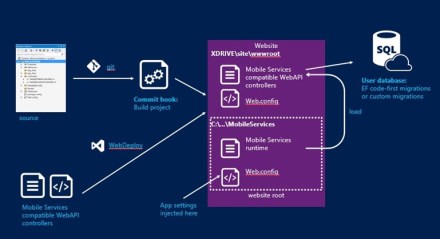
- Service the runtime without restarting your app
- Can inject strings into app.config

New data model – Green field
- DataManager – DTO – Entity for SQL

Existing data model – Brown field
- DataManager – DTO / AutoMapper / Model
- Maps to existing database

Offline support
- Applications that are occasionally connected
- Conflict resolution – users
- Explicit Push/Pull to/from Mobile Service
- TableController – with optimistic concurrency

Offline support
- Store table operations in local data store
- SQL-lite out of the box
- Can use what’s out of the box or roll your own
Offline Methods
- PushAsync – on entire context
-
PullAsync – pull all or a subset of items from remote
- Pull triggers a push, for data inconsistency
-
PurgeAsync
- Clear local cache to update data which app no longer needs
- Purge triggers a push
Handling Offline Conflicts – code snippet
Hybrid Connections
- Fastest way to consume on-premises resources in Mobile Services app
- Connect to any on-premises resource that uses static TCP port
- BizTalk Services hybrid connections

API Management
- Mobile Services, Web Sites – Build & Host
-
API Management – Publish & Manage
- Acquisition – “Epiphany”
API Management diagram
- Admin portal – where you set policies, etc.
- Developer portal

API Management Features
- ADAPT
- EXPOSE – discovery
- PROTECT – authorization, quotas, rate limits
- UNDERSTAND – usage, health, latency, activity, trends
- MANAGE – lifecycle, versioning, monitoring
Elio Damaggio, Product Manager, Azure Mobile, Microsoft
@ElioDamaggio

Push Notifications
Notification Hubs – Azure hub that deals specifically with Push Notification
What’s New
- Kindle support
- Tag expressions
- Visual Studio integration – send debug notifications
- Mobile Services integration
- New push-based pricing – based on # pushes
- Build registration management APIs
- Xamarin
Push Notifications
- Push 101
- Use Notification Hubs ..
Push 101
Mobile push is everywhere
- Toasts, etc. in notification center
- E.g. breaking news, SMS replacement
- Healthcare LOB, e.g. prescription reminders
- Travel, etc.
Push notification lifecycle
-
Registration at app launch
- Retrieve current channel
- App updates handled in back-end
-
Sending Notification
- App back-end send notification to PNS (Platform Notification Service)
- PNS pushes notification to the app on the device
-
Maintenance
- Delete expired handles when PNS rejects them (tokens expire)

Challenges of push notifications
-
Platform dependency
- Different communication protocols
- Different presentation formats and caps
-
Routing
- PNS provides way to send message to device/channel
- Notifications targeted at users or interest groups
- App back-end has to maintain registry associating device handle to interest groups/users
-
Scale
- App back-end has to store handles for each device – high storage and VM costs
- Broadcast to millions of devices with low latency requires parallelization
Advantages of using Notification Hubs
-
Cross-platform
- REST-based
- Support many client platforms
-
No need to store device information in the app back-end
- Notification Hub does this
-
Routing and interest groups
- Target individual users and large interest groups using tags
- Free form, can use them for user IDs or for interest groups
- From single user/device to big groups
-
Personalization and localization
- Keep back-end free of presentation concerns like localization and user prefs using templates
-
Broadcast at scale, multicast, unicast
- Push notifications to multiple devices with single call
-
Telemetry
- Through portal or APIs
Using Notification Hubs
-
One-time setup
- Create Notification Hub
-
Register
- Client app gets handle from PNS
- App updates registration

Some snippets
- Register and Send
Tags
-
Tags as interest groups
- When device registers, it specifies a set of tags
-
You can use tags for
- Interest groups
- Tag devices with user id
- No need to pre-create
Tag expressions
- E.g. “all my group except me”
- OR, AND, NOT, etc.
- Send notifications at specific times, or to time zones
- Versions and platforms
Case Studies
-
Bing apps
- All use Notification Hubs to power their notifications
- 10s of millions of devices
- 3 million notifications/day
- <2 minutes to deliver
-
Sochi 2014
- 100s of interest groups (countries, disciplines, athletes)
- Localized notifications
- 3+ million devices
- 150+ million notifications, over 2 weeks
Notification Hubs & Mobile Services
New push engine for Mobile Services
- Based on Notification Hubs (powered by)
-
No more Channels table
- Simple two steps process to push notifications, no data handling
- 1 Unit of Notification Hubs included for free
- Node.js and .NET (back-ends)
From Mobile Services
- Register and Push
Secure tags for push to users
- Cases when Push used to enhance responsiveness of app
Register from your back-end
-
When tags have to be secured
- E.g. userId for tag
- App back-end can authenticate user before registering the device
- Mobile app can’t connect notification hub directly
-
When back-end has to modify tags
- Tags might depend not on user prefs, but on other global things
- Back-end has access to add/remove tags from what device sends
Registering from the back-end
-
Identify your device
- Keep long-living NH registration ids in device storage
-
Register
- First time only, on app start – get registration id from hub, store in local storage
- CreateOrUpdate device registration (every app start)
- Back-end can verify and/or add tags (e.g. performing authentication)
-
Notes
- Nothing stored in app back-end, not doing device management
- Don’t use device SDK – will create multiple things

Back-end driven tag updates
-
Use tag to identify user
- Back-end refers to users and not devices
- Register devices with tag like userid
-
Back-end updates tags
- Retrieve device registration by userid
-
Note
- No device information in back-end
- Back-end only refers to users
Very easy with Mobile Services (.NET)
- Registrations already through through back-end
- Just login the user in the device
- Register from device (RegisterNativeAsync)
-
Implement registration callback to inject user tag
- InotificationHandler.Register
-
Push to user
- SendAsync to user ID
Secure Push & Rich Push
-
Deliver content directly from back-end
- Rich media
- Retrieve content securely from BE
- Will look the same to user, but data won’t go through cloud service
-
Notes
- Platform dependent
- Secure push has to use long-lived auth token on app
- App pulls data directly from back-end, but not yet showing anything to user

Push to Sync
-
Updates app state
- Does not show message to the user
-
Example: music app
- User changes playlist on desktop
- Back-end send push-to-sync notifications to user’s devices
- Even w/o opening app
- User finds the new song already on their phone
-
User this feature with Offline feature of Mobile Services – local store
- So everything just already right there
- “This is what people expect from mobile apps” – no waiting
-
Platform-dependent
- Windows, et al
Telemetry
- Portal dashboard, programmatic access for all PNS outcomes
-
Security
- Role-based security available to restrict access to hub for various rights
-
Scale
- Guidance for high scale depends on specific scenarios
- <5 million devices and <5 million pushes per day can just use single hub – no problem
Pricing
- $20/unit/mo (“unit” is NH)
- 500,000 pushes per unit per month
Miranda again
Azure Mobile
Microsoft is making a massive investment to provide an end-to-end story for cross-platform mobile app development and management
TechEd NA 2014 – Domain-Driven Design
TechEd North America 2014, Houston
How You Can Architect and Develop Enterprise Mission-Critical Applications with Domain-Driven Design and .NET – Vaughn Vernon
Day 2, 13 May 2014, 1:30PM-2:45PM (DEV-B326)
Disclaimer: This post contains my own thoughts and notes based on attending TechEd North America 2014 presentations. Some content maps directly to what was originally presented. Other content is paraphrased or represents my own thoughts and opinions and should not be construed as reflecting the opinion of either Microsoft, the presenters or the speakers.
Executive Summary—Sean’s takeaways
-
Basic explanation of domain-driven design
- Breaking model into sub-parts to reduce complexity
- Each part in a different context, possibly using different language to talk about its elements
- Presented at a very high subjective level, typical of academic papers about domain modeling
- Nothing concrete presented
- Nothing relating to doing data or domain modeling in .NET presented
Vaughn Vernon
vvernon@shiftmethod.com
@VaughnVernon
http://VaughnVernon.co
Overview
- Why enterprise apps need DDD
- Mental Model – Domain experts and ubiquitous language
-
Strategic Design First, Tactical Modeling Second
- Aggregate
SCRUM-based application management
- Product, BacklogItem, Release, Sprint
- BacklogItem has Task, which has EstimationLogEntry
- Release – ScheduledBacklogItem
- Sprint – CommittedBacklogItem
Additional items in DDD application lifecycle model
- Forums, Discussions
- Calendars
- Tenants, Users
- Account info, etc.
- Team has structure, product owner, members, etc.
What are we really modeling here?
- Time management, project management?
- What is core?
-
Story of architects with huge UML diagram
- Do you really need knowledge of this in order to develop enterprise software?
-
Easier way?
- Yes, DDD
- DDD isn’t necessarily easy
- But DDD gives you tools to help you divide and conquer
Goal – Avoid hugely complex model
This Is DDD
- Ubiquitous Language – describing elements relationship
-
Bounded Context – sets boundaries for what you model
- How does it map to what I do every day?
- Bounded context is just—everything you need for your application
- Think of Visual Studio solution as the bounded context. (But avoid creating dozens of projects)
- Think of it as – what doesn’t belong?
- Insight bounded context, we are modeling single ubiquitous language
Linking contexts
- Object in Bounded Context might be single rectangle that just references a different bounded context
The gap
- Between business analyst and developer
- Analyst has a very different idea of what the application is about
Main goal of DDD
- Unify mental models
- We use ubiquitous language to allow business analyst to talk to developer
Business Value
- Story of customer where key domain expert wouldn’t attend the meeting
- Asked the guy to just sit there for 30 minutes
- Guy has “a-ha” moment, realizing need for DDD
Is It a Language?
- Developers naturally draw boxes and lines and call it a language
-
Volunteer—describe your day only using nouns
- We could make sense of this
- But language is far more than that
- Example sentence for SCRUM, e.g. “Backlog item will be committed to a Spring”
- But quickly, we think of other constraints—who does something, etc.
Back to original drawing of Model, pick core Domain (subset of entities)
- Pick subset of domain that makes sense
DDD Rule: Use Bounded Context to separate models by language
SaaSOvation
- Fictional company, developing an agile project management product
Tenant and Multi-Tenancy
Early problem – too many connections
- User and Permission connects to everything
- Developers would say—move access management outside the bounding context
-
Key—the language doesn’t match
- E.g. For Forum, talking about Moderators, Authors – not User and Permission
Bounded Contexts
- Show original schema now broken up into bounding contexts
- Users/Roles not in core context
- Can think of having a different Visual Studio solution for each bounded contexts
- And domain model in each
Brown-field development
- Legacy system
- “It’s just a lot of brown” – what a silly thing to say
- Glimmer of hope, green is growing, next to the brown – ok, that was even sillier
Abstract and Encapsulate
- Brown is spread between the green rows
- Brown is in the barn over there, away from the green crops – yikes
Context Mapping
- How does core context get its notion of entities in other contexts
- It does “context mapping”
-
Several different context mapping approaches
- E.g. Anti-corruption layer
Architecture diagram
- Ports and adapters
- Domain model at core, Application around it
- Adapters on the outside
- Ports are interfaces to outside entities
- Adapters allow data to be brought in or out
Code snippet showing saveCustomer function and critique
- This is not object-oriented
- “This is a huge problem”
Second code snippet, more object-oriented
- Reorganized code, with separate properties
- These methods (maybe) better fit the domain logic
Aggregates
- Aggregate is a special kind of entity
TechEd NA 2014 – Data Privacy and Protection in the Cloud
TechEd North America 2014, Houston
Data Privacy and Protection in the Cloud– A.J. Schwab, Jules Cohen, Sarah Fender
Day 2, 13 May 2014, 10:15AM-11:30AM (OFC-B233)
Disclaimer: This post contains my own thoughts and notes based on attending TechEd North America 2014 presentations. Some content maps directly to what was originally presented. Other content is paraphrased or represents my own thoughts and opinions and should not be construed as reflecting the opinion of either Microsoft, the presenters or the speakers.
Executive Summary—Sean’s takeaways
-
The issue of Trust is important whenever you talk about moving data to cloud
- Need to convince users that data will be secure, private
- Data Privacy is key goal for Microsoft
- Lots of tools for controlling access to data, e.g. identity management
-
Security at many layers, e.g. physical, network, etc.
- Microsoft pours lots of resources into security for the layers that they control
Jules Cohen – Trustworthy Computing group, Microsoft
Three major buckets, when thinking about moving data to the cloud
- Innovation properties – will cloud let me do what I want?
- Economics – what is TCO?
- Trust
First two buckets are relatively un-complicated
- Trust – harder to evaluate, more visceral
- Privacy and data protection are part of trust
Trust
- Microsoft has made significant investments
- If you already trust the cloud, we’re going to improve level of trust
Changing Data Protection concerns to opportunities
- You already trust people within your organization
- In cloud world, some of these functions move off premises
-
Ref: Barriers to Cloud Adoption study, ComScore, Sept-2013
- 60% – security is barrier to cloud adoption
- 45% – concerned about data protection (privacy)
Definitions
- Can’t have privacy without security
-
Security is a pre-req
- Do the right people have access to the data?
-
Once data is in the right hands, we can talk about privacy
- Do people who have access to data use it for the right things?
Perceptions after migration to cloud
- 94% – said they experienced security that they didn’t have on-premise
- 62% – said privacy protection increased after moving to cloud

Microsoft’s approach to data protection
-
1 – Design for privacy
- Corporate privacy policies, disclosures
- Trustworthy Computing formed in 2002, after memo from Bill Gates—privacy, security, reliability
-
2 – Built-in features
- Customers can use these features to protect their data
-
3 – Protect data in operations
- Operating services – Microsoft committed to data protection in service operations
- Microsoft complies with various standards, help customers comply with those standards
- 4 – Provide transparency and choice
Privacy governance – Program
- Design for Privacy
- People – Employee several hundred people focused on privacy
-
Process
- Internal standards
- Rules maintained by Trustworthy Computing
-
Technology
- Use tools to support people and processes
- Look for vulnerabilities
Privacy government – Commitments
- Microsoft services meet highest standards in EU (Article 29)
- First (and only) service provider to get this approval
Sarah Fender – Director of Product Marketing, Windows Azure, Microsoft – Built-in Features

Data Protections in Azure
- Data location – can choose to run in a single region, or multiple regions
-
Redundancy & Backup
- 3 copies of data, within region
- Can also do geo-redundant storage, to different region
- E.g. Create new storage account, pick region
-
Manage identities and access to cloud applications
- Centrally manage user accounts in cloud
- Enable single sign-on across Microsoft online service and other cloud applications
- Extend/synchronize on-premise to cloud – Active Directory synching to Azure
-
Monitor and protect access to enterprise apps
- Passwords stored in encrypted hashes
- Security reporting that tracks inconsistent access patterns – e.g. user accessing service from distant geo-locations
- Step up to Multi-Factor Authentication – e.g. text message or e-mail with secret code


Data encryption
- VMs – encrypted disk using BitLocker
- Can encrypt data at rest
- SQL TDE
- Applications – RMS SDK
- Storage – .NET Crypto, BitLocker (import/export), StorSimple w/AES 256
Data protections in Office 365
- Encrypt data in motion and also at rest

A.J. Schwab – Senior Privacy Architect, Office 365, Microsoft – Protect Data in Operations
Value proposition of running in cloud
- Less work—patching, reacting to problems
Defense in depth strategy
-
Physical
- Who comes into facility?
- What media goes in/out?
- If bad guy can stand in front of your computer, it’s not your computer anymore
-
Network
- Looking for anomalous traffic
- Packet penetration testing
- Watching logs
-
Identity & Access Management
- Internal Microsoft authentication policies for internal staff
- Know who people are and who gets access from within Microsoft
- Just-in-time access – when someone wants access to customer information, it’s an exception
-
Host Security
- Patching, managing OS on host
-
Application
- Make sure that application is running in secure configuration
-
Data
- “Data is everything” – data is money
- Big part of the focus, protesting the data
- 24x7x365 incident response

Cloud security must be equal or better to on-premise
Protect data in operations
-
Data isolation
- Very important to customers
- Only privileged user has access to data
-
Limited Access
- MFA for service access
- Auditing of operator access/actions
- Zero standing permissions in the service
-
Automatic Microsoft staff account deletion
- To make sure that things follow policies, everything is automated
-
Staff background checks, training
- Can Microsoft trust the people that it hires?
Approach to Compliance
- Industry standards and regulations
- Controls Framework & Predictable audit schedule
- Certification and Attestations
Customer Stories – Kindred Healthcare
-
Background
- Big healthcare provider
- Mobile service, ensure data privacy
-
Solution
- Office 365 Exchange, SharePoint, Lync
- Met security and privacy needs
Shared Protection Responsibility
- IaaS – cloud customer has most of the responsibility
- SaaS – cloud provider assume many of the responsibilities

Provide transparency and choice
- Trust Center web page – for Office 365, and for Azure
- Lots of documentation online
Summary
- 1 – Design for privacy
- 2 – Built-in features
- 3 – Protect data in operations
- 4 – Provide transparency and choice
Questions and Answers
Q: Sharepoint, is data encrypted while data is at rest? Is BitLocker available? Or third-party products?
- Microsoft has committed to goal of having all data in transit and all data at rest is encrypted
- By the end of 2014, Sharepoint data at rest will be fully encrypted
- But law enforcement has generally been satisfied with current security and privacy policies
Q: What tools do you have to assist attorneys?
- See materials in the Trust Center
- Microsoft constantly talking to lawyers, to stay on top of current regulations
- So probably collateral materials that are required are there
- We do have Controls Framework that maps what Microsoft does and maps it to specific regulatory requirements
- Thinking about how to package this up and present it for customers
Q: How to evaluate tools based on legal requirements?
- We (Microsoft) can’t give you (customer) legal advice. But we can show you how tools map to particular requirements
- Can do this in the context of certain verticals, e.g. Banking
If you have questions, stop by the Security & Compliance station in the Azure booth
TechEd NA 2014 – Microsoft Azure Security and Compliance Overview
TechEd North America 2014, Houston
Microsoft Azure Security and Compliance Overview– Lori Woehler
Day 2, 13 May 2014, 8:30AM-9:45AM (DCIM-B221)
Disclaimer: This post contains my own thoughts and notes based on attending TechEd North America 2014 presentations. Some content maps directly to what was originally presented. Other content is paraphrased or represents my own thoughts and opinions and should not be construed as reflecting the opinion of either Microsoft, the presenters or the speakers.
Executive Summary—Sean’s takeaways
-
Microsoft has done a lot of work to support various security standards
- In some cases, you can use their documents as part of your own demonstration of compliance
- Data can be more secure in cloud, given the attention payed to security
-
Customer has greater responsibilities for demonstrating compliance when using IaaS (Infrastructure)
- Fewer responsibilities when using PaaS (Platform)—just application and data
- Potentially more compliance issues in EU and Asia, or in certain verticals (e.g. Healthcare)
- Good compliance cheat sheet that lists typical steps to take
Lori Woehler – Principal Group Program Manager, Microsoft. CISSP, CISA
LoriWo@Microsoft.com
At Microsoft since 2002
On Azure team for 18 months

Goals
- Understand how Azure security/compliance helps you to meet obligations
- Define Azure S&C boundaries and responsibilities
- Info on new resources and approaches
Other sessions
- B214 Azure Architectural Patterns
- B387 Data Protection in Microsoft Azure
- B386 MarkRu on Cloud Computing
- B306 Public Cloud Security
Track resources
- http://Azure.microsoft.com/en-us/support/trust-center/
- Security Best Practices for enveloping Azure Solutions
- Windows Azure Security Technical Insights
-
Audit Reports, Certifications and Attestations
- Includes all details related to audits
- Can just hand off the stack of paper to outside auditors
Other resources
- Channel 9 – Sessions on Demand – http://channel9.msdn.com/Events/TechEd
- Learning – etc.
Technology trends: driving cloud adoption
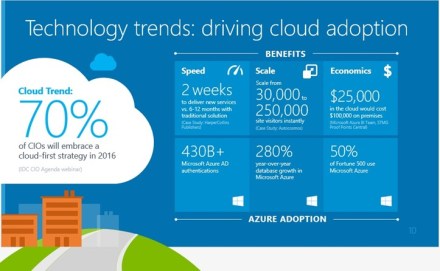
- 70% of CIOs will embrace cloud-first in 2016
-
Benefits of cloud-first
- Much faster to deliver solution
- Scale instantly
- Cheaper, e.g. $25k in cloud would cost $100k on premises

Cloud innovation
-
Pre-adoption concerns (barriers to adoption)
- 60% – security is concern
- 45% – worried about losing control of data
- Security, Privacy, Compliance

Cloud innovation
-
Benefits realized
- 94% – new security benefits
- 62% – privacy protection increased by moving to cloud

Trustworthy foundation timeline
- 2003 – Trustworthy Computing Initiative
- Digital Crimes Unit
- ISO/IEC 27001:2005
- SOC 1
- UK G-Cloud Level 2
- HIPAA/HITECH
- SOC 2
- CSA Cloud Controls Matrix
- FedRAMP/FISMA
- PCI DSS Level 1
Azure stats
- 20+ data centers
- Security Centers of Excellence – combat evolving threats
-
Digital Crimes Unit – legal/technical expertise, disrupt the way cybercriminals operate
- Info on botnets
- Bing team publishes blacklist and API to access it
- Compliance Standards – alphabet soup of standards, audits, certs
Microsoft Azure – Unified platform for modern business
-
Four pillars
- Compute
- Data Services
- App Services
- Network Services
- Global Physical Infrastructure

Simplified compliance
-
Information security standards
- Microsoft interprets, understands
-
Effective controls
- Map to controls, e.g. SOC 1 type 2, SOC 2 Type 2
- Evaluate both design and effectiveness of controls
-
Government & industry certifications
- Ease of audit and oversight
Security compliance strategy
- Security goals in context of industry requirements
- Security analytics – detect threats and respond
- Ensure compliance for high bar of certifications and accreditations
- Continual monitoring, test, audit

Certifications and Programs
- Slide shows summary of various certifications
-
ISO/IEC 27001 – broadly accepted outside U.S.
- Now supporting “Revision 3” under 27001
-
SOC 1, SOC2 – for customers who need financial reporting
- Five different areas: Security, Privacy, Confidentiality, Integrity, Availability
- SSAE 16 / ISAE 3402 – accounting standard
- For IaaS, compliance information is more detailed
-
Increasing focus on government certification and attestation
- FedRAMP/FISMA

Contractual commitments
-
EU Data Privacy approval
- Only Microsoft approved from EU Article 29
-
Broad contractual scope
- Contractual commitments for HIPAA et al

Shared responsibility
- Where is customer responsible, vs. Microsoft
-
Customer
- Manages control of data in PaaS
- Going with PaaS reduces customer responsibility to just Applications and Data
- Under PaaS, no customer responsibility for Runtime, Middleware, O/S
- SaaS – no customer responsibility

PaaS Customers – important things to know
Paas Customer Responsibilities
-
Access Control – define security groups and security set
- Logs to demonstrate that access is due to customer granted permission
-
Data Protection
-
Geo-location – be careful about setting yourself up for potential non-compliance
- There are obligations in Europe and Asia
- You can check for access from outside your geo-location boundaries; then potentially restrict access
-
Data Classification and Handling
- Deciding what data should go up to the cloud
- Microsoft has published guides to classifying data (schemas)
- Cloud Controls Matrix – show where you have programmatic obligation
- Privacy and Data Regulatory Compliance
-
- Logging & Monitoring Access and Data Protection
- ISMS Programmatic Controls
-
Certifications, Accreditations and Audits
- Can I just use Microsoft’s audit results are our own? No
IaaS Customer Responsibilities
-
Application Security & SDL (Security Development Lifecycle)
- Can test outside of protection
- Role segregation, between operations and development
- E.g. rely on TFS to show process and evidence
-
Access Control – identity management
- Start with access control to Azure environment itself
- Then also access control to guest Oss (or SQL Server)
- Auditors will focus on timing of provisioning/de-provisioning (e.g. remove user when they leave company)
-
Data Protection
- Microsoft demonstrates that data in your environment is not exposed to other customers
- Focuses on HyperV when testing
-
O/S Baselines, Patching, AV, Vulnerability Scanning
- Standard build image in Azure, patched to most recent security update
- Customers should adopt standard patching cadence; matching your on-premise infrastructure
- Configuration and management of SSL settings is responsibility of customer
- Penetration Testing
-
Logging, Monitoring, Incident Response
- Microsoft has limited ability to access your logs and VM images
-
ISMS Programmatic Controls
- Impact of documentation of Standard Operating Procedures—quite cumbersome
- Can start by taking dependency on Azure, in documents that Microsoft have already generated
- But this doesn’t go all of the way
-
Certifications, Accreditations & Audits
- Auditors shouldn’t re-test customers in the areas that Azure already covers
- Documentation that Azure provides should be enough
- White papers in trust center describe how to leverage Microsoft stuff
Compliance cheat sheet
-
Identify your obligations/responsibilities
- E.g. contractual
-
Adopt Standard Control Set
- List of the rules, ties into policies
-
Establish policies and standards
- “Your plan is your shield”
- Criteria against which external auditors will evaluate your environment
- Don’t try to be too broad, trying to cover every possible audit—auditor will apply their own judgment
- Set level of detail listing deliverable and schedule for deliverable
- Then you just demonstrate that you’ve met the policies that you’ve set
-
Document system(s) in scope
- Challenging, if you haven’t implement an asset inventory mechanism
- Auditors will want to see all assets—physical and virtual (e.g. user accounts, etc).
- A significant amount of work
- Log when systems come online and offline (into or out of production)
-
Develop narratives for each control
- Written description of how a control executes
- Ties back to specs for systems
- Auditors will look at spec and then test plan
- Test control design & execution
-
Identify exceptions and issues
- No such thing as perfect
- Document decisions made
- “Qualified report” – auditor’s report that says that vendor is only partly compliant
-
Determine risk exposure
- “Transferring risk” to third party—sometimes reduces your risks, sometimes increases your risks
- Understand both costs and risks
- Story of Singapore government, including keystroke loggers and video cameras, plus person observing live data feed (for traders using financial service)
- Define remediation goals and plans
-
Monitor the system
- And demonstrate to 3rd party that your controls are behaving as expected
-
Report on compliance status
- Not just reporting for checklist
More detailed cheat sheet

Most Frequently Asked Questions
- PCI Compliant? – no
- Can xyz audit Azure? – no
- Can we have your pen test reports? –
- Will you fill out this 500 question survey? –
- Kicked out of the room at this point
TechEd NA 2014 – The Future of Microsoft Azure DevOps: Building, Deploying, Managing, and Monitoring Your Cloud Applications in the New Azure Portal
TechEd North America 2014, Houston
The Future of Microsoft Azure DevOps: Building, Deploying, Managing, and Monitoring Your Cloud Applications in the New Azure Portal – Chandrika Shankarnarayan, Bradley Millington
Day 1, 12 May 2014, 4:45PM-6:00PM (DCIM-B223)
Disclaimer: This post contains my own thoughts and notes based on attending TechEd North America 2014 presentations. Some content maps directly to what was originally presented. Other content is paraphrased or represents my own thoughts and opinions and should not be construed as reflecting the opinion of either Microsoft, the presenters or the speakers.
Executive Summary—Sean’s takeaways
- Gradually doing migration of old portal features to new portal
- New portal organization much better, information organized based on what you need to see
-
Tight integration with Visual Studio Online
- VSO will eventually go away, as it’s subsumed into Azure portal
- With VSO integration, Azure portal includes lots of ALM stuff
- Diagnostics on web sites now a bit easier, with streaming logs, etc.
Chandrika Shankarnarayan – Principal Program Manager Lead, Microsoft

Agenda
- Icebreaker – http://aka.ms/ugca1j
- DevOps lifecycle
- Resource Manager
-
Demos
- New portal, new concepts
- Using VSO to manage dev lifecycle
- Operating a running app
Microsoft Azure
- IaaS, PaaS
- IaaS – VMs, Storage, Networking, CDN
- PaaS – Web, Mobile, Identity, Data, Analystics, Integration, Media, Gaming
DevOps Basics
- Developers
- Code Repository
- Build
- Test
- Deploy to Cloud
- Monitor and Improve

Consistent Management Layer
- Tools – Azure + Command Line + Visual Studio
- Consistent Service Management API
- Resource Manager – compose application of multiple resources, on-premise and in cloud
- Resource provider contract
What does it all mean?
-
Application Lifecycle Container
- Deply/manage application as you see fit
-
Declarative solution for Deployment and Configuration
- Single-click deployment of multiple instantiations of your application
-
Consistent Management Layer
- Same experience whether from portal, command line, or tools
Demo
- Gallery – one-stop for all Azure services, Microsoft or third-party
-
Website + SQL – composite
- Resource Group – set of services
-
Website configuration
- Very nice summary of web hosting plan features
- Lots more tiers
- E.g. Standard Small
-
Database configuration
- Can use existing database
-
Create Team Project
- Name
- Git for source code control
- Account – Visual Studio Online
-
Portal overview
- Can customize the portal
- Can change size of various things
- Can unpin tiles from portal
-
Hubs concept
- Notifications – all of your operations (including API stuff)
-
Billing – lists your accounts – single place to show pricing stuff
- Burn rate for the month
- Cost breakdown, based on resource
- Manage Admins from Billing
-
Open Team Project
- Add User for Team Project – autocomplete if user is in AAD tenant


Bradley Millington – Principal Program Manager, Microsoft

Browse Team projects
- Can pin to dashboard
- Can find web site and pin to start
Drilling into Team Project
- Summary lens – overview of resource
- Quick start – some quick docs on what you can do
- Properties – basic props
-
Code lens
- Source repository (TFS or Git)
-
Build lens
- Build definitions that trigger builds
-
Work lens
- Backlog and work items
- Users lens – manage users
Adding code to repository
- Get clone URL
- Command line, “git remote add ..” and then “git push ..”
-
Back on portal, code shows up – all the git commit history is still there
- Commits – properties, diffs, etc.
- Can browse source code

Continuous deployment between project and the web site
- Can browse from project and look for web site
-
Deployment slots
- Add Slot
- Name
- Slot is just another web site
- In web site, “set up continuous deployment”
- Choose source – e.g. Visual Studio Online
- Choose project
- Choose branch
This created a Build definition
- Every time you check-in code, it builds (and deploys?)
- Resource map shows master web site and staging deployment
- Drill into build – can look at log files, build results
- Same build info that you’d see in Visual Studio
Create work items
- Can just type items and press RETURN
- Can set properties on work items

Users
- Projects backed by Azure Active Directory – so you can really control who gets access
- When yo uadd user to project, they are added to a VSO account
- VSO – unlimited number of private projects
- But 5 free basic users
Scaling of Visual Studio Online account
- Users, paid services, etc. – through VSO portal
Build definition
- Can see deployment
Can look at staging site
- Click Swap to swap it to production
- “Swapping website slots”
Look at Azure portal from perspective of developer that’s been using it for a while
- Can click on Build Definition and look at various builds
- Drill into build that failed – look at details
- Can see compilation problem, get specific error in solution
- Can even edit code (errors not yet highlighted)
- Can then make code changes directly in repository
Or you might see that compilation worked, but tests failed
Visual Studio integration
- Can open up solution, look at build results
- Can fix, then queue new build
Chandrika back again
Day 100 in life of Ops person
-
Look at Resource Group
- Can contain web sites
- Show costs for this resource group
-
Pick website
- Website, SQL database, and associated project
Monitoring
- Graph of HTTP requests
-
Edit query (for graph)
- Add other metrics, change to “Past Hour”
- No 404 errors
- Can set up Alert, track errors, e.g. 404
Client-side analytics
- Mobile device type
- Browser types
- Can look at page load time, by page
Configuration – code snippet
- Just Javascript snippet that you inject into application
Webtest – can ping application from various geographic locations
- For a test, look at average response time, failures, etc.
Can also look at server that you’re hosting on
- CPU percentage for a given day
Can set up Autoscale
- By default, you have a single metric – e.g. CPU percentage
- One Key metric to look at, to see if you need to scale, is HTTP Queue Length
Customization
- Can customize metrics and graphs
- E.g. CPU usage, Memory, and HTTP queue length
- Easy to customize
Troubleshooting – Events
- Azure records every operation that you make in portal
- E.g. Scale Up / Down (e.g. from Autoscale)
- Can drill into these events and look at specific properties
Alerts
- Can set up alert rules for any metrics
- E.g. CPU Percentage
- Specify threshold, condition, period
- Can do E-mail, SMS
Streaming Logs – real-time for troubleshooting
- Diagnostics logs – can configure
- Can see stuff hitting site in real-time
Console connection to web site

Webjobs
- Can’t define in new portal yet – use old portal
- Sometimes gaps between current portal and new portal
Traffic Manager
- Support for hybrid connections
- Can set up in portal
- Create or use existing
- Also available for Mobile Services
Summary
-
Azure Portal Preview + Resource Manager
- Enterprise grade
- Bridges islands of experiences
- Simple, best in class
- Consistent
- Customizable
- Enable discovery, cross-sell and up sell of services
- Provide ecosystem for internal and externa partners
Questions
Q: Merging Visual Studio Online and Azure Portal?
- Yes gradually moving stuff to Azure Portal. But no real roadmap for how this will work
Q: On current portal, timeline of preview portal?
- New portal available in “preview”, not full functionality yet. Will continue to obring more and more services into Preview portal. “Over a period of time”. And data consistency between two portals
Q: Features available in on-premise platform? (Windows Azure Pack)
- All this work will transition to Azure Pack. But timeframe is TBD
Q: Application insights – can you bring info from on-premises instances?
- Yes, goal to be agnostic w/respect to cloud/on-prem. So eventually, yes.
Q: Plan for role-based stuff?
- Resouce Manager integrated with AD, so we’re set up for it. So a possible future ability – define Users/Roles
Q: Analytics – what about perspective for business/marketing people?
- We have some of those scenarios, e.g. in Office 365. Will definitely bring some of those scenarios into this portal. So yes, the experience would be in this same portal. Also looking at dashboards that you customize for certain roles, “custom dashboards” target at specific role, e.g. Marketing.
Q: Where are the metrics coming from (e.g. 404)
- Yes, coming directly from web site back-end (Performance Counter)
Q: Continuous deployment options? ??
- A function of team management features and dashboards targeted at specific groups in team
Q: Additional step to continuously deploy into production?
- Swap to move to production. More likely, you’d have bigger resource group and you want to move a number of items from staging to production. Maybe pull some features from Visual Studio. Also, you can use API layer in Resource Manager to do something like run scripts that do cloning and deployment. One goal of Resource Management is to reliably replicate some of the expected scenarios.
Q: Integration of package management system, e.g. NuGet?
- Great idea, but can’t speak to specific plans.
TechEd NA 2014 – ASP.NET: Building Web Applications Using ASP.NET and Visual Studio
TechEd North America 2014, Houston
ASP.NET: Building Web Applications Using ASP.NET and Visual Studio – Scott Hanselman, Scott Hunter
(Calling themselves — The “Lesser” Scotts, in a very gracious nod to the greatness of Scott Guthrie)
Day 1, 12 May 2014, 3:00PM-4:15PM (DEV-B213)
Disclaimer: This post contains my own thoughts and notes based on attending TechEd North America 2014 presentations. Some content maps directly to what was originally presented. Other content is paraphrased or represents my own thoughts and opinions and should not be construed as reflecting the opinion of either Microsoft, the presenters or the speakers.
Executive Summary—Sean’s takeaways
-
“One ASP.NET” initiative
- Can mix and match technologies
- Don’t have to make the “right” choice when doing File|New
-
In general, lots of great new features in ASP.NET, like:
- New Identity system, with two-factor authentication
- Azure Server Explorer in Visual Studio
- Browser Link, pushing browser-based changes back into Visual Studio
- Async in Entity Framework
-
Coming soon
- Project template support for 3rd party libraries like Angular
Scott Hanselman / Scott Hunter

Hanselman now doing new video podcast – Friday.azure.com – small 10 min podcasts w/devs from Azure team
ASP.NET and Web Tools, Visual Studio 2013.2
ASP.NET vs. Web Tools
- ASP.NET – think of GAC
One ASP.NET
- Sites / Services
-
Sites
- Web Forms
- Web Pages
- Single Page Apps
- MVC
-
Services
- Web API
- SignalR
- All on top of ASP.NET

You don’t have to choose up front (File | New)
- Can add stuff later, e.g. MVC, Web API
- E.g. add MVC controller to Web Forms
MVP program changed
- Old: loudest, wrote most books, blogs
- Now: Can be MVP based solely on open source contributions
Cadence – every 6 mos
Fall 2014 – Focus – Modern Web
- Support for various 3rd party .js libraries
- E.g. jQuery, Angular
- Will support all these within project templates
From Web Tools “Labs”
- Release every 2 mos
- Web Essentials (VS extension)
- Vswebessentials.com
New stuff, Oct 2013
-
General
- New Identity system
- Templates based on Bootstrap **
-
One ASP.NET
- One single project
-
Azure SDK
- Azure Server Explorer – Azure features from within VS
-
Web API
- CORs
- Attribute Routing – brings routing into controller
-
MVC
- Attribute Routing
-
Entity Framework
- Async, Stored Procs, Resiliency
-
Azync – will be faster ** very important, available across sub-systems
- E.g. avoid blocking calls by doing async when doing network access
- User doesn’t know, code doesn’t know
-
Visual Studio
- New HTML Editor
- Live Browser Link + Extensibility
- AngularJS Class Intellisense (and Bootstrap)

May 2014
-
One ASP.NET
- Scaffolding
- Two-factor Auth
- Account lockout, confirmation, reset, et.c
-
SignalR
- Xamarin, No jQuery, Android
-
Web API
- BSON formatter (binary JSON)
- Improved attribute routing
-
MVC
- Better bootstrap scaffolding
-
Entity Framework
- EF Power Tools
- Reverse engineer DB to Code First

Roslyn
- New language features
- Code analysis, custom diagnostics
ASP.NET CodeDOM provider
- Use new features in ASP.NET applications
- Improve startup time for large applications
Azure stack
- Azure Storage
- VMs (IaaS)
- Worker Roles

Web Sites vs. Virtual Machines
- VMs – You manage it – IaaS
- Web Sites – PaaS

Bitly.com/TECHED2014WebTools

TechEd NA 2014 – Building Highly Available and Scalable Applications in Microsoft Azure
TechEd North America 2014, Houston
Building Highly Available and Scalable Applications in Microsoft Azure – Stephen Malone, Narayan Annamalai
Day 1, 12 May 2014, 1:15PM-2:30PM (DEV-B311)
Disclaimer: This post contains my own thoughts and notes based on attending TechEd North America 2014 presentations. Some content maps directly to what was originally presented. Other content is paraphrased or represents my own thoughts and opinions and should not be construed as reflecting the opinion of either Microsoft, the presenters or the speakers.
Executive Summary—Sean’s takeaways
-
Azure Traffic Manager
- Routes to appropriate region, depending on where user is located
- Automatic failover, if region goes down
- Configure things using Powershell
- Can now include non-Azure endpoints in policy
- Use PaaS when you can, IaaS when you have to
- Lots of flexibility when creating/configuring virtual networks
Stephen Malone – Program Manager, Microsoft

Why Microsoft / Azure
- Global footprint
Azure Network Stack
- Network is glue that binds everything together for scale
- Main building blocks that allow you to build scalable, secure services
- Layers: Network services, Core SDN etc.
Azure Traffic Manager
- Intelligent customer routing
-
Load balancing policies (profile types)
- Performance – Direct user to closest service (based on latency)
- Round-robin – Distribute equally
- Failover – Direct to backup service if primary fails (also happens with other policies)
Automated failure detection and re-direction
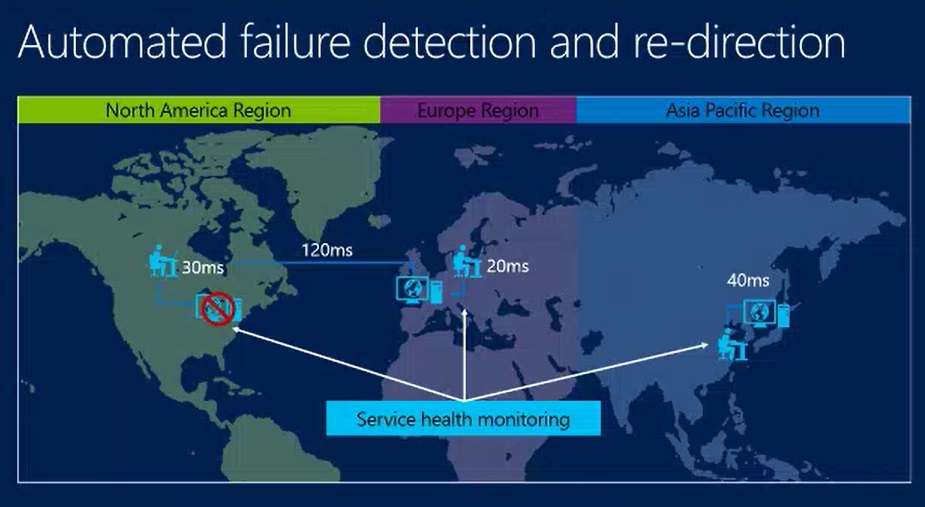
- Users hit servers in their own region
-
Service health monitoring
- If something stops responding
- Azure Traffic Manager automatically detects and re-routes user to “next best” service
How Azure Traffic Manager work?
- DNS based global traffic management
- Traffic Manager profile created with name, routing policy, and health monitoring configuration
- Your domain name
- CNAME to xxx.trafficmanager.net
- Load-balancing, endpoint monitoring
- Service instances (endpoints) added to Traffic Manager …
How it works
- DNS look for web site you need
- Name server for your name indicates that it’s CNAME
- Hits DNS Server for traffic manager, with Policy Engine
- Then to Traffic Manager
E.g. If there are three sites
- Traffic Manager makes use of your particular policy (e.g. pick nearest service)
- Then site picked and IP returned to client
New support for External Endpoints
- Now support for non-Azure endpoints for all traffic manager policies
-
Full support for
- Automated monitoring
- Failure detection
- End-user re-direction
- Include endpoints from different Azure subscriptions in the same policy
-
Add redundancy for your on-premises service using Azure Traffic Manager
- Great way to try out Azure – as backup
-
Include on-premises endpoints as scale units to achieve greater scale
- Or as additional geo locations to improve performance for your end users
-
Enables burst to cloud scenarios transparently to end-user
- Also can auto scale up within a region
Demo – External Endpoints
- Create a new profile in Powershell
- Then add endpoint to profile (e.g. U.S.)
- Different domain name (e.g. mycompanyus.cloudapp.net or mycompanyeu.cloudapp.net)
- Then show adding an external endpoint
Narayan Annamalai – Senior Program Manager, Azure
- Will talk about how we can help you to scale
Build to scale
-
Regional Virtual Networks
- Really picking up now
Virtual Network
- Logical isolation with control over network
- Create subnets with your private IP addresses
- Stable and persistent private IP addresses
- Bring your own DNS
-
Use Azure-provided DNS
- VMs can register themselves with this DNS
- Secure VMs with input endpoint ACLs

Typical multi-tier services
- Composed of various services
- They are interconnected, certain services having to talk to certain others
How you use
- You can pick IP addresses for your VMs, within a virtual subnet that you create
Isolated and connected
- Internet portal into one public IP
- Then customer virtual network that acts as a private network
- “Isolated private channel”
- Use PaaS when you can; use IaaS when you have to
- PaaS gives you some additional services (like auto-scaling)
-
All of these services can be part of the same virtual network
- Brings IaaS and PaaS together
Regional scope
- VNET spans to an entire region
- Fully connected private and isolated network across datacenters
-
New services requiring specific SKUs A8, A9 can be added to same VNet –
- Seamless expansion
- Previously, VNet had to be within a single scale unit
- Now, VNet can include multiple SKUs (in terms of scale)
Inter connected VNets
- VNets can be connected thru secure Azure gateways
- VNets can be in different subscriptions
- VNets in same or across regions can be connected

Connecting to Multiple Sites
- Multiple site-to-site connections
- Multiple on-premises sites connect to same VNet
- Sites may be geographically dispersed

Public facing Services
- Every cloud service given public IP address (VIP) from Azure’s pool of address
- Virtual machines, Web/Worker roles in cloud service can be accessed thru VIP using endpoints
- Azure provides load balancing at no charge

Create endpoints
- E.g. open port 80, run two instances behind it
Public Endpoint Access Control Lists
- Can whitelist IPs, subnets, etc.
- Can allow or deny various IPs

Internal load balancing (preview)
- Load balancing between VMs w/o public facing endpoints
-
Two flavors
- Private load balancing within cloud service
- Or within VNet
-
Multi-tier applications with internal facing tiers require load balancing
- Middle tier, DB backend not exposed to Internet
- Load-balanced endpoints exposed only to CorpNet
- Sharepoint, LOB Apps

Scenario – LOB Apps
- Private, Sharepoint accessible from other VNets

IP reservation
- Today, you get VIP assigned by Azure
- When you re-deploy, you get different IP
-
Now, IP reservation
- Reserve public IP addresses
- Customers can own IP addresses and assign them to cloud services
- Reserved IP can be used on any cloud service on the region
- Current IP address on existing service can be reserved as well
- Reserved IPs are customers to keep
-
Why do you need it?
- Your service might talk to an external service that needs to be configured to whitelist your service
- So your IP needs to remain static so that whitelist still works
Instance level public IPs (Preview)
- Today, every cloud service gets VIP assigned by Azure
- You must map from public VIP to port on VM for internal server
-
Now – Instance-level Public IPs
- Assign public IPs to VMs
- Direct reachability to VM, no endpoint required
- Public IP used as the outgoing IP address
- Enables scenarios like FTP services, external monitoring, etc.

Demo – Create VNet, etc.
- Powershell very powerful when doing things on Azure
- Some functions not available yet on portal, must use Powershell
- Start with: Get-AzurePublishSettingsFile
- Set-AzureVNetConfig
-
Reserve IP
- New-AzureReservedIP, define by name
- Then Get-AzureReservedIP – by name
- Creating specific web sites (VMs)
- Create VM on a specific Vmnet
TechEd NA 2014 – Create Applications that Span Devices and Services
TechEd North America 2014, Houston
The Microsoft Development Platform: Create Applications that Span Devices and Services – Scott Hanselman
Day 1, 12 May 2014, 11:00AM-12:00PM (FDN05)
Disclaimer: This post contains my own thoughts and notes based on attending TechEd North America 2014 presentations. Some content maps directly to what was originally presented. Other content is paraphrased or represents my own thoughts and opinions and should not be construed as reflecting the opinion of either Microsoft, the presenters or the speakers.
Executive Summary—Sean’s takeaways
- For developers, we need to focus on Cloud + Mobile
-
Very easy to debug/test using Azure
- Attach Visual Studio debugger to web app running in Azure
- Microsoft Azure Mobile Services – turnkey back-end solution for mobile apps
-
Modular focus – ability to pick the stuff you want, leave the stuff behind that you don’t
- Choice
- “Bring your own” – platform, tools, framework
-
Cross-platform – use Xamarin to get breadth
- Lots of code reuse across platforms
- Tools help you with this
-
Native vs. Web app
- Native is best experience
- Web app is “shortest path”
Scott Hanselman – Microsoft
What we are hearing from you
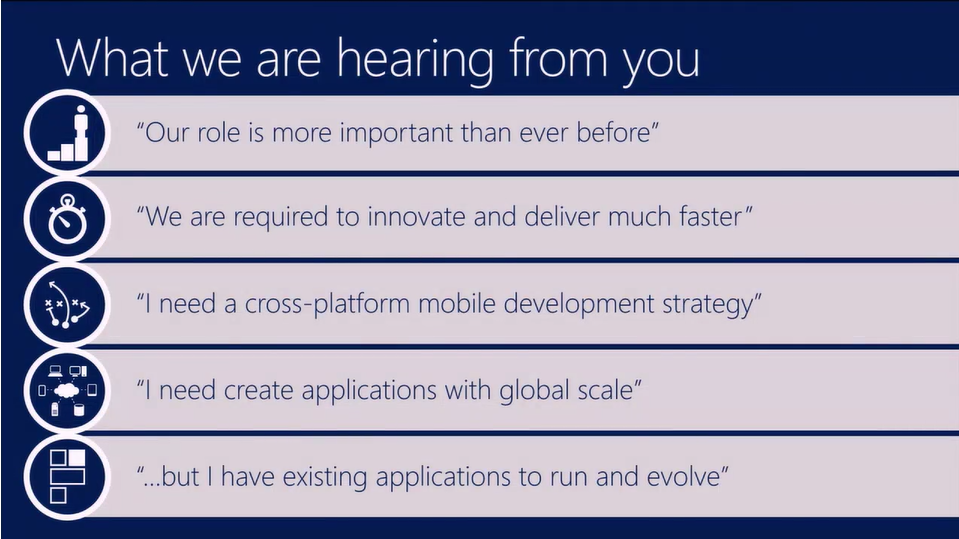
- Devs more important than ever
- Cross-platform required
Developer needs
- Optimize for cloud / devices
- Hybrid
Today’s Cloud/Mobile
Cloud scenarios
Dev & Test in the cloud
- Old world—process took couple week
- Plug stuff into Azure
Demo – VMs
VM demo
- Private network
- Can quickly fire up VM in virtual network
- Fire up Win 7 VMs in Azure for dev/test
- Can VPN into VM in cloud
- Remote into the machine
- E.g. testing WPF app on Win 7 VM
Back in Visual Studio – Rt-click, Enable Debugging
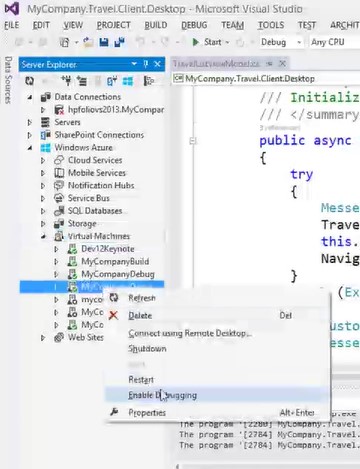
- Attach, set breakpoint
- Back in VM, exercise app
- Complete remote debugging session in Visual Studio
- You only pay for VM while it’s provisioned
Web Apps in the cloud
- Standards based
- Highly interactive apps
- Enterprise complexity
Browse With – various browsers
- Can push Refresh out to multiple browsers
- Ctrl-Design, hover around browser
- Modify in Design mode in browser, updated in real-time in code
- Browser Link

File New project, host in web
Hybrid Apps
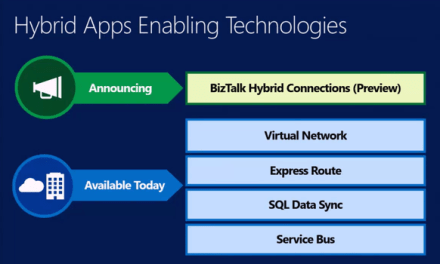
- Maybe want parts of an app on the public internet, part in private network
- BizTalk Hybrid Connections (preview)
-
Also
- Virtual network et al

BizTalk Hybrid Connections
- Tunnel to corp network to get resources

Demo – Hybrid Connections
- Web site is connection to a specific host (HP laptop)
- E.g. connection string is hooked to the local machine
- Service on local machine – Hybrid Connection Manager

Mobile Apps in the cloud
- Microsoft Azure Mobile Services
- Back-end API running in cloud
- Turnkey backend for Mobile Services
- Extend internal web apps to mobile devices
- Powerful client-side library for multiple devices
- Offline sync support
- Available on any platform

Demo – Managing web API on Azure
- Supports JSON and .NET APIs
- Postman, Chrome extension – RESTful client
Web API in Azure:

Using Postman to test Mobile Service Web API:

Future of .NET
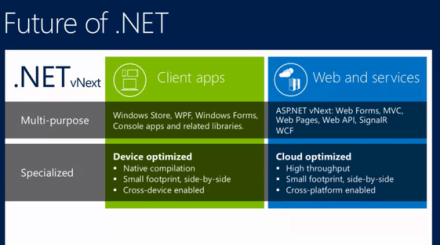
- .NET vNext
-
Multi-purpose
- Client –
-
Specialized
- Device optimized – for client
- Web and service – Cloud optimized
-
Side by side compatibility, each app has its own version of the CLR
- Break apart Framework, just use the parts that you need
- Small footprint
-
Common stuff
- “Entity Framework” everywhere
- All open source and all in .NET Foundation

ASP.NET vNext and the Modern Web
- Modular – swap out stuff you don’t like
- Seamless transition from on-premises to cloud
- Open Source with Contributions
- Faster development cycle
- Choose Editors and Tools
- Cross-platform

New project, ASP.NET vNext application
- Nested references, can pull stuff out
-
Project system changing
- Unified Nugets and References
- Bring in packages by just typing
- Run the app
-
Go into controller – C# code
- Just type in code, don’t do build step, then refresh browser and stuff changes
- No DLLs in \bin folder
-
With Roslyn, just do everything in memory, doesn’t store bits to DLL
- Code/refresh/repeat
-
Pick specific packages in NuGet that you want
- As opposed to installing .NET on local machine
- Makes it easier to try new stuff without breaking old apps
- Looking at various .nupkg builds, each of which is some subset of .NET Framework
Demo – Visitors App –
- Self-hosted, no IIS, run hosting environment in command line
- Do same app on OS X, ASP.NET running in command line on Mac, web site hits local service
ASP.NET vNext Summary
- Choice
- MVC, Web API, Web Pages 6, SignalR 3, EF 7
- SPS: Entity Framework still a first-class citizen
Cross-platform mobile development – Client
Multi-device approaches
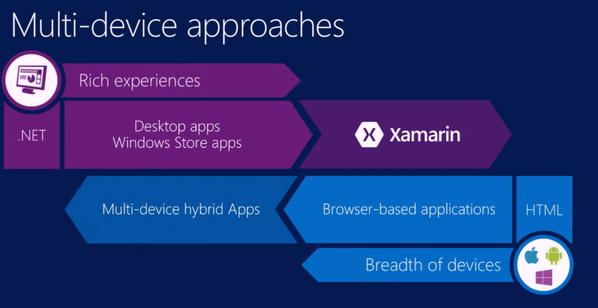
-
.NET – rich experiences
- Use Xamarin to get breadth
-
Coming from HTML side
- Hybrid apps to get better richer experience

Windows Store Apps
- Universal Windows apps
- .NET Native
Demo – Universal App demo
- Shared module in universal app – ViewModels, resources, etc.
- Some Views shared, some views custom
Run Universal App
- Win Phone emulator, Win 8 tablet
- Debug Windows Store apps on your machine, RDPs into simulator
- Win Phone – app running on phone
.NET in Android, iOS devices
-
Native mobile apps
- Full access to device features
- High flexibility and customization per device
- Best US and performance in devices
-
Xamarin
- Microsoft/Xamarin technical and
business partnership - Visual Studio and C# capabilities fully available
- Share app logic code across device platforms
- Microsoft/Xamarin technical and

Xamarin demo
- Same app on Android and iOS
- Android app can use shared component from universal project
- Run app on Android tablet (Samsung Galaxy Fab?)
- Remote debugging on physical tablet
- “Android app that looks like an Android app” – on tablet, native
- Then run the app on an Android phone and on iPad
“Native cross-platform mobile development”
Cordova tooling in Visual Studio
-
Hybrid-HTML apps
- Natural path for web devs targeting devices
- Shortest path for cross-platform mobile
-
New Cordova tooling in Visual Studio
- Multi-device Hybrid Apps for Visual Studio
- Hybrid apps
- Flexibility to use any JavaScript framework
- Scale to complex Enterprise apps through optional TypeScript support
- End-to-end dev workflow included

Visual Studio benefits
- File New Project – now have Android, iOS, F#, Python, Node,
- Can start VMs from Visual Studio, attach to debuggers
- Fire up VMs, make web sites, deploy
- Bottom line – amazing power to developer
Demo – Hybrid App, Cordova tooling
- Devices listed in Device dropdown in Visual Studio
- “Ripple” support
- Debug Cordova from Visual Studio
Summary
-
Providing the best end-to-end development experience
- Platform
- Framework
- Tools
-
On our terms
- Bring your own in each area