Sean’s Stuff

Various musings on software development and technology.

Archive for November, 2008

Windows 7 Install Screens on PhotoZoom

Posted by Sean on 17 November, 2008

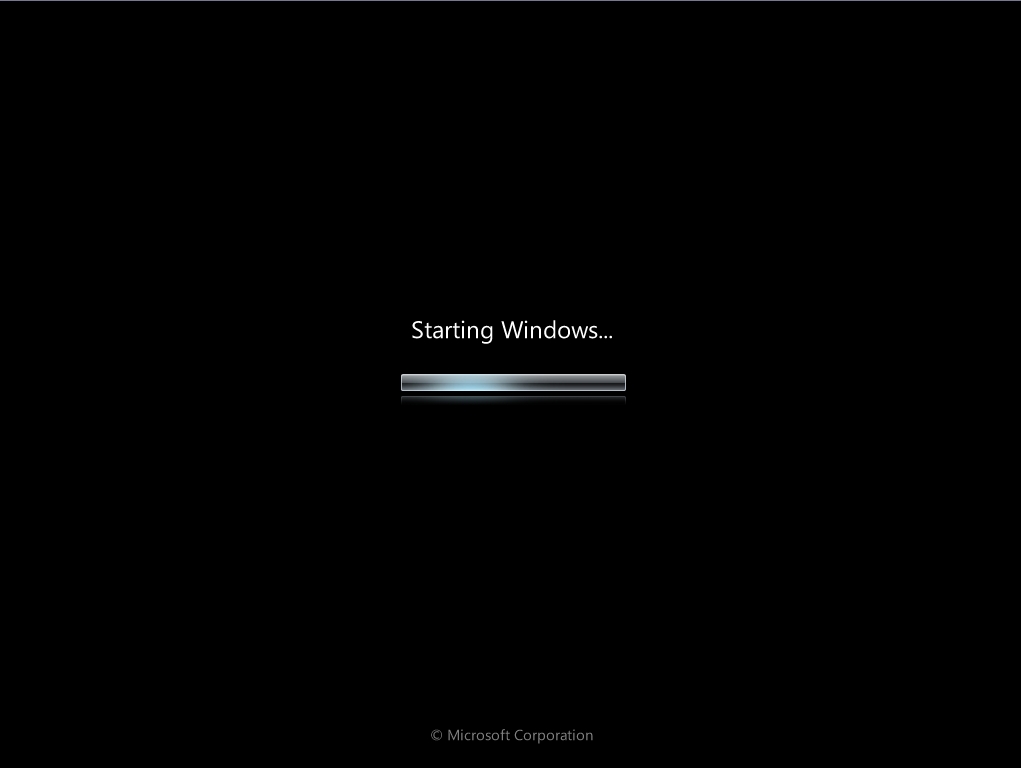
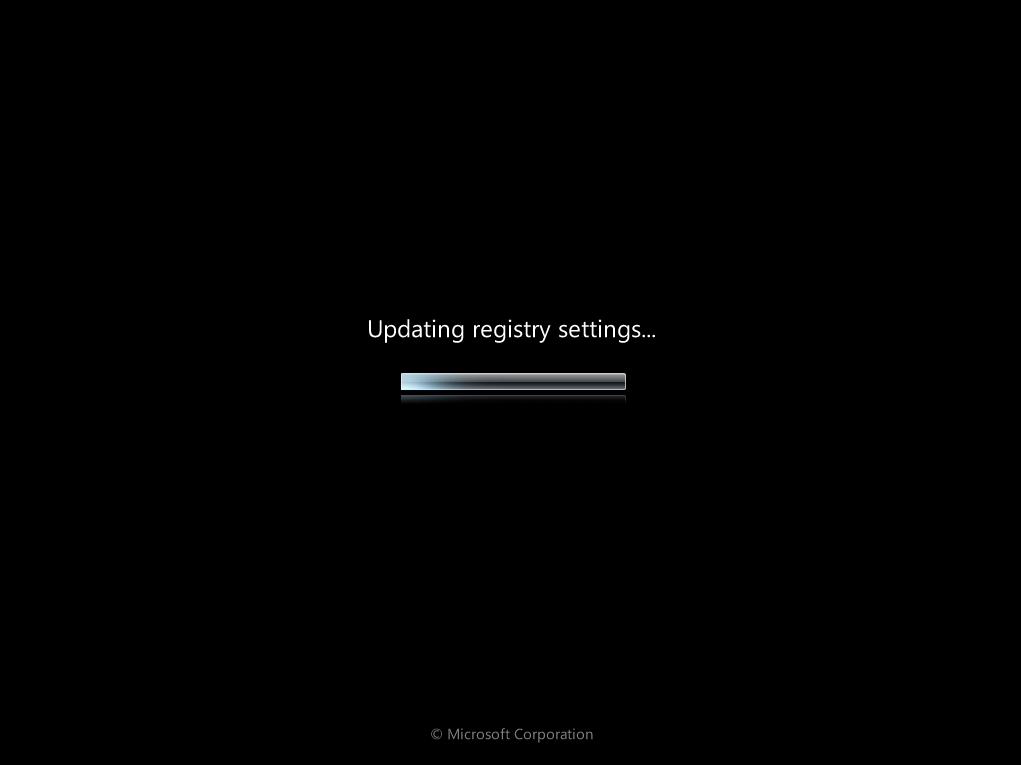
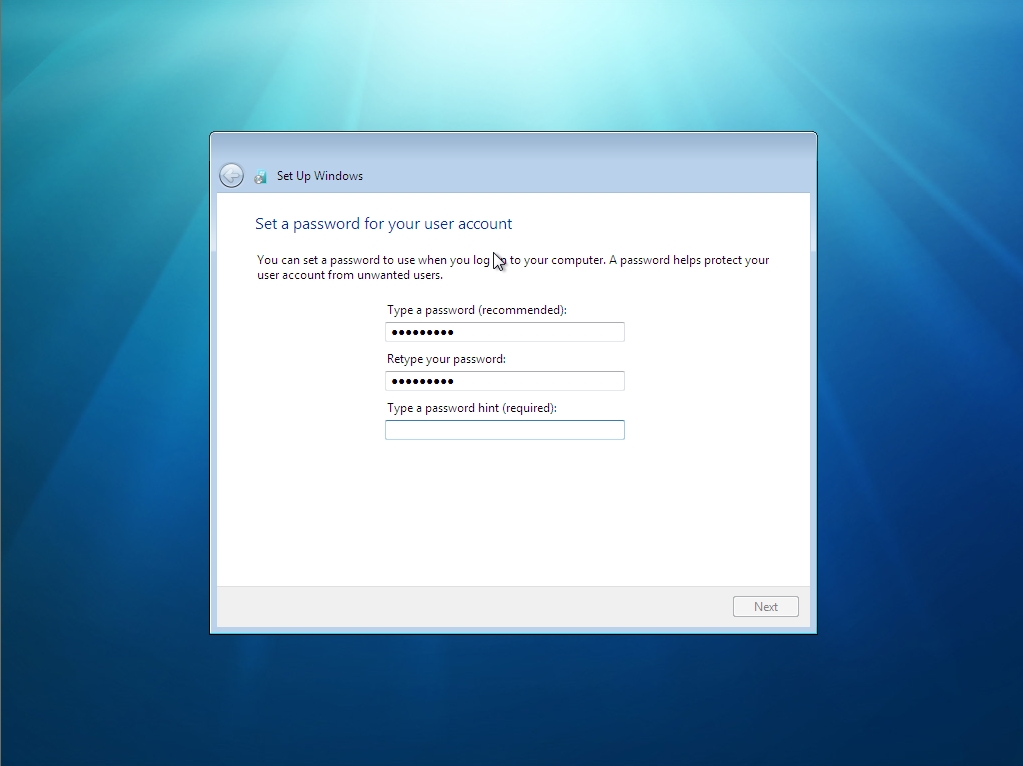
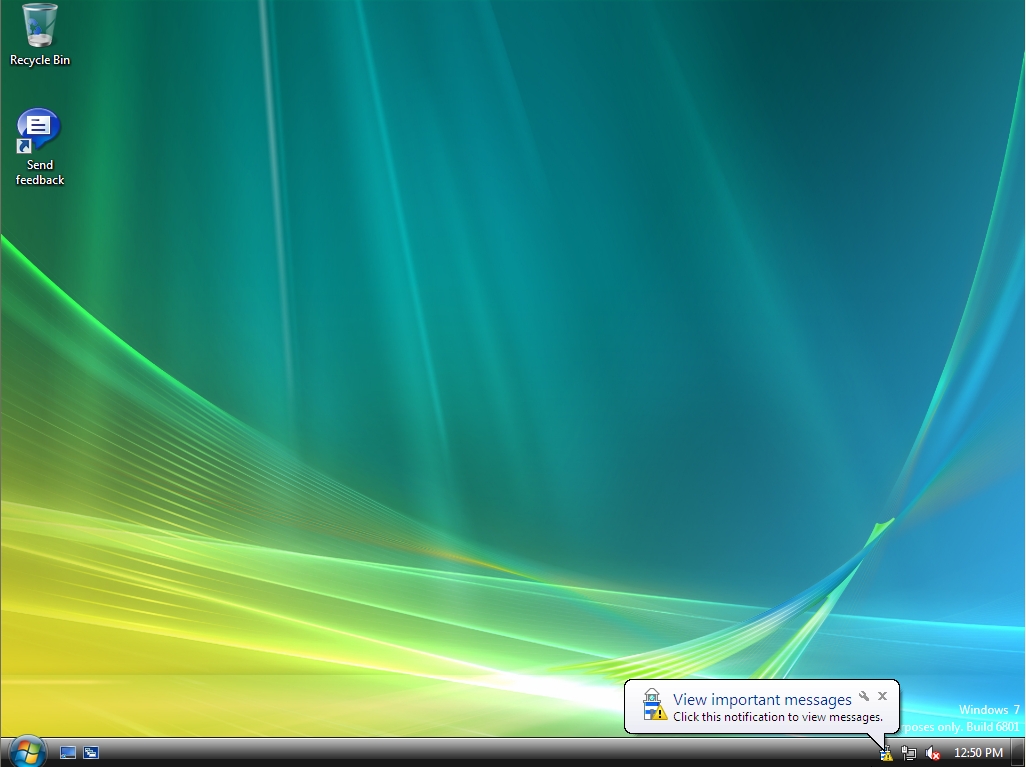
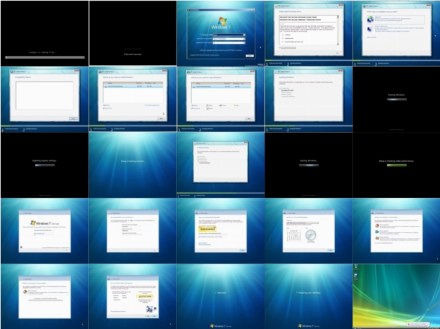
I just created my first Deep Zoom Composer project.  I added all of my Windows 7 install screenshots to a Deep Zoom project and then simply published them on Photo Zoom.  This was surprisingly easy–no coding required.  To zoom around in this set of images, click here.

win7installall

Posted in Windows 7 | Tagged: , , , | No Comments »

A Recipe for Green-Field Software Development

Posted by Sean on 15 November, 2008

Developing Your Product and Your Customers in Parallel

In my 9-5 life, I’ve been a member of a software development team since 1985.  That’s 23 years as a software developer—ouch!

Like many developers who have been around for a few years, at least some of my grey hair can be attributed to having worked on hellish projects, or on projects that failed outright.  Over the years, I’ve gradually added to my mental list of “worst practices”—things that tend to lead to project failure, or at least hide a failing project until it’s too late to turn it into a successful one.

It’s much easier to compile a list of worst practices than it is to pick some “perfect” development process.  But worst practices can lead to best practices simply by avoiding the bad practices.  At a minimum, we should at least avoid making the same mistakes over and over again.

If I had to pick a single worst practice (there are many), it would be this:

Not building the product that the customer really needed

This happens all of the time.  We (the developers) build a product that is bug-free, efficient, scalable, and does exactly what we intended it to do.  We even occasionally get the work done in something close to the amount of time that we said it would take.

But our well-built software still fails—for a variety of reasons.

  • It’s too hard to use
  • Users are unable to use it efficiently/effectively
  • It’s missing one or more critical features
  • Users don’t have a need for the software in the first place
  • It’s too expensive, given what it does

In order to be “successful”, software has to meet a critical need that the user has.  Good software solves a pressing problem.  Great software does so in a way that seems natural to the users.

So what do I mean when I talk about software “failure”?  Simply put, “failed” software is: software that doesn’t get used.

What are the consequences of failure?  For internal software projects, it means wasted time and energy that could have been spent on things that the organization does need.  For consulting houses, it means possibly not getting hired back by the client, or seeing your reputation diminished.  For ISVs developing software/services to sell, it means lost revenue or even bankruptcy.

For developers, failure means knowing that you’ve wasted your time, intellect and energy on something that no one is going to use.  That sucks.

Our goal then as developers is to build great software.  We want to see users working with our stuff, to see it making their lives better, and to see them excited about it.  That’s the true Holy Grail that many of us work towards.

The Remedy

So how do we develop great software?  We can’t all be Steve Jobs, or hire him into our organization.  So without brilliant insight, how do we figure out what the users truly need?

To understand what users need—truly, madly, deeply—we need to think beyond developing products and start thinking about developing an understanding of our users.

This focus on a Customer Development Process, rather than a Product Development Process, is the point of the book The Four Steps to the Epiphany, by Steven Gary Blank.

Blank’s main thesis is that we should work towards an understanding of our customers and their needs much earlier in the development lifecycle.  We need to fully understand what customers need and whether we can sell them our product before we go too far down the path of building that product.

Blank proposes a very detailed Customer Development Process and talks a little bit about when it should occur, relative to the typical phases of a Product Development Process.  This is a little tricky.  If we wait too long to learn about our customers, we risk building the wrong product.  But if we talk to them too early, before we’ve had time to think a little bit about our vision, we’re not really innovating, but just trying to build what they tell us to build.  That also can lead to failure.

My Take on the Product Development Process

Having worked as a software developer for so many years, I’ve seen lots of different software lifecycles.  In my first job, with Control Data Corp in Bloomington, MN, we were a Dept of Defense shop and rigidly followed DOD-STD-2167A—a very rigidly-defined classic waterfall process.

I’ve also done my share of agile development, working in groups that used various agile methods.

My main takeaway on software process is that it’s important to develop iteratively.  For me, that’s the most critically important piece of the agile movement.  Many of the other techniques, like pair programming and test driven development might be important, but don’t seem quite as critical as being able to build your product iteratively.  Short iterations allow agility.

For me, one book that really made a lot of sense in laying out a framework for an iterative lifecycle was The Rational Unified Process Made Easy, by Per Kroll.

For a lot of people, when they think about RUP (Rational Unified Process), they think: heavyweight and lots of modeling/diagramming.  But Kroll explains that RUP doesn’t necessarily mean heavy.  He refers to the number of artifacts that you’re required to produce as your level of ceremony.  And he describes RUP as:

An iterative approach with an adaptable level of ceremony

Again, iterative is the important part.  An iterative approach with very little ceremony would basically be an agile methodology.  But sometimes you work on projects that require a bit more ceremony—some project tracking, etc.  On these projects, you can still be iterative, but with more ceremony.  Here’s a picture:

rupmap

RUP talks about general phases of the lifecycle being: Inception, Elaboration, Construction and Transition.  But Kroll is quick to point out that this does not just map to the classic waterfall model.  (Requirements, Analysis/Design, Implementation, Testing).  Rather, you’d typically perform some of each of the classic waterfall activities during each iteration of RUP.  You’d likely be doing a lot more requirements-gathering in your Inception phases, but you’d also be doing some implementation.  And you’d spend a lot of time writing code during Construction phases, but you might also still be tweaking some requirements.

Here’s a nice picture of how RUP typically plays out.  Again, note that the idea of iterations is important:

rupphases

Personally, I like this view of the development lifecycle a lot.  This model is how I think about software development.  Work in an iterative fashion, but be aware of what main phase you’re in and adjust your activities accordingly.

Over the years, I’ve taken lots of notes to answer the question, “what activities should I be doing at each step”?  Kroll has a lot of good information in his book, but I’ve borrowed liberally from other sources.  What I ended up with was a fairly detailed “a la carte” list of activities that you might engage in across the lifecycle.

I say “a la carte” because every project will not engage in every step.  But I think it’s a nice master list to draw from.  And I think that I have the activities listed in a pretty reasonable order.

So here’s my list of high-level activities for the Product Development Lifecycle.  (See below for more detail for each activity):

  • Vision
  • Initial Requirements Gathering  (Inception)
  • GUI Conceptualizing
  • Identify Candidate Architecture
  • Define Non-Functional Tasks
  • Define Iterations  (Project Planning)
  • Write Development Plan
  • Execute Inception iterations
  • Write Business Plan
  • Write Test Plan
  • Write Deployment Plan
  • Execute Construction Iterations
  • Initiate Test Plan
  • Deploy Alpha Release
  • Write Customer Support Plan
  • Execute Deployment Iteration
  • Deploy Beta Release
  • Launch Product
  • Begin Planning Next Release

The Customer Development Process

I love the idea of the Customer Development Process, as Blank presents it in The Four Steps to the Epiphany.  He talks about discovering who your customers are, figuring out what they need, and then testing your hypotheses.  In other words—iterate not just on the product, but also on your model of who the customers are.  This includes not just an understanding of the customers and their needs, but also gets into the actual selling proposition and marketing of your product.

Here are the top-level activities in Blank’s customer development process:

  • Customer Discovery
  • Customer Validation
  • Customer Creation
  • Company Building

Lining Things Up

The trick is to figure out how the Product Development Process and the Customer Development Process relate to each other.  If you listed out the various phases of each process side by side, how would they line up?  At what point in your product development process should you start the customer development process?  Or should it be the other way around?

Here’s a first stab at lining the two processes up.  My goal was to come up with a high-level roadmap for doing new (green field) development, which would cover developing both the product and the customers.

Product Development Process
Customer Development Process
Vision
Initial Requirements Gathering
GUI Conceptualizing
Identify Candidate Architecture
Define Non-Functional Tasks
Define Iterations (Project Planning)
Write Development Plan
Execute Inception Iterations  >> Customer Discovery
Write Business Plan
Write Test Plan
Write Deployment Plan
Execute Construction Iterations  >> Customer Validation
Initiate Test Plan
Deploy Alpha Release  >> Customer Creation
Write Customer Support Plan
Execute Deployment Iteration
Deploy Beta Release
Launch Product
Begin Planning Next Release  >> Company Building
.

Should I Keep Reading?

The rest of this post expands on each of the activities in the table above, listing details of what happens during each phase.  This is the outline that I use when I’m trying to figure out “what to do next”.

Note again—this process is very much geared towards green-field development, and in a market where you are developing a product or service to sell to end-users.

Product Development Process—Details

Here’s the detailed breakdown of the steps involved in the Product Development Process.  Much of this content comes from the books I list at the end of the article, primarily The Rational Unified Process Made Easy and Head First Software Development.  But a lot of it is just my own concept of what you typically do during each phase.

Note that iterations occur in the Inception and Construction phases.

Vision

  • Do a short description of a handful of possible products
    • For each, describe:
      • Market or market segment  (which group of users, short description)
        • What is the problem that they experience
        • How painful to the users?  What workarounds are in place?
      • Short description of product that might help them solve this problem
      • Short feature list (<10 items, single sentence)
      • How does this product specifically solve the customer’s problem?
  • Expand on top one or two possible products.
    (For each, expand information to include):

    • Write up SIMs (Specific Internet Market Segment, Walsh pg 158..)
      • Lots of details about the targeted user group
    • Other user information
      • How often do you expect each user group to user the product?
      • Why might they stop using the product?
      • Rough guess as to size of this market, e.g. # potential users?
    • Are there other non-primary users?
      (E.g. users who didn’t purchase, or just different group of users)

      • Also describe their “problem” and how product solves it
      • Are they also potential buyers, or just users?
      • What subset of the feature list might they use?
      • What else differentiates them from primary user group?
      • Also write up SIM for this user group
    • Bluesky one or more revenue models.  Answer for each:
      • What would this customer pay for this product?
        • Specify target price or range that might be tolerable
      • One-time purchase or ongoing subscription?  (or a combination)
      • Pricing tiers?  If so, describe
      • Trial period?  If so, describe
      • If >1 user group, repeat for other groups
      • What level of certainty do you have that they will purchase?
      • Why might they not purchase?  List reasons.
      • Possible ways to mitigate non-purchase reasons.
      • Does revenue model depend on continued use of the product?
      • How will you collect money?
      • What is your distribution channel?  (i.e. how do they receive product)
      • If ongoing subscription, describe what happens when they stop paying
        (E.g. limited access)?
    • Revenue model/estimates  (per yr)
      • Make rough estimate of ongoing costs, per user or account
      • List expected revenue per user, single or ongoing, per yr
      • Starting with desired annual revenue, describe # customers required to meet goal
    • Marketing / Sales vision
      • How might product be branded?
      • How is product positioned (e.g. tagline)
      • How might you reach desired users?  (make aware)
      • What is selling proposition (argument to buy)?
    • Competitive analysis
      • Assess and summarize competitive products that do similar/same thing as yours
      • What are their strengths/weaknesses?
      • Where can you improve on them?  To what degree?
      • What are you missing that competitors might have?

Initial Requirements Gathering
(Chap 2 of Head First Software Development)

  • Generate quick list of basic ideas, 1-3 sentences each, Title/Description
  • Ask user questions to flesh out the list
  • Bluesky to generate feature lists (Title/Description)
    • Use other people
    • Okay to spit out non-functional stuff, like specific GUI thoughts, or architecture
  • Build User Stories
    • Describe one thing
    • Language of the customer
    • Title/Description
    • 1-3 sentences
  • Pull out non-customer stories, save for later (design)
  • Refine initial set of user stories, w/customer feedback
  • Provide estimates for each user story
    • Include assumptions
  • Team estimation and revision
  • Clarify assumptions w/users, if necessary
  • Break apart users stories that are >15 days
  • Add up estimates to get estimate for total project

GUI Conceptualizing

  • Select key use cases that need GUI concept
  • User interaction goals
    • Outline some key goals of user interaction model
      (E.g. discoverability, efficiency, slick animation, etc)
    • Describe user action requirements verbally for specific use cases
  • Assess similar products’ GUIs for similar use cases
    • Pros/cons of each
  • For each use case selected
    • Paper prototype one or more possible GUIs
    • Storyboard any dynamic behavior
    • Brainstorm alternative approaches and paper prototype
  • Identify common sequences of use cases  (e.g. find/edit)
    • Storyboard use case sequences
    • Brainstorm ways to optimize the storyboard/sequence
  • Assess GUI model against several measures of good GUI design
  • Technical review of GUI feasibility
    • Build it, buy it, or freebie (part of tool or freeware)?
    • If build, rough guess as to effort
    • If buy, what is the cost?  One-time & ongoing.
  • Assess technical risk
    • Are there any aspects of GUI that need to be proven out?
  • Hammer looking for nails
    • Make short list of most compelling GUI models in new products
    • Is there anywhere in product that you might use these models?
  • Brainstorm user assistance model (help, wizards, demos, etc.–learning)
  • GUI models from competitors
    • If there are competitive products that compete in same space, summarize their main GUI elements.
    • Assess—is their GUI or user interaction model an asset or a liability?
  • Review
    • Early review internally (not w/customers)
    • Review static screen mockups (e.g. paper prototypes)
    • Look at discoverability–obvious what it’s used for?
    • Aesthetics

Identify Candidate Architecture

  • Identify one possible architecture that could support the product
  • Identify any areas of technical risk
  • Discuss pros/cons/risks
  • [For more details, see Kroll]

Define Non-Functional Tasks

  • Define additional tasks to be completed during inception that are NOT use cases
  • Possible examples include:
    • GUI proof-of-concept, for technical & usability
    • Building candidate architecture  (must do)
    • Technical proof-of-concept
    • Capacity testing for architecture (e.g. scalability)
  • Provide priorities and estimates for all tasks
    (will feed into iteration planning, along w/use cases)

Define Iterations
(Chap 3 of Head First Software Development)

  • Set target date for first (next) release
  • Work w/customer to prioritize user stories
  • Also feed non-functional tasks into process
  • Select subset of user stories to meet target date  (Milestone 1)
    • If the features don’t fit target date, re-prioritize
    • Focus on user stories that are absolutely critical
    • Baseline functionality–smallest set of features so that SW is at all useful to customers
  • Prioritize user stories in Milestone 1.0  (1-5, with 1 as highest priority)
  • Assign user stories to iterations, using 20-day iterations
    • Based on priority
    • Or user stories required to implement other user stories
    • Use velocity of 0.7  (0.7days effort for each real day)
      I.e. Each iteration should contain 14 person-days of estimated work
  • Reassess schedule and adjust schedule and/or content
    • Because of velocity, things likely can’t fit
    • Add iteration(s), change M1 date, or both
  • Get iterations & user stories into tracking spreadsheet
  • Construct burn-down graph for 1st iteration
    • X axis is calendar days
    • Y axis is person-days of work accomplished
    • Draw diagonal line as ideal burn-down rate

Write Development Plan

  • Describe everything that will happen from here on out
  • Include
    • Iterations and contained user stories & tasks
    • Milestones
    • Review points and staff
    • High-level test plan
    • alpha/beta/release plan
    • Staff
    • Schedule
    • Tools
    • Show steps in Product Development process
    • Show steps in Customer Development process
    • Show how the two processes line up
    • Include calendar alignment, if appropriate

Execute Inception Iterations
(Chap 4 of Head First Software Development - User stories & tasks)

  • Break down each user story into tasks
    • Title/Description/Estimate
    • Provide estimate for each task
    • E.g. Create class, create GUI prototype, create schema, create SQL scripts
    • Each task should be 0.5 - 5 days
  • Plot where you are on burn-down graph
    • Calendar day vs. new estimate of person-days of work left
  • Update spreadsheet w/tasks & their estimates
    • Task estimates replace user story estimates
    • Also track burn-down in spreadsheet
    • Put stickies on big board, tasks, In Progress/Complete, etc. (pg 116 of Pilone/Miles)
  • Start working on first tasks
    • Move stickies on board when they are In Progress
  • Daily stand-up meetings to track progress
    • First thing in the morning
    • Track progress–what has each person accomplished
    • Update burn-down rate
    • Update tasks
    • What happened yesterday, what is plan for today
    • Talk about any problems
    • 5-15 mins long
  • Add unplanned tasks to iteration, if necessary
    • Add user story, estimate, break into tasks, review w/customer, add to board
    • Use red stickies
    • Update burn-down, showing that you’re off
  • Next iteration
    (Chap 10 of Head First Software Development)

    • End of iteration review (pg 342-343 of Pilone/Miles)
    • Verify SW passes all tests
    • Demo/review w/customer
    • Plan next iteration
      • Add new user stories, if required
      • Update priority/estimates for everything
      • Adjust velocity
      • Feed in bug backlog as tasks
      • Priority tradeoffs include bug-fixes vs. new features
    • Follow steps from Pilone/Miles chap 4 (break down into tasks and estimate)

Write Business Plan

  • Goal isn’t to get funding, but to make a case for the product/business
    (at least on paper)
  • Include stuff like
    • Market description
    • Customer description
    • Description of competitors’ products/services
    • Product proposition
      • What is customers’ problem?
      • What is your vision for product/service
      • How does product/service solve their problem?
    • Outline of development plan
    • Outline of Product/Customer Development processes
    • Summarize revenue model
    • Summarize marketing/sales plan
    • Business structure: staffing, organization, etc.
  • Add other typical business plan elements

Write Test Plan

  • What to test, how to test, when to test
  • Plan for test-driven development, using appropriate TDD tools
  • Plan automated/nightly builds and automation of testing
  • See Pilone/Miles, chap 7, among others

Write Deployment Plan

  • How/when will software be deployed?
  • Map out alpha/beta/launch
  • Where does testing fit into the plan?
  • How will customers get the software?
  • How will they pay for it?
  • How do you track customers?

Execute Construction Iterations
(Chap 4 of Head First Software Development - User stories & tasks)

  • Break down each user story into tasks
    • Title/Description/Estimate
    • Provide estimate for each task
    • E.g. Create class, create GUI prototype, create schema, create SQL scripts
    • Each task should be 0.5 - 5 days
  • Plot where you are on burn-down graph
    • Calendar day vs. new estimate of person-days of work left
  • Update spreadsheet w/tasks & their estimates
    • Task estimates replace user story estimates
    • Also track burn-down in spreadsheet
    • Put stickies on big board, tasks, In Progress/Complete, etc. (pg 116 of Pilone/Miles)
  • Start working on first tasks
    • Move stickies on board when they are In Progress
  • Daily stand-up meetings to track progress
    • First thing in the morning
    • Track progress–what has each person accomplished
    • Update burn-down rate
    • Update tasks
    • What happened yesterday, what is plan for today
    • Talk about any problems
    • 5-15 mins long
  • Add unplanned tasks to iteration, if necessary
    • Add user story, estimate, break into tasks, review w/customer, add to board
    • Use red stickies
    • Update burn-down, showing that you’re off
  • Next iteration
    (Chap 10 of Head First Software Development)

    • End of iteration review (pg 342-343 of Pilone/Miles)
    • Verify SW passes all tests
    • Demo/review w/customer
    • Plan next iteration
      • Add new user stories, if required
      • Update priority/estimates for everything
      • Adjust velocity
      • Feed in bug backlog as tasks
      • Priority tradeoffs include bug-fixes vs. new features
    • Follow steps from Pilone/Miles, chap 4 (break down into tasks and estimate)

Initiate Test Plan

  • Begin regular testing
  • Functional, integration, system test (no customer testing yet)

Deploy Alpha Release

  • Outline goals for beta and exit criteria
  • Identify potential customers/users
  • Communicate w/users about goals & feedback mechanism
  • Feeds into appropriate spot in Customer Development process
    • Possibly at end of each construction iteration
  • Gather feedback and feed into development
    • E.g. Changes desired/required?

Write Customer Support Plan

  • How will customers be supported after software is deployed?
  • List main goal(s)
  • Decide on tools, e.g.
    • External issue tracking
    • FAQ sheets for tech support staff
  • Decide on process(es), e.g.
    • Communication w/customer
    • Looking for answer in FAQ
    • How to communicate answer, if known
    • Get closure
    • 2nd tier–investigate, look for workaround
    • Interaction between staff (e.g. support/development)
    • 3rd tier–reported bug, e.g. give bug # and have traceback mechanism
  • Escalation process

Execute Deployment Iteration

  • Working on deployment tasks, e.g.
    • Installs/uninstalls
    • Distribution/delivery
    • Payment
    • Customer tracking

Deploy Beta Release

  • Outline goals for beta and exit criteria
  • Identify potential customers/users
  • Communicate w/users about goals & feedback mechanism
  • Feeds into appropriate spot in Customer Development process
    • Likely after Deployment Iteration
  • Gather feedback and feed into development
    • E.g. Changes desired/required?
  • Beta should not last indefinitely

Launch Product

  • Announce product
  • Launch it
  • Throw a big party

Begin Planning Next Release

  • Post-mortem for Product/Customer Development processes
  • Lessons learned
  • Changes to process
  • Assess organize outstanding bugs
    • Prioritize, estimate
  • Organize list of possible future features
    • Plan mechanism for using existing customers to get feedback on priorities
    • Prioritize, estimate
  • Decide on schedule for next release
  • Map out iterations
    • Each iteration either bug-fixing or new development
    • Bug-fixing phase likely first
  • Goal: All bugs fixed prior to next release
  • Continued refinement of plan, based on ongoing customer feedback
  • Back to start of Product/Customer Development processes for next release
    (follow same processes, including updating relevant plans)

Customer Development Process—Details

Here’s the detailed breakdown of the steps involved in the Customer Development Process.  This comes directly from Four Steps to the Epiphany.

Customer Discovery

  • State hypotheses
    • Write briefs, state assumptions about product, customers, pricing, demand, competitors
  • Test problem hypotheses
    • Test in front of potential customers
  • Test product concept
    • Test product features in front of customers
    • Solves their problem?
    • Also test business model
      • Must-have?
      • Pricing
      • Distribution
  • Verify
    • You understand the customer’s problems
    • Your product solves these problems
    • Customers will pay for the product
    • You have in mind a profitable business model
  • Repeat if necessary

Customer Validation

  • Get Ready to Sell
    • Articulate value proposition
    • Prep sales materials & collateral plan
    • Develop distribution channel plan
    • Develop sales roadmap
    • Hire sales closer
    • Synch up Product/Customer Dev teams on features/dates
    • Formalize advisory board
  • Sell to Visionary Customers
    • Sell unfinished product
    • Answer all sales roadmap questions
  • Develop Positioning
    • Initial positioning
    • Articulate belief about product and its place in the market
  • Verify
    • Enough orders to prove we can sell?
    • Profitable sales model?
    • Profitable business model?
    • Can you scale the business?
  • Repeat, if necessary

Customer Creation

  • Get Ready to Launch
    • Market Type Questionnaire
    • Choose Market Type
    • Choose 1st Year Objectives
  • Position company & product
    • Select PR agency
    • Positioning audits
    • Positioning to market type
  • Launch company & product
    • Select launch type
    • Select customer audience
    • Select the messengers
    • Craft the messages
    • Message context
  • Create demand
    • Demand creation strategy
    • Demand creation measurements
    • Iterate or exit

Company Building

  • Reach mainstream customers
    • Change “earlyvangelists” into mainstream customers
    • Manage sales growth by market type
  • Review management / Create mission culture
    • Review management
    • Develop “mission-centric” culture
  • Transition to functional departments
    • Set department mission statement
    • Set department roles by market type
  • Build fast-response departments
    • Implement mission-centric management
    • Create an “information culture”
    • Build a “leadership culture”

Closing Thoughts

The key takeaway for me from Blank’s book was as follows:

It’s not enough to build a great product.  You must also build a product that the customers need and that they will buy.  It’s also criticial to find a workable business model to sell to the right customers at the right price.

If you haven’t yet read Four Steps to the Epiphany, I’d really encourage you to go out and read it.  Then you can start thinking about how to develop your customers, as well as your product.

Sources

I’ve used the following sources, in varying degrees, for this post:

Posted in Miscellaneous | Tagged: , , , , , , , , , , , , , , , , , | No Comments »

Windows 7 Install Screenshots

Posted by Sean on 7 November, 2008

I thought I’d do my part to flood the web with screenshots from the M3 preview of Windows 7 that was distributed at last week’s Professional Development Conference in LA.

The obvious place to start in Win 7 is with the installation process.  I’ll put up more posts later with screenshots of various bits and pieces in Windows 7.  But this first post will just contain: every damn Windows 7 installation screen.

Ok, admittedly, looking through install screens is about as exciting as watching bacon fat congeal.  But really—there are people out there who will eat this stuff up.  So it’s for them that I’ve suffered an endless series of screen captures.  Enjoy.

The Environment

I installed my copy of Windows 7 to a VMWare virtual machine.  The only “gotcha” was that VMWare creates a SCSCI virtual hard drive by default—which Windows 7 failed to recognize.  Simple fix—just delete the default hard drive and create an IDE drive in VMWare.

The Screens

Ok, here we go.

You just get shivers as you start to install a new Microsoft OS for the first time, don’t you?

install-05

Then we switch from a DOS-looking progress bar to a cute Windows-looking progress bar:

install-1

Next we get the first Windows 7 install screen.  This is the spot to insert the angelic music.

install-2

After picking an install language, you get to the main install kick-off window:

install-3

I once met a guy who actually read these EULAs.  Can you believe it?

install-4

This next dialog is just as confusing in Windows 7 as it was in Vista.

install-5

In my first try, I went with the Upgrade option, which only got me this next confusing empty dialog.  Nice.

install-6

Restarting everything and instead choosing Custom gets us where we want to go:

install-7

If you click on the link that reads “Drive options (advanced)”, you’ll see some options for managing hard disk partitions:

install-8

Finally, the actual installation begins.

install-9

At some point, near the end of the installation, Windows boots for the first time.  It lives!

install-10

This was an interesting detail during the boot process:

install-11

All of the services apparently start firing up, as the boot process continues.  (Hallelujah)!

install-12

And for some reason, we’re allowed to go back and look at this status dialog one more time.

install-13

And then back to the main boot screen.  (Are you starting to feel as if you were really there)?

install-14

Oh, this is a nice little touch.  No screen flickers or anything, but nice to know that it’s “checking” my video performance.  (Whatever that means).

install-15

Now Windows is more or less running and we start doing some of the final configuration stuff.  First, we specify a default username.  This will be the Administrator user account.  Seeing a PC name of “PC” also makes me think of John Hodgman and the Mac switcher ads.

install-16

And I enter my password:

install-17

And (of course) the product activation key.  Wouldn’t it be cool if every key had a barcode and I could use a barcode scanner at this point?  (My key did not have a barcode).

install-18

I also get to set my time and time zone.

install-19

This is an interesting one.  Right out of the gate, I’m asked to specify whether my network is public or not.  Like Vista, this dictates some default security settings.

install-20

I picked Home network and Windows 7 did some remaining network configuration work.

install-21

Ok, here’s one of the first really new things to show up.  A “homegroup” is basically a relabeled “workgroup”—something short of a domain.  I’m wondering if I’d chosen Work location in the earlier screen, if I’d now be joining a domain.

install-22

Finally, we are “welcomed” to Windows 7.

install-23

We’re so close, I can taste it.

install-24

And voila!  The Windows 7 installation is complete and we’re sitting at the desktop screen.  Note that I don’t have that cool new taskbar in the build that was handed out at PDC.  More on that next time—the new taskbar is actually in the build and Rafael Rivera has found a hack to unlock it.

install-25

Posted in Windows 7 | Tagged: , , , , , , , | 1 Comment »

Session – WPF: Extensible BitmapEffects, Pixel Shaders, and WPF Graphics Futures

Posted by Sean on 6 November, 2008

PDC 2008, Day #4, Session #4, 1 hr 15 mins

David Teitlebaum
Program Manager
WPF Team

My final session at PDC 2008 was a talk about the improvements in WPF graphics that are available in .NET Framework 3.5 SP1.  David also touched briefly some possible future features (i.e. that would appear in .NET Framework 4.0).

David’s main topic was to walk through the details of the new Shader Effects model, which replaces the old Bitmap Effects feature.

What are Bitmap Effects?

These are effects that are applied to an individual UI element, like a button, to create some desired visual effect.  This includes things like drop shadow, bevels and blur effects.

BitmapEffect

The BitmapEffect object was introduced in Framework 3.0 (the first WPF release).  But there were some problems with it, that led to now replacing it with Shader Effects in 3.5SP1.

Problems with BitmapEffect:

  • They were rendered in software
  • Blur operations were very slow
  • There were various limitations, including no ClearType support, no anisotripic filtering, etc.

New Shader Effects

Basic characteristics in the new Shader Effects include:

  • GPU accelerated
  • Have implemented hardware acceleration of the most popular bitmap effects
    • But did not implement outer glow
  • Can author custom hardware-accelerated bitmap effects using HLSL
  • There is a software-only fallback pipeline that is actually faster than the old Bitmap Effects
  • New Shader Effects run on most video cards
    • Require PixelShader 2.0, which is about 5 years old

How Do You Do Shader Effects?

Here’s an outline of how you use the new Shader Effect model:

  • Derive a custom class from the new ShaderEffect class (which derives from Effect)
  • You write your actual pixel shader code in HLSL, which is used for doing custom hardware-accelerated stuff using Direct3D
    • Language is C-like
    • Compiled to byte-code, consumed by video driver, runs on GPU
  • Some more details about HLSL, as used in WPF
    • DirectX 10 supports HLSL 4.0
    • WPF currently only supports Pixelshader 2.0

So what do pixel shaders really do?  They basically take in a texture (bitmap) as input, do some processing on each point, and return a revised texture as an output.

Basically, you have a main function that accepts the coordinates of the current single pixel to be mapped.  Your code then accesses the original input texture through a register, so it just uses the input parameter (X/Y coordinate) to index into the source texture.  It then does some processing on the pixel in question and returns a color value.  This resultant color value just represents—the resulting RGB color at the specified coordinate.

The final step is to create, in managed code, a class that derives from ShaderEffect and hook it up to the pixel shader code (e.g. xyz.ps file) that you wrote.  You can then apply your shader to any WPF UIElement using XAML.  (By setting the Effect property).

Direct3D Interop

David’s next topic was to talk a bit about interop’ing with Direct3D.  This just means that your WPF application can easily host Direct3D content by using a new class called D3DImage.

This was pretty cool.  David demoed displaying a Direct3D wireframe in the background (WPF 3D subsystem can’t do wireframes), with WPF GUI elements in the foreground, overlaying the background image.

The basic idea is that you create a Direct3D device in unmanaged code and then hook it to a new instance of a WPF D3DImage element, which you include in your visual hierarchy.

WPF Futures

Finally, David touched very briefly on some possible future features.  These are things that may show up in WPF 4.0 (.NET Framework 4.0), or possibly beyond that.

Some of the features likely included in WPF 4.0 include:

  • Increased graphical richness  (e.g. Pixelshader 3.0)
  • Offloading more work to the GPU
  • Better rendering quality
    • Integrate DirectWrite for text clarity
    • Layout rounding

And some of the possible post-4.0 features include:

  • Better exploitation of hardware
  • Vertex shaders
  • Shader groups
  • Shaders in WPF 3D
  • 3D improvements
  • Better media extensibility

References

You can get at David’s PDC08 slide deck for this talk here: http://mschnlnine.vo.llnwd.net/d1/pdc08/PPTX/PC07.pptx

And you can find full video from the session at:  http://mschnlnine.vo.llnwd.net/d1/pdc08/WMV-HQ/PC07.wmv

Posted in PDC 2008, WPF | Tagged: , , , , , , , | No Comments »

Session – Windows 7: Unlocking the GPU with Direct3D

Posted by Sean on 1 November, 2008

PDC 2008, Day #4, Session #3, 1 hr 15 mins

Allison Klein

I jumped off the Azure track (starting to be a bit repetitive) and next went to a session focused on Direct3D.

Despite the title, this session really had nothing to do with Windows 7, other than the fact that it talked a  lot about Direct3D 11, which will be included in Windows 7 and available for Windows Vista.

Direct3D 10

Direct3D 10 is the currently shipping version, and supported by most (all?) modern video cards, as well as integrated graphics chips.  I’m not entirely sure, but I think that Direct3D 10 shipped out-of-the-box with Windows Vista.  It is also available for Windows XP.

Allison spent about half of the talk going through things that are different in Direct3D 10, as compared with Direct3D 9.

I’m not inclined to rehash all of the details.  (I’ll include a link to Allison’s slide deck when it is available).

The main takeaway was that it’s very much worth programming to the v10 API, as opposed to the v9 API.  Some of the reasons for this include:

  • Much more consistent behavior, across devices
  • Cleaner API
  • Elimination of large CAPS (device capability) matrix, for a more consistent experience across devices
  • Built-in driver that allows D3D10 to talk to D3D9 hardware
  • Addition of WARP 10 software rasterizer, to support devices that don’t support WDDM directly.  This is actually quite a bit faster than earlier software-only implementations

Direct3D 11

In the second half of her talk, Allison talked about the advances coming in Direct3D 11.  She mentioned that D3D11 will ship with Windows 7 and also be available for Windows Vista.

Again, the details are probably more appropriate for a game developer.  (See the slide deck).  But the high level points are:

  • Direct3D 11 is a strict superset of 10—there are no changes to existing 10 features
  • Better support for character authoring, for denser meshes and more detailed characters
  • Addition of tessellation to the rendering pipeline, for better performance and quality
  • Much more scalable multi-threading support.
    • Much more flexibility in what can be distributed across threads
  • Dynamically linking in custom shaders
  • Introduction of object-oriented features (interfaces/classes) to HLSL
  • New block compression
  • Direct3D11 will be available in the Nov 2008 SDK

Futures

Finally, Allison touched briefly on some future directions that the Direct3D is thinking about.

The main topic that she talked about here was in potentially using the GPU to perform highly parallel general purpose compute intensive tasks.  The developer would use HLSL to write a “compute shader”, which would then get sent to the GPU to do the work.  As an example, she talked about using this mechanism for post-processing of an image.

Posted in PDC 2008 | Tagged: , , , , , , , , , , | No Comments »

Session – Services Symposium: Enterprise Grade Cloud Applications

Posted by Sean on 1 November, 2008

PDC 2008, Day #4, Session #2, 1 hr 30 mins

Eugenio Pace

My second session on Thursday was a continuation of the cloud services symposium from the first session.  There was a third part to the symposium, which I did not attend.

The presenter for this session, Eugenio, was not nearly as good a presenter as Gianpaolo from the previous session.  So it was a bit less dynamic, and harder to stay interested.

The session basically consisted of a single demo, which illustrated some of the possible solutions to the Identity, Monitoring, and Integration challenges mentioned in the previous session.

Identity

Eugenio pointed out the problems involved in authentication/authorization.  You don’t want to require the enterprise users to have a unique username/password combination for each service that they use.  And pushing out the enterprise (e.g. Active Directory) credential information to the third party service is not secure and creates a management nightmare.

The proposed solution is to use a central (federated) identity system to do the authentication and authorization.  This is the purpose of the Azure Access Control service.

Management

The next part of the demo showed how Azure supports remote management, on the part of IT staff at an individual customer site, of their instance of your application.  The basic things that you can do remotely include:

  • Active real-time monitoring of application health
  • Trigger administrative actions, based on the current state

The end result (and goal) is that you have the same scope of control over your application as you’d have if it were on premises.

Application Integration

Finally, Eugenio did some demos related to “process integration”—allowing your service to be called from a legacy service or system.  This demo actually woke everyone up, because Eugenio brought an archaic green-screen AS400 system up in an emulator and proceeded to have it talk to his Azure service.

Takeaways

The conclusions were recommendations to both IT organizations and ISVs:

  • Enterprise IT organization
    • Don’t settle for sub-optimal solutions
    • Tap into the benefits of Software+Services
  • ISV
    • Don’t give them an excuse to reject your solution
    • Make use of better tools, frameworks, and services

Posted in Azure, PDC 2008 | Tagged: , , , , , , , , | No Comments »

Session – Services Symposium: Expanding Applications to the Cloud

Posted by Sean on 1 November, 2008

PDC 2008, Day #4, Session #1, 1 hr 30 mins

Gianpaolo Carraro

As the last day of PDC starts, I’m down to four sessions to go.  I’ll continue doing a quick blog post on each session, where I share my notes, as well as some miscellaneous thoughts.

The Idea of a Symposium

Gianpaolo started out by explaining that they were finishing PDC by doing a pair of symposiums, each a series of three different sessions.  One symposium focused on parallel computing and the other on cloud-based services.  This particular session was the first in the set of three that addressed cloud services.

The idea of a symposium, explained Gianpaolo, is to take all of the various individual technologies and try to sort of fit the puzzle pieces together, providing a basic context.

The goal was also present some of the experience that Microsoft has gained in early usage of the Azure platform over the past 6-12 months.  He said that he himself has spent the last 6-12 months using the new Services, so he had some thoughts to share.

This first session in the symposium focused on taking existing business applications and expanding them to “the cloud”.  When should an ISV do this?  Why?  How?

Build vs. Buy and On-Premises vs. Cloud

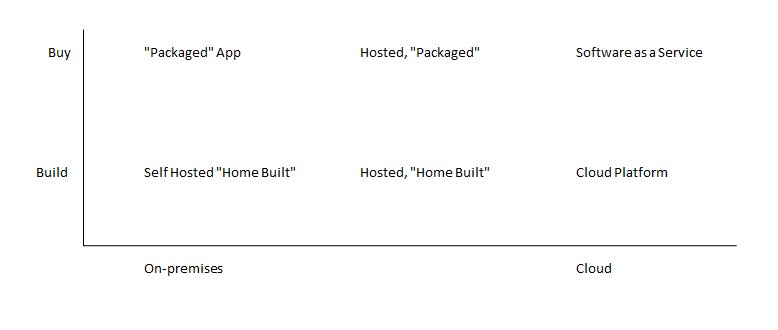
Gianpaolo presented a nice matrix showing the two basic independent decisions that you face when looking for software to fulfill a need.

  • Build vs. Buy – Can I buy a packaged off-the-shelf product that does what I need?  Or are my needs specialized enough that I need to build my own stuff?
  • On-Premises vs. Cloud – Should I run this software on my own servers?  Or host everything up in “the cloud”?

There are, of course, tradeoffs on both sides of each decision.  These have been discussed ad infinitum elsewhere, but the basic tradeoffs are:

  • Build vs. Buy – Features vs. Cost
  • On-Premises vs. Cloud – Control vs. Economy of Scale

Here’s the graph that Gianpaolo presented, showing six different classes of software, based on how you answer these questions.  Note that on the On-Premises vs. Cloud scale, there is a middle column that represents taking applications that you essentially control and moving them to co-located servers.

This is a nice way to look at things.  It shows that, for each individual software function, it can live anywhere on this graph.  In fact, Gianpaolo’s main point is that you can deploy different pieces of your solution at different spots on the graph.

So the idea is that while you might start off on-premises, you can push your solution out to either a co-located hosting server or to the cloud in general.  This is true of both packaged apps as well as custom-developed software.

Challenges

The main challenge in moving things out of the enterprise is dealing with the various issues that show up now when your data needs to cross the corporate/internet boundary.

There are several separate types of challenges that show up:

  • Identify challenges – as you move across various boundaries, how does the software know who you are and what you’re allowed to access?
  • Monitoring and Management challenges – how do you know if your application is healthy, if it’s running out in the cloud?
  • Application Integration challenge – how do various applications communicate with each other, across the various boundaries?

Solutions to the Identity Problem

Gianpaolo proposed the following possible solutions to this problem of identity moving across the different boundaries:

  • Federated ID
  • Claim-based access control
  • Geneva identity system, or Cardspace

The basic idea was that Microsoft has various assets that can help with this problem.

Solutions to the Monitoring and Management Problem

Next, the possible solutions to the monitoring and management problem included:

  • Programmatic access to a “Health” model
  • Various management APIs
  • Firewall-friendly protocols
  • Powershell support

Solutions to the Application Integration Problem

Finally, some of the proposed solutions to the application integration problem included:

  • ServiceBus
  • Oslo
  • Azure storage
  • Sync framework

The ISV Perspective

The above issues were all from an IT perspective.  But you can look at the same landscape from the perspective of an independent software vendor, trying to sell solutions to the enterprise.

To start with, there are two fundamentally different ways that the ISV can make use of “the cloud”:

  • As a service mechanism, for delivering your services via the cloud
    • You make your application’s basic services available over the internet, no matter where it is hosted
    • This is mostly a customer choice, based on where they want to deploy
  • As a platform
    • Treating the cloud as a platform, where your app runs
    • Benefits are the economy of scale
    • Mostly an ISV choice
    • E.g. you could use Azure without your customer even being aware of it

When delivering your software as a service, you need to consider things like:

  • Is the feature set available via cloud sufficient?
  • Firewall issues
  • Need a management interface for your customers

Some Patterns

Gianpaolo presented some miscellaneous design considerations and patterns that might apply to applications deployed in the cloud.

Cloudbursting

  • Design for average load, handling the ‘peak’ as an exception
  • I.e. only go to the cloud for scalability when you need to

Worker / Queue / Blob Pattern

Let’s say that you have a task like encoding and publishing of video.  You can push the data out to the cloud, where the encoding work happens.  (Raw data places in a “blob” in cloud storage).  You then add an entry to a queue, indicating that there is work to be done, and a separate worker process eventually does the encoding work.

This is a nice pattern for supporting flexible scaling—both the queues and the worker processes could be scaled out separately.

CAP: Pick 2 out of 3

  • Consistency
  • Availability
  • Tolerance to network Partitioning

Eventual Consistency (ACID – BASE)

The idea here is that we are all used to the ACID characteristics listed below.  We need to guarantee that the data is consistent and correct—which means that performance likely will suffer.  As an example, we have a process submit data synchronously because we need to guarantee that the data gets to its destination.

But Gianpaolo talked about the idea of “eventual consistency”.  For most applications, while it’s important for your data to be correct and consistent, it’s not necessarily for it to be consistent right now.  This leads to a model that he referred to as BASE, with the characteristics listed below.

  • ACID
    • Atomicity
    • Consistency
    • Isolation
    • Durability
  • BASE
    • Basically Available
    • Soft state
    • Eventually consistent

Fundamental Lesson

Basically the main takeaway is:

  • Put the software components in the place that makes the most sense, given their use
Posted in Azure, PDC 2008 | Tagged: , , , , , , , , | No Comments »