Session – Building Mesh-Enabled Web Applications Using the Live Framework

PDC 2008, Day #3, Session #5, 1 hr 15 mins

Arash Ghanaie-Sichanie

Throughout the conference, I bounced back and forth between Azure and Live Mesh sessions.  I was trying to make sense of the difference between them and understand when you might use one vs. the other.

I understand that Azure Services is the underlying platform that Live Services, and Live Mesh, are built on.  But at the outset, it still wasn’t quite clear what class of applications Live Services were targeted at.  Which apps would want to use Live Services and which would need to drop down and use Azure?

I think that after Arash’s talk, I have a working stab at answering this question.  This is sort of my current understanding, that I’ll update as things become more clear.

Question: When should I use Live Services / Live Mesh ?

Answer:

  • Create a Live Mesh application (Mesh-enabled) if your customers are currently, or will become, live.com customers.
  • Otherwise, use Azure cloud-based services outside of Live, or the other services built on top of Azure:
    • Azure storage services
    • Sync Framework
    • Service Bus
    • SQL Data Services

Unless I’m missing something, you can’t make use of features of the Live Operating Environment, either as a web application or a local desktop client, unless your application is registered with Live.com, and your user has added your application to his account.

The one possible loophole that I can see is that you might just have your app always authorize, for all users, using a central account.  That account could be pre-created and pre-configured.  Your application would then use the same account for all users, enabling some of the synchronization and other options.  But even this approach might not work—it’s possible that any device where local Mesh data is to be stored needs to be registered with that Live account and so your users wouldn’t normally have the authorization to join their devices to your central mesh.

Three Takeaways

Arash listed three main takeaways from this talk:

  • Live Services add value to different types of applications
  • Mesh-enabled web apps extend web sites to the desktop
  • The Live Framework is a standards-based API, available to all types of apps

How It All Works

The basic idea is to start with a “Mesh-enabled” web site.  This is a web site that delivers content from the user’s Mesh, including things like contacts and files.  Additionally, the web application could store all of its data in the Mesh, rather than on the web server where it is hosted.

Once a web application is Mesh-enabled, you have the ability to run it on various devices.  You basically create a local client, targeted at a particular platform, and have it work with data through the Live Framework API.  It typically ends up working with a cached local copy of the data, and the data is automatically synchronized to the cloud and then to other devices that are running the same application.

This basically implements the Mesh vision that Ray Ozzie presented first at Mix 2008 in Las Vegas and then again at PDC 2008 in Los Angeles.  The idea is that we move a user’s data into the cloud and then the data follows them around, no matter what device they’re currently working on.  The Mesh knows about a user’s:

  • Devices
  • Data, including special data like Contacts
  • Applications
  • Social graph  (friends)

The User’s Perspective

The user must do a few things to get your application or web site pointing at his data.  As a developer, you send him a link that lets him go sign up for a Live.com account and then register your application in his Mesh.  Registration, from the user’s perspective, is a way for him to authorize your application to access his Mesh-based data.

Again, it’s required that the user has, or get, a Live.com account.  That’s sort of the whole idea—we’re talking about developing applications that run on the Live platform.

Run Anywhere

There is still work to be done, on the part of the developer, to be able to run the application on various devices, but the basic choices are:

  • Locally, on a client PC or Mac
  • In a web browser, anywhere
  • From the Live Desktop itself, which is hosted in a browser

(In the future, with Silverlight adding support for running Silverlight-sandboxed apps outside of the browser, we can imagine that as a fourth option for Mesh-enabled applications).

The Developer’s Perspective

In addition to building the mesh application, the developer must also register his application, using the Azure Services Portal.  Under the covers, the application is just an Azure-based service.  And so you can leverage the Azure standard goodies, like running your service in a test mode and then deploying/publishing it.

One other feature that is made available to Mesh application authors is the ability to view basic Analytics data for your application.  Because the underlying Mesh service is aware of your application, wherever it is running, it can collect data about usage.    The data is “anonymized”, so you can’t see data about individual users, but can view general metrics.

Arash talked in some detail about the underlying security model, showing how a token is granted to the user/application.

Conclusions

Mesh obviously seems a good fit for some applications.  You can basically run on a platform that gives you a lot of services, as well as access to useful data that may already exist in a particular user’s Mesh environment.  There is also some potential for cross-application sharing of data, once common data models are agreed upon.

But the choice to develop on the Mesh platform implies a decision to sign your users up as part of the Mesh ecosystem.  While the programming APIs are entirely open, using basic HTTP/REST protocols, the platform itself is owned/hosted/run exclusively by Microsoft.

Not all of your users will want to go through the hassle of setting up a Live account in order to use your application.  What makes it a little worse is that the process for them is far from seamless.  It would be easier if you could hide the Live branding and automate some of the configuration.  But the user must actually log into Live.com and authorize your application.  This is a pretty high barrier, in terms of usability, for some users.

This also means that your app is betting on the success of the Live.com platform itself.  If the platform doesn’t become widely adopted, few users will live (pardon the pun) in that environment.  And the value of hosting your application in that ecosystem becomes less clear.

It remains to be seen where Live as a platform will go.  The tools and the programming models are rich and compelling.  But whether the platform will live up to Ozzie’s vision is still unclear.

Session – Offline-Enabled Data Services

PDC 2008, Day #3, Session #4, 1 hr 15 mins

Pablo Castro

I attended a second session with Pablo Castro (the previous one was the session on Azure Tables).  This session focused on a future capability in ADO.NET Data Services that would allow taking data services “offline” and then occasionally synching them with the online data.

Background – Astoria

ADO.NET Data Services was recently released as part of the .NET Framework 3.5 SP1 release.  It was formerly known as project “Astoria”.

The idea of ADO.NET Data Services is to allow creating a data service that lives on the web.  Your data source can be anything—a SQL Server database, third-party database, or some local data store.  You wrap your data source using the Entity Data Model (EDM) and ADO.NET Data Services Runtime.  Your data is now available over the web using standard HTTP protocols.

Once you have a data service that is exposed on the web, you can access it from any client.  Because the service is exposed using HTTP/REST protocols, you can access your data using simple URIs.  By using URIs, you are able to create/read/update/delete your data (POST/GET/PUT/DELETE in REST terms).

Because we can access the data using HTTP, our client is not limited to a .NET application, but can be any software that knows about the web and HTTP.  So we can consume our data from Javascript, Ruby, or whatever.  And the client could be a web-based application or a thick client somewhere that has access to the web.

If your client is a .NET client, you can use the ADO.NET Data Services classes in the .NET Framework to access your data, rather than having to build up the underlying URIs.  You can also use LINQ.

So that’s the basic idea of using ADO.NET Data Services and EDM to create a data service.  For more info, see:

The Data Synchronization Landscape

Many of the technologies that made an appearance at PDC 2008 make heavy use of data synchronization.  Data synchronization is available to Azure cloud services or to Live Mesh applications.

The underlying engine that handles data synchronization is the Microsoft Sync Framework.  The Sync Framework is a synchronization platform that allows creating sync providers, sitting on top of data that needs to be synchronized, as well as sync consumers—clients that consume that data.

The basic idea with sync is that you have multiple copies of your data in different physical locations and local clients that make use of that data.  Your client would work with its own local copy of the data and then the Sync Framework would ensure that the data is synched up with all of the other copies of the data.

What’s New

This session talked about an effort to add support in ADO.NET Data Services for offline copies of your Astoria-served data, using the Sync Framework to do data synchronization.

Here are the basic pieces (I’m too lazy to draw a picture).  This is just one possible scenario, where you want to have an application that runs locally and makes use of a locally cached copy of your data, which exists in a database somewhere:

  • Data mainly “lives” in a SQL Server database.  Assume that the database itself is not exposed to the web
  • You’ve created a data service using ADO.NET Data Services and EDM that exposes your SQL Server Data to the web using a basic REST-based protocol.  You can now do standard Create/Read/Update/Delete operations through this interface
  • You might have a web application running somewhere that consumes this data.  E.g. A Web 2.0 site built using Silverlight 2, that allows viewing/modifying the data.  Note that the web server does not have a copy of your data, but goes directly to the data service to read/write its data.
  • Now you create a thick client that also wants to read/write your data.  E.g. A WPF application.  To start with, you assume that you have a live internet connection and you configure the application to read/write data directly from/to your data service

At this point, you have something that you could build today, with the tools in the .NET Framework 3.5 SP1.  You have your data out “in the cloud” and you’ve provided both rich and thin clients that can access the data.

Note: If you were smart, you would have reused lots of code between the thin (Silverlight 2) and thick (WPF) clients.  Doing this gives your users the most consistent GUI between online and offline versions.

Now comes the new stuff.  Let’s say that you have cases when you want your thick WPC client to be able to work even though the Internet connection is not present.  Reasons for doing this include:

  • You’re working on a laptop, somewhere where you don’t have an Internet connection (e.g. airplane)
  • You want the application to be more reliable—i.e. app is still usable even if the connection disappears from time to time
  • You’d like the application to be slightly better performing.  As it stands, the performance depends on network bandwidth.  (The “lunchtime slowdown” phenomenon).

Enter Astoria Offline.  This is the set of extensions to Astoria that Pablo described, which is currently not available, but planned to be in Alpha by the end of the year.

With Astoria Offline, the idea is that you get a local cache of your data on the client PC where you’re running your thick client.  Then what happens is the following:

  • Your thick (WPF) application works directly with the offline copy of the data
  • Performance is improved
  • Much more reliable—the data is always there
  • You initiate synchronization (or set it up from time to time) to synch data back to the online copy

This synchronization is accomplished using the new Astoria Offline components.  When you do synchronize, the synchronization is two-ways, which means that you update both copies with any changes that have occurred since you last synched:

  • All data created locally is copied up to the online store
  • Data created online is copied down
  • Changes are reconciled—two-way
  • Deletions are reconciled—two-way

Pablo did a basic demo of this scenario and it worked just as advertised.  He showed that the client worked with the local copy of the data and that everything synched properly.  He also showed off some early tooling in Visual Studio that will automate much of the configuration that is required for all of this to work.

Interestingly, it looked like in Pablo’s example, the local copy of the data was stored in SQL Server Express.  This was a good match, because the “in the cloud” data was stored in SQL Server.

How Did They Do It?

Jump back to the description of the Microsoft Sync Framework.  Astoria Offline is using the sync framework to do all of the underlying synchronization.  They’ve written a sync provider that knows about the entity data model and interfaces between EDM and the sync framework.

Extensibility Points

I’m a little fuzzier on this area, but I think I have a general sense of what can be done.

Note that the Sync Framework itself is extensible—you can write your own sync providers, providing synchronized access to any data store that you care to support.  Once you do this, you get 2-way (or more) synchronization between your islands of custom data.

But if I understood Pablo correctly, it sounds like you could do this a bit differently with Astoria Offline in place.  It seems like you could pump your custom data from the Entity Framework, by building a custom data source so that the EDM can see your data.  (EntityFrameworkSyncProvider fits in here somewhere).  I’m guessing that once you serve up your data in a relational manner to the EDM, you can then synch it using the Astoria Offline mechanisms.  Fantastic stuff!

Going Beyond Two Nodes

One could imagine going beyond just an online data source and an offline copy.  You could easily imagine topologies that had many different copies of the data, in various places, all being synched up from time to time.

Other Stuff

Pablo talked about some of the other issues that you need to think about.  Conflict detection and resolution is a big one.  What if two clients both update the same piece of data at the same time?  Classic synchronization issue.

The basic things to know about conflicts, in Astoria Offline, are:

  • Sync Framework provides a rich model for detecting/resolving conflicts, under the covers
  • Astoria Offline framework will detect conflicts
  • The application provides “resolution handlers” to dictate how to resolve the conflict
    • Could be locally—e.g. ask the user what to do
    • Or online—automatic policies

Pablo also talked briefly about the idea of Incremental Synchronization.  The idea is that you might want to synch things a little bit at a time, in a batch-type environment.

There was a lot more stuff here, and a lot to learn.  Much of the concepts just bubble up from the Sync Framework.

Takeaways

Astoria Offline is potentially game-changing.  In my opinion, of the new technologies presented at PDC 2008, Astoria Offline is the one most likely to change the landscape.  In the past, vendors have generally had to pick between working with live data or local data.  Now they can do both.

In the past, the online vs. offline data choice was driven by whether you needed to share the data across multiple users.  So the only apps that went with offline data were the ones that didn’t need to share their data.  What’s interesting about Astoria Offline is that these apps/scenarios  can now use this solution to leave their data essentially local, but make the data more mobile, across devices.  Imagine an application that just stores local data that only it consumes.  But now if you want to run that app on multiple machines, you have to manually copy the data—or move it to a share seen by both devices.  With Astoria Offline, you can set up a sync to an online location that each device synchs to, as needed.  So you can just move from device to device and your data will just follow you.  So you can imagine that this makes it much easier to move apps out to mobile devices.

This vision is very similar to what Live Mesh and Live Services promise.  But the difference is that here you don’t need to subscribe to your app and its data living in the MS Live space.  Your data can be in whatever format you like, and nobody needs to sign up with MS Live.

When Can I Get It?

Pablo mentioned a basic timeline:

  • Early Alpha by the end of the year
  • CTPs later, i.e. next year

Resources

In addition to the links I listed above, you might also check out:

Session – Windows Azure Tables: Programming Cloud Table Storage

PDC 2008, Day #3, Session #3, 1 hr 15 mins

Pablo Castro, Niranjan Nilakantan

Pablo and Niranjan did a session that went into some more detail on how the Azure Table objects can be used store data in the cloud.

Context

This talk dealt with the “Scalable Storage” part of the new Azure Services platform.  Scalable Storage is a mechanism by which applications can store data “in the cloud” in a highly scalable manner.

Data Types

There are three fundamental data types available to applications using Azure Storage Services:

  • Blobs
  • Tables
  • Queues

This session focused mainly on Tables.  Specifically, Niranjan and Pablo addressed the different ways that an application might access the storage service programmatically.

Tables

Tables are a “massively scalable” data type for cloud-based storage.  They are able to store billions of rows, are highly available, and “durable”.  The Azure platform takes care of scaling out the data automatically to multiple servers, if necessary.  (With some hints on the part of the developer).

Programming Model

Azure Storage Services are accessed through the ADO.NET Data Services (Astoria).  Using ADO.NET Data Sercices, there are basically two ways for an application to access the service.

  • .NET API   (System.Data.Services.Client)
  • REST interface   (using HTTP URIs directly)

Data Model

It’s important to note that Azure knows nothing about your data model.  It does not store data in a relational database or access it via a relational model.  Rather, you specify a Table that you’d like to store data in, along with a simple query expression for the data that you’d like to retrieve.

A Table represents a single Entity and is composed of a collection of rows.  Each row is uniquely defined by a Row Key, which the developer specifies.  Additionally, the developer specifies a Partition Key, which is used by Azure in knowing how to split the data across multiple servers.

Beyond the Record Key and Partition Key, the developer can add any other properties that she likes, up to a total of 255 properties.  While the Record and Partition Keys must be string data types, the other properties support other data types.

Partitioning

Azure storage services are meant to be automatically scalable, meaning that the data will be automatically spread across multiple servers, as needed.

In order to know how to split up the data, Azure uses a developer-specified Partition Key, which is one of the properties of each record.  (Think “field” or “column”).

The developer should pick a partition key that makes sense for his application.  It’s important to remember two things:

  • Querying for all data having a single value for a partition key is cheap
  • Querying for data having multiple partition key values is more expensive

For example, if your application often retrieves data by date and shows data typically for a single day, then it would make sense to have a CurrentData property in your data entity and to make that property the Partition Key.

The way to think of this is that each possible unique value for a Partition Key represent a “bucket” that will contain one or more records.  If you pick a key that results in only one record per bucket, that would be inefficient.  But if you pick a key that results in a set of records in the bucket that you are likely to ask for together, this will be efficient.

Accessing the Data Programmatically

Pablo demonstrated creating the classes required to access data stored in an Azure storage service.

He started by creating a class representing the data entity to be stored in a single table.  He selected and defined properties for the Partition and Record key, as well as other properties to store any other desired data in.

Pablo also recommended that you create a single class to act as an entry point into the system.  This class then acts as a service entry point for all of the data operations that your client application would like to perform.

He also demonstrated using LINQ to run queries against the Azure storage service.  LINQ automatically created to corresponding URI to retrieve, create, update, or delete the data.

Miscellaneous

Pablo and Niranjan also touched on a few other issues that most applications will deal with:

  • Dealing with concurrent updates  (uses Etag and if-match)
  • Pagination  (using continuation tokens)
  • Using Azure Queues for pseudo-transactional deletion of data

Takeaways

Pablo and Niranjan demonstrated that it was quite straightforward to access Azure storage services from a .NET application.  It’s also the case that non-.NET stacks could make use of the same services using a simple REST protocol.

It was also helpful to see how Pablo used ADO.NET Data Services to construct a service layer on top of the Azure storage services.  This seems to make consuming the data pretty straightforward.

(I still might have this a little confused—it’s possible that Astoria was just being used to wrap Azure services, rather than exposing the data in an Astoria-based service to the client.  I need to look at the examples in a little more detail to figure this out).

Original Materials

You can find the video of the session at:  http://mschnlnine.vo.llnwd.net/d1/pdc08/WMV-HQ/ES07.wmv

Session – Silverlight Controls Roadmap

PDC 2008, Day #3, Session #2, 45 mins

Shawn Burke
Product Unit Manager
WPF/Silverlight Controls Team, Microsoft

Shawn Burke gave a short talk on the new controls being released this week in the Silverlight Toolkit, on Codeplex.

He started by outlining the general strategy for releasing controls toolkits like this one:

  • Focus on controls for both WPF & Silverlight
  • Ship out of band from major releases
  • Ship w/source code
  • Fold best (and most popular) controls back into the mainline product

I also appreciated that Shawn outlined the idea of “quality bands”.  Every control goes through a lifecycle, where it passes through various quality bands before eventually making it into the mainline product:

  • Experimental
  • Preview   (team is committed to it)
  • Stable  (equivalent to Beta—feature-complete)
  • Mature   (bugs are fixed)

This is great—because the team doesn’t have to wait for the entire toolkit to reach a particular quality level before releasing it to the public.  Instead, they can assess the quality of each control and then make that known.

WPF Parity Controls

Some of the controls included in the toolkit are “parity” controls—i.e. controls that are already in WPF and now being added to Silverlight.  They include:

  • DockPanel
  • Expander
  • TreeView

DockPanel (Stable)

A DockPanel control allows docking child elements to one side of the container.  The last child can be made to fill the remaining space in the container.

Expander (Preview)

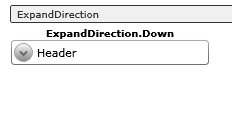
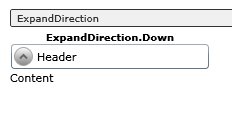
The Expander allows display overview and details information, with the details view showing when the user clicks on an expander widget.  You can also change the direction that the content expands to (the default is Down).  The first image below shows the default state—content not yet expanded.  When the user clicks on the expander icon, the Content appears and the icon changes to show an up arrow.

TreeView (Stable)

Shawn indicated that the TreeView was by far the control mostly frequently asked for by users.  It’s behavior is quite familiar—presenting hierarchical data in a dynamic way and allowing the user to expand/collapse the various nodes.

What’s very cool is that the individual nodes in the tree can be basically anything, and fully styled.

New Non-WPF Controls

Shawn mentioned a series of controls that are brand new—i.e. not yet in WPF either.

  • AutoComplete
  • Charting
  • NumericUpDown

AutoComplete (Preview)

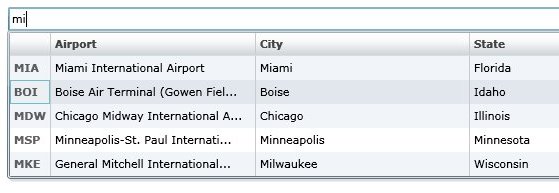
Auto completion is a pretty standard feature on the web.  The idea is to do some data lookup while a user types and then display relevant/possible matches to what they are typing.  The cool thing is that the content displayed can be nearly anything.  Shawn demonstrated having a DataGrid show up to display selected data.

Here’s another example, showing some nice styling:

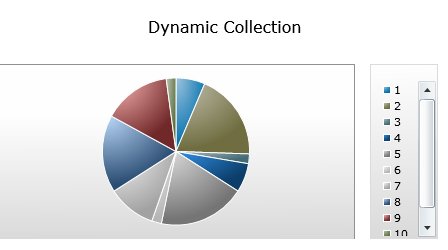
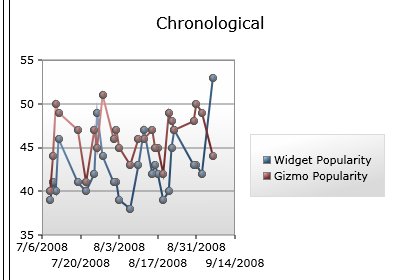
Charting (Preview)

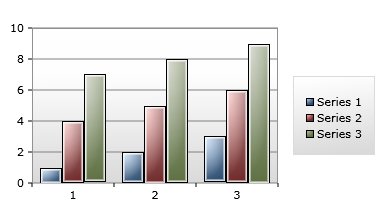
Shawn ran some pretty amazing charting demos, showing charts on a web page updating in real-time.  He said that Microsoft partnered with Dundas, long-time vendor of charting controls, to gain some expertise in the area.

Here are some samples:

Summary

There are some wonderful goodies in this new set of Silverlight tools.  It’s clear that as time goes by, Silverlight will just continue to become more mature and the set of controls will continue to grow—in both WPF and Silverlight.

Original Materials

You can find video of Shawn’s presentation at:  http://mschnlnine.vo.llnwd.net/d1/pdc08/WMV-HQ/PC35.wmv

You can play with “live” samples of the various controls at: http://silverlight.net/samples/sl2/toolkitcontrolsamples/run/default.html

Charting samples can be found at:  http://silverlight.net/samples/sl2/toolkitchartsamples/run/default.html