Sean’s Stuff

Learning new software development technologies out loud

Session – Live Services: Live Framework Programming Model Architecture and Insights

PDC 2008, Day #3, Session #1, 1 hr 15 mins

Ori Amiga

My next session dug a bit deeper into the Live Framework and some of the architecture related to building a Live Mesh application.

Ori Amiga was presenting, filling in for Dharma Shukla (who just became a new Dad).

Terminology

It’s still a little unclear what terminology I should be using.  In some areas, Microsoft is switching from “Mesh” to just plain “Live”.  (E.g. Mesh Operating Environment is now Live Operating Environment).  And the framework that you use to build Mesh applications is the Live Framework.  But they are still very much talking about “Mesh”-enabled applications.

I think that the way to look at is this:

  • Azure is the lowest level of cloud infrastructure stuff
  • The Live Operating Environment runs on top of Azure and provides some basic services useful for cloud applications
  • Mesh applications run on top of the LOE and provide access to a live.com user’s “mesh”: devices, applications and data that lives inside their mesh

I think that this basically means that you could have an application that makes use of the various Live Services in the Live Operating Environment without actually being a Mesh application.  On the other hand, some of the services in the LOE don’t make any sense to non-Mesh apps.

Live Operating Environment  (LOE)

Ori reviewed the Live Operating Environment, which is the runtime that Mesh applications run on top of.  Here’s a diagram from Mary Jo Foley’s blog:
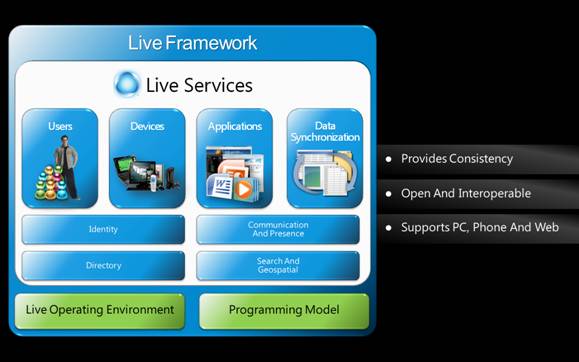
This diagram sort of supports my thought that access to a user’s mesh environment is different from the basic stuff provide in the LOE.  According to this particular view, Live Services are services that provide access to the “mesh stuff”, like their contact lists, information about their devices, the data stores (data stored in the mesh or out on the devices), and other applications in that user’s mesh.

The LOE would contain all of the other stuff—basic a set of utility classes, akin to the CLR for desktop-based applications.  (Oh wait, Azure is supposed to be “akin to the CLR”). *smile*

Ori talked about a list of services that live in the LOE, including:

  • Scripting engine
  • Formatters
  • Resource management
  • FSManager
  • Peer-to-peer communications
  • HTTP communications
  • Application engine
  • Apt(?) throttle
  • Authentication/Authorization
  • Notifications
  • Device management

Here’s another view of the architecture (you can also find it here).
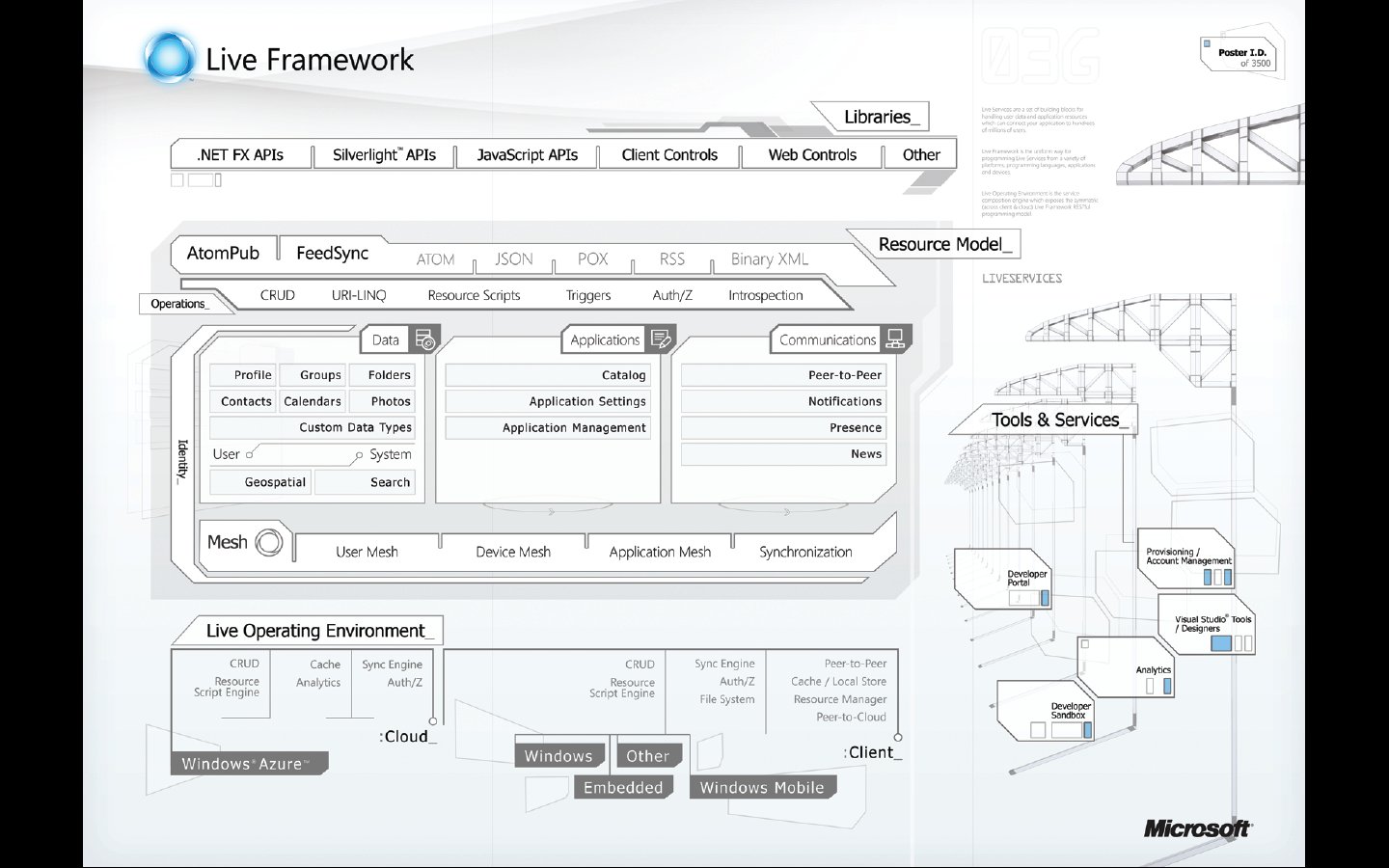
Also, for more information on the Live Framework, you can go here.

Data in the Mesh

Ori pointed out an important point about how Mesh applications access their data.  If you have a Mesh client running on your local PC, and you’ve set up its associated data store to synch between the cloud and that device, the application uses local data, rather than pulling data down from the cloud.  Because it’s working entirely with locally cached data, it can run faster than the corresponding web-based version (e.g. running in the Live Desktop).

Resource Scripts

Ori talked a lot about resource scripts and how they might be used by a Mesh-enabled application.  An application can perform actions in the Mesh using these resource scripts, rather than performing actions directly in the code.

The resource scripting language contains things like:

  • Control flow statements – sequence and interleaving, conditionals
  • Web operation statements – to issue HTTP POST/PUT/GET/DELETE
  • Synchronization statements – to initiate data synchronization
  • Data flow constructs – for binding statements to other statements(?)

Ori did a demo that showed off a basic script.  One of the most interesting things was how he combined sequential and interleaved statements.  The idea is that you specify what things you need to do in sequence (like getting a mesh object and then getting its children), and what things you can do in parallel (like getting a collection of separate resources).  The parallelism is automatically taken care of by the runtime.

Custom Data

Ori also talked quite a bit about how an application might view its data.  The easiest thing to do would be to simply invent your own schema and then be the only app that reads/writes the data in that schema.

A more open strategy, however, would be to create a data model that other applications could use.  Ori talked philosophically here, arguing that this openness serves to improve the ecosystem.  If you can come up with a custom data model that might be useful to other applications, they could be written to work with the same data that your application uses.

Ori demonstrated this idea of custom data in Mesh.  Basically you create a serializable class and then mark it up so that it gets stored as user data within a particular DataEntry.  (Remember: Mesh objects | Data feeds | Data entries).

This seems like an attractive idea, but it seems a bit clunky.  The custom data is embedded into the standard AtomPub stream, but not in a queryable way.  It looked more like it was jammed into an XML element in the <DataEntry> element.  This means that your custom data items would not be directly queryable.

Ori did go on to admit that custom data isn’t queryable or indexable, but really only for “lightweight data”.  This is really at odds with the philosophy of a reusable schema for other applications.

Tips & Tricks

Finally, Ori presented a handful of tips & tricks for working with Mesh applications:

  • To clean out local data cache, just delete the DB/MR/Assembler directories and re-synch
  • Local metadata is actually sotred in SQL Server Express.  Go ahead and peek at it, but be careful not to mess it up.
  • Use the Resource Model Browser to really see what’s going on under the covers.  What it shows you represents the truth of what’s happening between the client and the cloud
  • One simple way to track synch progress is to just look at the size of the Assembler and MR directories
  • Collect logs and send to Microsoft when reporting a problem

Summary

Ori finished with the following summary:

  • Think of the cloud as just a special kind of device
  • There is a symmetric cloud/client programming model
  • Everything is a Resource

30 October, 2008 Posted by Sean | Mesh, PDC 2008 | , , , , , , , , | No Comments Yet

Keynote #4 – Rashid

PDC 2008, Day #3, Keynote #4, 1.5 hrs

Rick Rashid

Rick Rashid, Senior Vice President of Microsoft Research, delivered the final PDC 2008 keynote.

Rick described how Microsoft Research is organized and talked about their mission statement:

  • Expand state of the art in each area in which we do research
  • Rapidly transfer innovative technologies into Microsoft products
  • Ensure that Microsoft products have a future

The Microsoft behemoth is truly impressive.  Here are a couple of tidbits:

  • 10-30% of papers presented at most CSci and Software Engineering academic conferences are  by Microsoft Research
  • Microsoft Research employees about 850 Ph.D. researchers—about as large a staff as most research-oriented universities

Mr. Rashid made a good case for why we do basic research.  It’s not so much for the immediate applications.  Instead, he argued the goals are to enable a company to respond quickly to change, based on an existing reservoir of people and technologies that can be brought to bear on new problems.

I for one was expecting some cool demos at the Research keynote.  There were several demos, but they started out as fairly mundane.

Feng Zhao – Energy Sensing

The first demo was by Feng Zhao, a Principal Researcher.  He talked about a little climate sensor that Microsoft developed and which they been using to gather climate data.

The first example was indoors.  Microsoft had actually hung a large number of these sensors from the ceiling of the keynote auditorium.  They’d then been acquiring basic temperature data for several days and transmitting that data back to a server.  Feng was able to show all kinds of graphs showing the temperature map of the room, including how it warmed up a little when people came in.

Feng also explained how they are using similar sensors in outdoor climactic research projects.  For example, they collect various data about Alpine climate data in Switzerland.

World Wide Telescope

The next demo was definitely a notch above the energy sensing.

The WorldWide Telescope is a Microsoft Research project that went public earlier this year.  It’s a web site that ties together a huge database of space images from all different sources.  The end result is a 3D virtual universe that you can fly around in, navigating to and viewing various objects.  As you zip around in the universe, you automatically see stitched together images of whatever objects would be in your view.

Microsoft announced in this keynote a new version of WorldWide Telescope, being released today.  It included lots of new images, as well as improved views of our solar system.

The demo of the new WorldWide Telescope site was truly awe-inspiring.

Boku

The energy level  went up a little bit more as Matt MacLaurin came out to demo Boku—an animated world used to teach kids how to program.

In the Boku world, kids create “programs” visually by selecting objects and then icons indicating what those objects should do.  Actions can include things like moving towards other objects, eating objects, or shooting at objects.

The demo was pretty impressive.  The little Boku world was rendered beautifully in 3D and Matt was able to very quickly create and animate objects.  More important is that he said that kids find the resulting “programming” environment very intuitive to use.  This allows them to learn basic logic and programming skills at a very early age.

Boku was great, but nothing compared to what came next.

SecondLight

Most of us have seen the online videos and demos of the Microsoft Surface.  The basic idea is that a PC projects an image of a user interface surface up onto a flat table that you can interact with by touching.  It’s sort of a combination coffee table and touchable PC screen.

The big thing about Surface is that it supports something called “multi-touch”.  So not only can you move things around on the surface by touch/dragging with one finger, you can initiate more complicated gestures by using two fingers at the same time.  For example, you might  use your thumb and forefinger to zoom into a photo by putting both fingers down and then spreading them apart.

Surface also includes an infrared camera that allows it to “see” things placed on the surface itself.  This allows user interaction with simple objects, or even something like a user’s arm.  (Think about a Poker game that would flip your cards over when it saw you put your arm down to block them from another player’s view).

That’s the basic idea of Surface.  It’s available today, for something like $15,000.

But at today’s keynote, several of the guys from the Surface team demoed the next big extension to Surface, which they called SecondLight.

The basic idea of SecondLight is to extend both the project area and the infrared detection mechanism out into the space above the surface.  So if I held up a piece of tracing paper 8-10” above the surface, I’d see an image on it, as well as the surface.  Ok, no big deal, right?  Well, the big deal is that the image on the tracing paper is different from the image on the surface below it?

The guys’ demo showed how this might work.  Let’s say you’re looking at a Virtual Earth map that showed an aerial view of some location.  The Surface would display the standard aerial view of the place.  Now let’s say that you hold a little sheet of tracing paper above the Surface, over one particular area of the map.  Surface might project out a street view, rather than aerial view onto your paper.  But the main surface of the table will continue to show the original aerial view.  Other applications might be to provide a photo on the Surface and then some description about that photo on the paper that you hold over it.

How the hell do they do that?  Well, they explained that their projector down under the table can actually interlace two completely separate images—one that they project up to the surface and one that they project beyond the surface.  This happens at such a high frequency that you don’t see any flicker and see both images simultaneously.

But wait, there’s more!  Now the guys demonstrated how Surface can also detect objects above the table with its infrared camera.  They took a little picture frame with a plastic see-through surface—something about 4-5” across.  To start with, there was a silhouette of a man on the main Surface.  Now when they held the see-through frame above the Surface, the man moved from the Surface up to the surface of their handheld picture frame.  Truly a “holy shit” moment.  Even more incredible, the presenter started slowly tilting the picture frame from horizontal to vertical.  As he did this, the aspect ratio of the man on the frame stayed the same—as opposed to the projection becoming narrower.  The effect was as if you’d grabbed the silhouette off the flat surface and stood it up.  Unbelievable.

How did they do this last part?  Well, simple—the infrared camera can see the outline of the handheld frame, so it knows its dimensions.  And it then pre-foreshortens the image of the man, so the entire image of the man is mapped to the entire size of the picture frame.  The result is that the man stands up.

This final demo was truly the highlight of the keynote and it made up for all of the boring opening acts.  There are many ways that you can imagine using GUI technology like this.  Just think of a computer that can recognize your face and see where you are.  We’re in for some truly amazing advances in user interaction over the next few years.

You can find a video of the demo at: http://www.youtube.com/watch?v=XfzplPIrzjY

30 October, 2008 Posted by Sean | PDC 2008 | , , , , , | No Comments Yet

Session – Deep Dive: Building an Optimized, Graphics-Intensive Application in Microsoft Silverlight

PDC 2008, Day #2, Session #4, 1 hr 15 mins

Seema Ramchandani

The final session of the day was all about optimizing graphics-based Silverlight applications.  The talk was a little bit different from what I expected.  I was imagining it being about how to do custom 2D graphics.  Instead, it was more geared at understanding the underlying rendering loop and optimizing basic animations.

Seema is a Program Manager in the Silverlight group and described her job as being focused on performance.  She is the person, she explained, that people call when they can’t figure out why their Silverlight application is running so slowly.

The Dancing Peacock

Seema’s first real-world story gives us a new term that we can use in assessing application performance:

The Dancing Peacock = the portions of your application that are consuming resources, but not contributing to the user experience in any meaningful way.

The story goes something like this.  Someone called up Seema and said that they had a very poorly performing Silverlight application and they could not figure out why it was so slow.  Seema took a look at it and started removing elements to understand which element was contributing to the performance degradation.

What she found, under all of the visible controls, was a giant full-screen animated dancing peacock.  It was being rendered, because it was behind all of the other windows, but the designer had left it in the XAML code, figuring that it wasn’t doing any harm.  But as it turns out, code to calculate all of the peacock’s dance steps was still running in the background—and dragging the entire application down.

So Seema’s basic message throughout the talk was—look for the dancing peacocks in your application and remove them.

The Graphics Pipeline

Seema argued that it was important to fully understand how the graphics pipeline in Silverlight works.  If you understand the full sequence of what happens to render graphics to the screen, it can greatly help you in debugging the source of any performance problems.

She showed a fairly detailed diagram of the rendering loop and walked through all of the steps, explaining what happens at each point.

Tips / Tricks

Seema also presented miscellaneous tips and tricks for improving performance.  Without going into details, some of the basic ideas were:

  • Blend in as small a region as possible
  • Mitigate blurry text with UsesLayoutRounding
  • Avoid large-scale animations  (costly)
  • Don’t plug up your UI thread with costly operations
  • Avoid video resizing by encoding at the desired resolution
  • Simplify XAML – avoid bloat

Tools

Seema also demonstrated a very useful tool that you can use for profiling Silverlight applications.  She described using a tool called XPerf, which using Event Tracing for Windows to exactly measure the amount of time spent in each module of the underlying native code.

XPerf can be used for debugging, but is most powerful as a way of comparing alternative designs, to see how they impact performance.

30 October, 2008 Posted by Sean | PDC 2008, Silverlight | , , , , , , | No Comments Yet

Session – Microsoft Silverlight Futures: Building Business Focused Applications

PDC 2008, Day #2, Session #3, 1 hr 15 mins

Jamie Cool

In the Silverlight Futures session, Jamie Cool focused on building business applications using Silverlight.  (From now on, when we say “Silverlight”, we really mean “Silverlight 2”).

Jamie started by summarizing the whole thick/thin client thing and reiterating where Silverlight fits in.

  • WPF apps run natively on your PC
    • Richer UI experience
    • Better performance
    • Access to everything on your PC, e.g. file system
  • ASP.NET web apps run in the browser
    • Broadest reach, running on any platform, any browser
    • Much more limited UI
    • Runs in a sandbox, limited access to local resources
  • Silverlight is somewhere in the middle
    • Runs in your browser
    • Much better user experience than ASP.NET
    • Fewer trips back to server, things running on client
    • Requires client to first download Silverlight runtime

People who write business applications hear requests all the time for accessing their apps through a web browser.  In the past, this has meant a radically different and more limited GUI in the form of ASP.NET.  But with Silverlight, you can really have it all—deliver both rich WPF applications and browser-based applications using Silverlight.  Because Silverlight uses a subset of the .NET Framework, you can even use the same codebase.  (If you’re careful).

Support for Business Apps Using Today’s Platforms

Much of Jamie’s talk focused on a future extension to Silverlight, code-named Alexandria, that would provide a richer framework for allowing business apps hosted in Silverlight to do the kinds of things that they typically need doing.

According to Jamie, business applications have the following characteristics:

  • They are mainly focused on working with data and applying business logic to data
  • They need
    • A way to move data between tiers
    • Methods for “shaping” data
    • Methods for soundly applying business logic to the data
    • A way to bind data to the user interface

In terms of moving data between tiers, Jamie mentioned ADO.NET Data Services as really being the best tool for exposing data stored in a database to a web-based application.  He mentioned the same speaking points as the guys in the Astoria talks—the ability to expose/consume data using simple a REST protocol.

Jamie also demoed how the Entity Data Model could be used a data layer between the database (or data service) and the application.  He also demoed some of the basics of binding Silverlight controls to the data served up through ADO.NET Data Services.

Futures – A Business Logic Framework

The second half of Jamie’s talk focused on a future extension to Silverlight, code-named Alexandria, that would provide a richer framework for allowing business apps hosted in Silverlight to do the kinds of things that business apps typically need to do.

(Jamie never mentioned “Alexandria”, but he was making use of a namespace that had that name in all of his demos).

Jamie did some basic demos of how Alexandria works.  To start with, you create a class to represent your business object, then set up its data binding and use attributes to specify validation rules.

Hold on just a second!  Alexandria suddenly sounds exactly like Rocky Lhotka’s CSLA.NET Framework—especially since Rocky is just finishing up a version of CSLA for Silverlight.  With an entire team of developers, Microsoft has managed to develop a framework that Rocky created (mostly) all by himself.

I’m being a little facetious.  I’m really curious what Rocky’s take is on Alexandria, since it seems to fulfill the same basic mission as CSLA.NET.  I don’t know about many of the details of CSLA, but a couple of things occurred to me:

  • CSLA.NET also supports Win Forms and Web Forms, whereas Alexandria appears to be targeted exclusively at Silverlight
  • CSLA.NET supports a wide variety of transport protocols (anything in WCF, I think), where Alexandria seems to be REST-only
  • CSLA.NET may not directly support binding to an ADO.NET Data Service, or maybe not as seamlessly as Alexandria
  • CSLA.NET is open source, so benefit from many improvements that come from the community

Anyway, as I said I’m not very knowledgeable about CSLA, but it definitely seemed like Alexandria is targeting the exact same set of business requirements as CSLA.  As with any framework comparison, however, each is certain to have its own strengths and weaknesses and appropriate for a particular category of applications.

Rocky, what is your take on this?  Ditto current users of CSLA.

30 October, 2008 Posted by Sean | PDC 2008, Silverlight | , , , , , , , | No Comments Yet